BuildDaily

Make contractor workflows easier to manage.

BuildDaily gives contractors simple places to work the lead, bid, job, service ticket, change, document, timesheet, crew plan, and invoice. The point is not to make the software the job. The point is to make each part of the job easier to run, easier to hand off, and easier to finish without chasing spreadsheets and inboxes.

The Real Problem

Simple workflows for the work contractors repeat every day.

A lead needs follow-up. A bid needs vendor quotes. A job needs backup for a change. A service ticket needs a signature before billing. A crew week needs cleanup before payroll. BuildDaily gives each workflow a clear place to manage the next step.

Pursuit Customer, contact, site, source, follow-up, files, photos, and outcome.
Bid Files, RFP groups, addenda, RFIs, takeoff, alternates, proposals, and results.
Job RFIs, submittals, field logs, change work, drawings, specs, files, and closeout.
Service Call intake, dispatch, work performed, line items, files, signature, invoice, and payment.
Crew Time, PTO, expenses, employee files, manpower, assets, skills, and conflicts.
Signature Templates, envelopes, public signing, countersignature, executed packets, and audit trail.
Screens

The page should show the work, not explain around it.

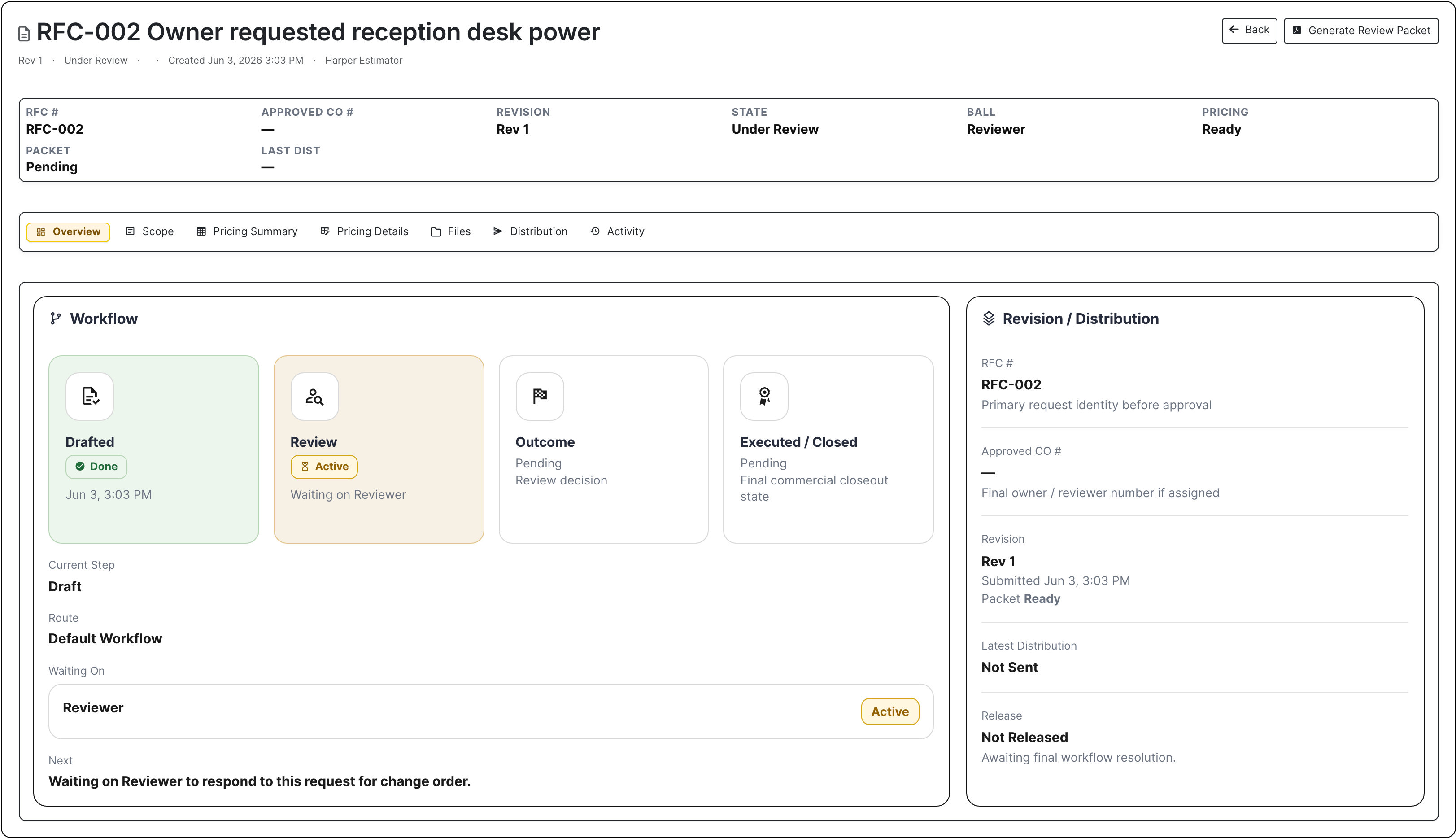
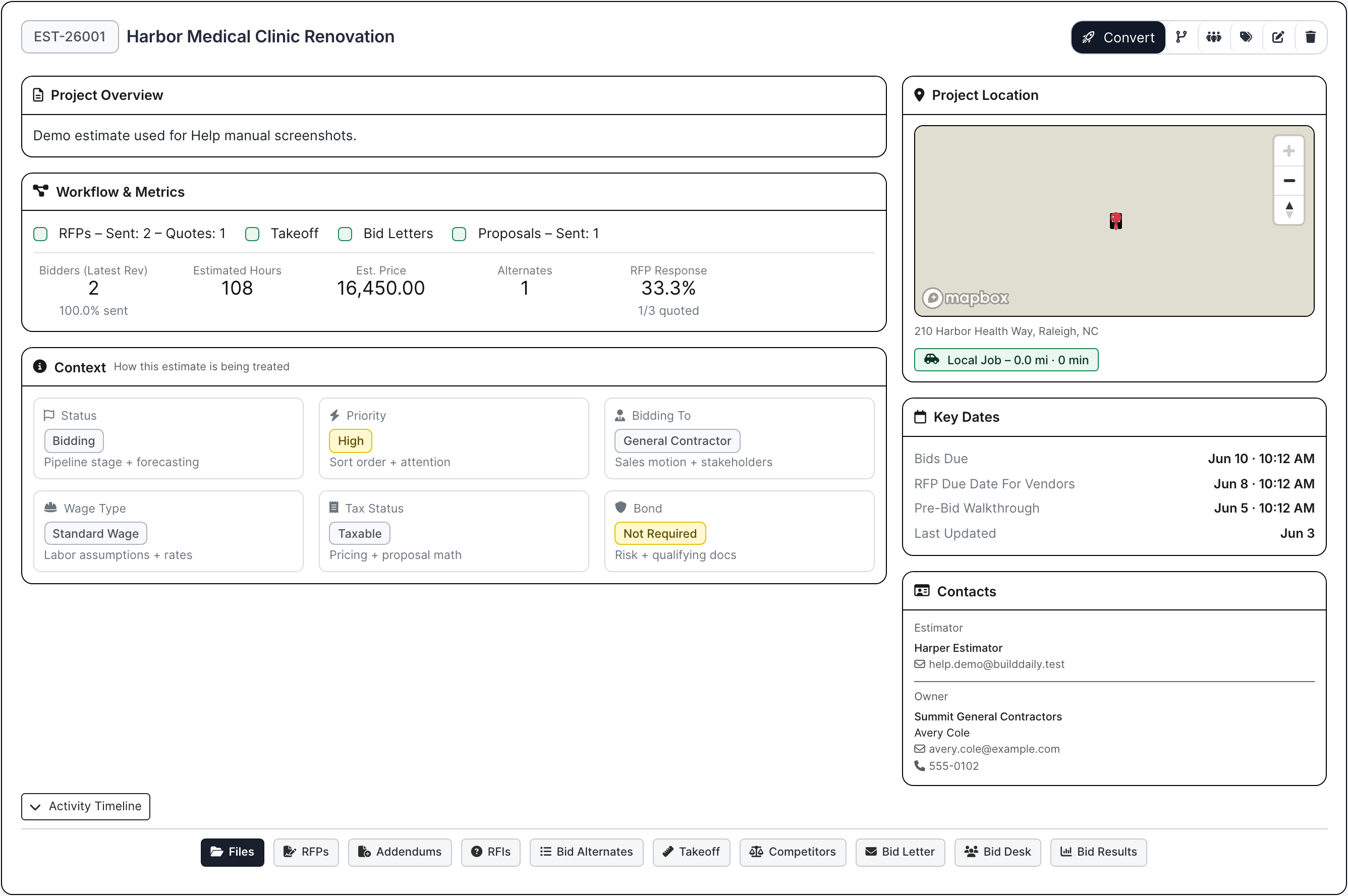
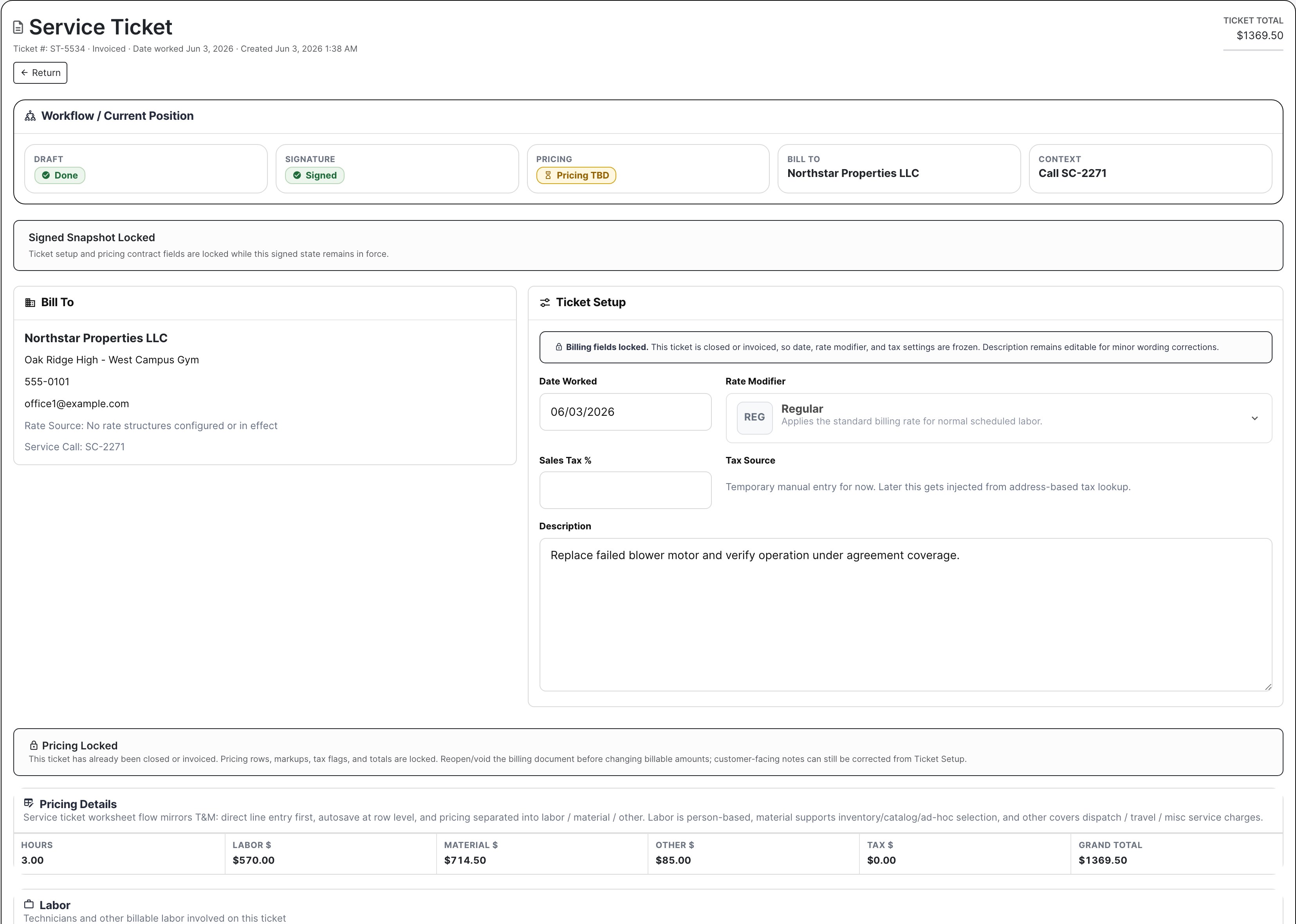
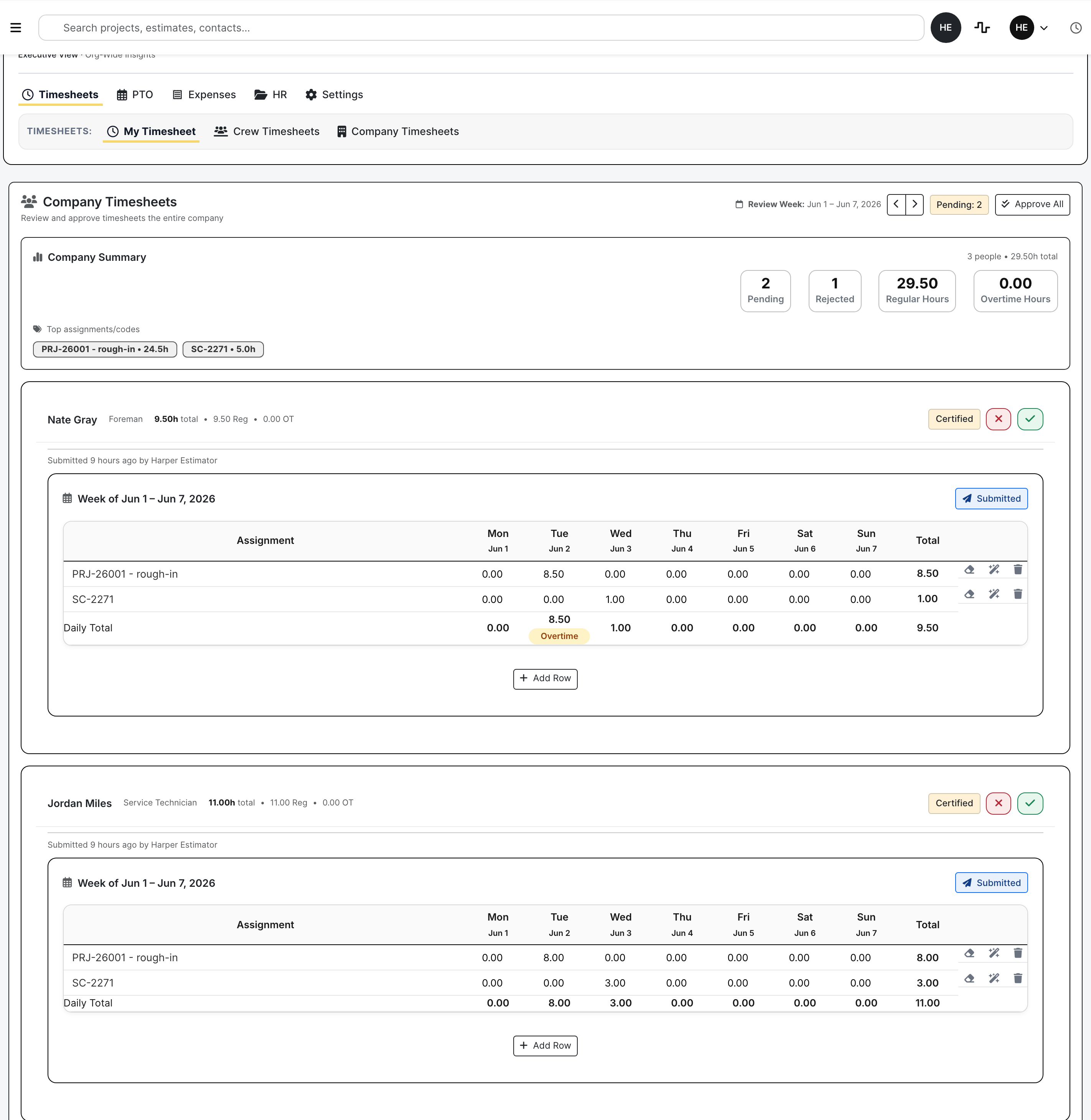
The screen should show the decision or action. These examples show change pricing, bid setup, service completion, timesheet review, and agreement routing with real demo records.

BuildDaily project change order workbench with pricing review and files
Change work stays billable Scope, pricing, files, packet status, and review decisions stay with the job.
Project operations
BuildDaily estimate work page with RFP files and bid context
The bid history survives award Bid files, RFPs, addenda, RFIs, takeoff, alternates, proposals, and bidders.
BuildDaily service ticket Work On page with line items and completion controls
A service call can become an invoice Labor, material, notes, equipment, files, signature, billing decision, and closeout.
BuildDaily company timesheet review with certified rows and approval controls
Labor gets reviewed before payroll Company timesheets, job/service coding, rejected sheets, reviewer actions, and payroll cleanup.
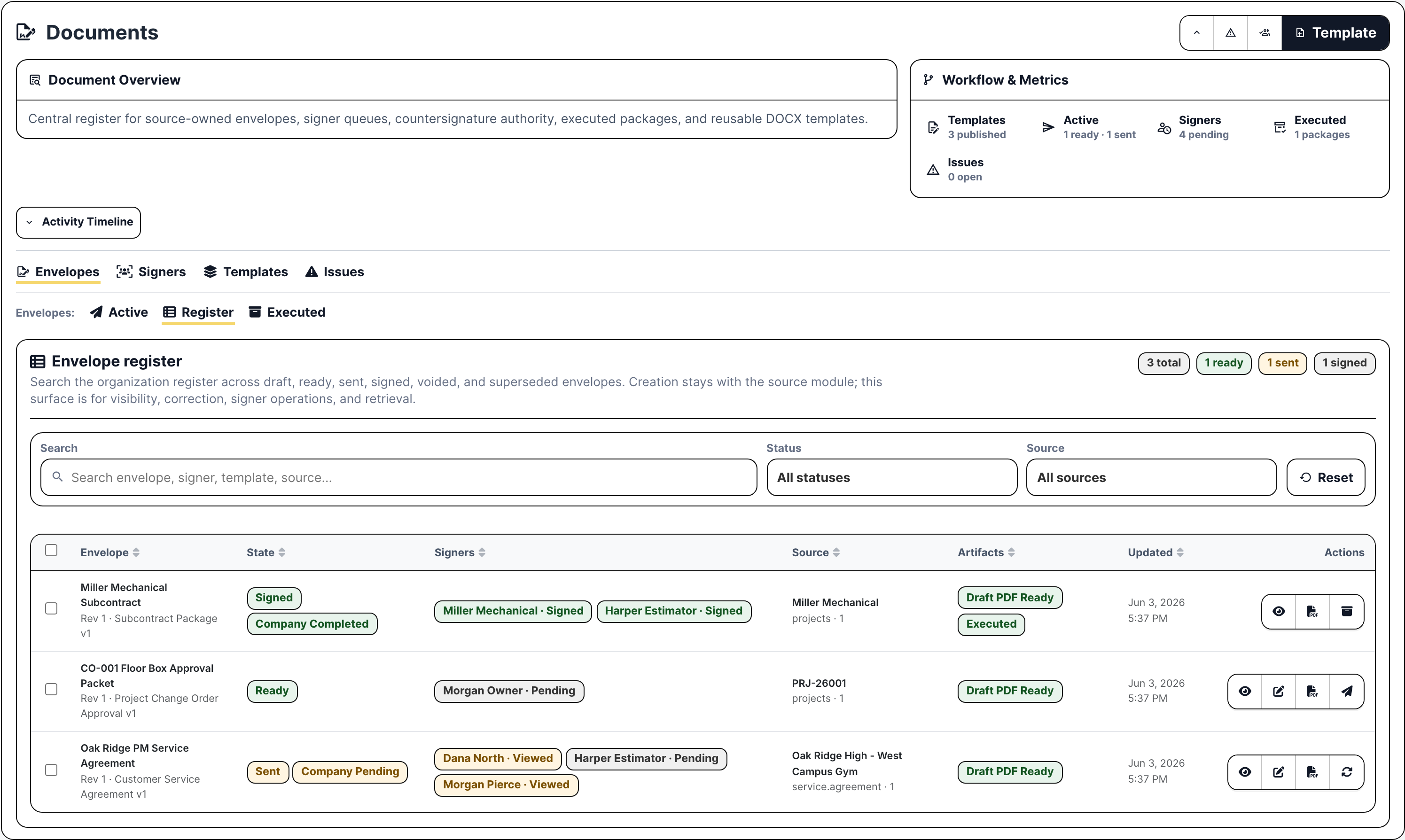
BuildDaily document envelope register with signer status and executed package actions
Agreements do not disappear into email Templates, envelopes, signer routing, countersignature, public signing, and executed packages.
Handoffs

Keep the next step obvious.

A useful demo should follow one real piece of work all the way through: what needs to happen, who owns it, what files are attached, what is missing, and whether it is ready for the next step.

Contractor question Where BuildDaily handles it Why it matters
Should we chase this lead?
Who owns it, what is the jobsite, what follow-up is due, and what was already sent?
Lead work page with customer, contact, source, location, files, photos, communications, follow-up, activity, estimate link, and outcome. Estimating does not waste the first hour asking sales where the site, files, or contact history went.
Can we bid this cleanly?
Which bidders, scopes, addenda, RFIs, takeoff items, alternates, and proposals are in play?
Estimate work page with RFP groups, no-login planrooms, bid files, RFIs, addenda, takeoff, alternates, bid letter, competitor tracking, and bid results. When the job is won, operations can see the bid files, bidders, addenda, and proposal work without starting over.
What changed on the job?
Is this an RFI, submittal, change order, T&M ticket, pay application issue, drawing/spec issue, or closeout item?
Project page with management, field, financial, schedule, files, drawings, specs, distribution, and setup controls. The PM can price, document, or route the issue while the backup is still tied to the job.
Can we bill the service call?
Was the tech dispatched, was the work completed, what parts/labor were used, and did the customer sign?
Service ticket and Work On flow with dispatch slots, technician assignment, site/equipment context, line items, files, signature, billing review, invoice, and payment link. Service and billing can see whether the visit is ready to invoice without guessing from texts.
Is payroll going to be a mess?
Are hours coded to the right job/service/overhead work, and are PTO, expenses, and HR files current?
Timeclock/HR with clock status, employee/crew/company timesheets, PTO, expense accounts, receipts, employee files, HR library, and manpower context. Labor and reimbursement cleanup happens before payroll, not after everyone is annoyed.
Who needs to sign or review?
Does this need an owner, customer, vendor, subcontractor, employee, or internal countersignature?
Document templates, envelopes, public signing links, RFP planrooms, review portals, subcontractor portals, executed packages, and audit history. Outside people get the one link they need, while your internal record keeps the audit trail.
Inside The Contractor

Each team gets the controls it needs. The job does not get typed twice.

Estimators, PMs, supers, dispatchers, service managers, HR, and billing all work differently. BuildDaily keeps the customer, site, files, notes, pricing, signatures, and assignments close enough that the next person can keep moving.

Preconstruction

From first pursuit to bid day

The bid starts with the customer and site record already in motion.

  • Lead owner, follow-up, heat, source, geography, files, customer, and contact.
  • Estimate files, RFP groups, bidders, RFIs, addenda, takeoff, alternates, bid letters, competitors, and bid results.
Project operations

From award to closeout

The PM gets the bid context and adds field work, money items, schedule, and closeout.

  • RFIs, submittals, project RFPs, meetings, permits, inspections, correspondence, and distribution.
  • Daily reports, safety, toolbox talks, deliveries, punchlist, change orders, T&M, pay applications, A/R, and subcontractors.
Service

From call intake to paid invoice

The service desk can move a call from intake to signed work and billing review.

  • Calls, tickets, dispatch, technician assignment, site/equipment history, agreements, PM, and rates.
  • Line items, signatures, billing review, invoice emails, Stripe-backed payment links, A/R, and payment history.
Workforce

From crew plan to payroll review

Field labor, PTO, expenses, assets, and people records stay close to the schedule.

  • Clocking, breaks, employee/crew/company timesheets, PTO, expense accounts, receipts, and HR files.
  • Manpower schedule, conflicts, roster, assets, maintenance, usage logs, skills, certifications, and licenses.
Documents and portals

From template to signed packet

Documents, reviews, signing, and public links stay with the job, ticket, company, or employee.

  • Template library, generated envelopes, signer queue, countersignature, reminders, and executed packages.
  • No-login planrooms, RFI/submittal review, change/pay review, subcontractor portal, and public signing.
Analytics and support

From problem to next action

Leaders can see which lead, bid, job, ticket, or support issue needs attention.

  • Executive, leads, estimates, projects, service, manpower, and geographic boards.
  • Support tickets, notes, files, activity, module context, Friday assistance, and operational follow-up.
Outside Links

Some people need to act. They do not need an internal login.

Vendors, reviewers, owners, customers, signers, and subcontractors often need to do one thing: upload a quote, answer an RFI, review a submittal, sign a packet, or pay an invoice. BuildDaily gives them a controlled link for that action.

Vendor planroom Bidders review RFP files, download packages, respond, no-bid, and upload quotes from a controlled link.
Review links RFIs, submittals, change orders, and pay applications can go outside for a response, file upload, or decision.
Public signing Signers open the envelope, review the packet, sign, decline, forward where allowed, and receive the executed package.
Subcontractor work Subcontractors, certificates, compliance, SOVs, pay requests, files, and contracts stay tied to the project relationship.
How To Judge It

A good demo should use work your team recognizes.

The point is not to click every tab. The point is to bring a real handoff and see whether BuildDaily keeps the record cleaner than the way your team works today.

Bring the messy handoff

One recent job tells you more than a polished deck.

Bring a lead that became a bid, a bid that became a job, a field issue that needed price or signature, a service call that had to be billed, or a labor week that needed cleanup.

Follow the record

The demo question is simple.

Can the next person see what happened, what changed, who needs to act, what is missing, and whether the work is ready for review, signature, payroll, billing, or closeout?

Start With One Handoff

Bring the thing your office keeps chasing twice.

A bid file that never reaches the PM. A signed ticket that billing cannot find. A change that lacks backup. A crew week that gets rebuilt in texts. That is the right demo.