BuildDaily

Leads and Sales

Lead management that turns sales noise into qualified estimating work

A lead is the job record before the estimate exists. BuildDaily captures the source, customer, contact, jobsite, owner, follow-up, files, emails, pursuit state, sales geography, estimate handoff, and final outcome so contractors can decide what to chase, what to nurture, what to no-bid, and what actually turns into work.

Lead Workflow

How a lead becomes a real pursuit

Capture the opportunity with enough detail to act

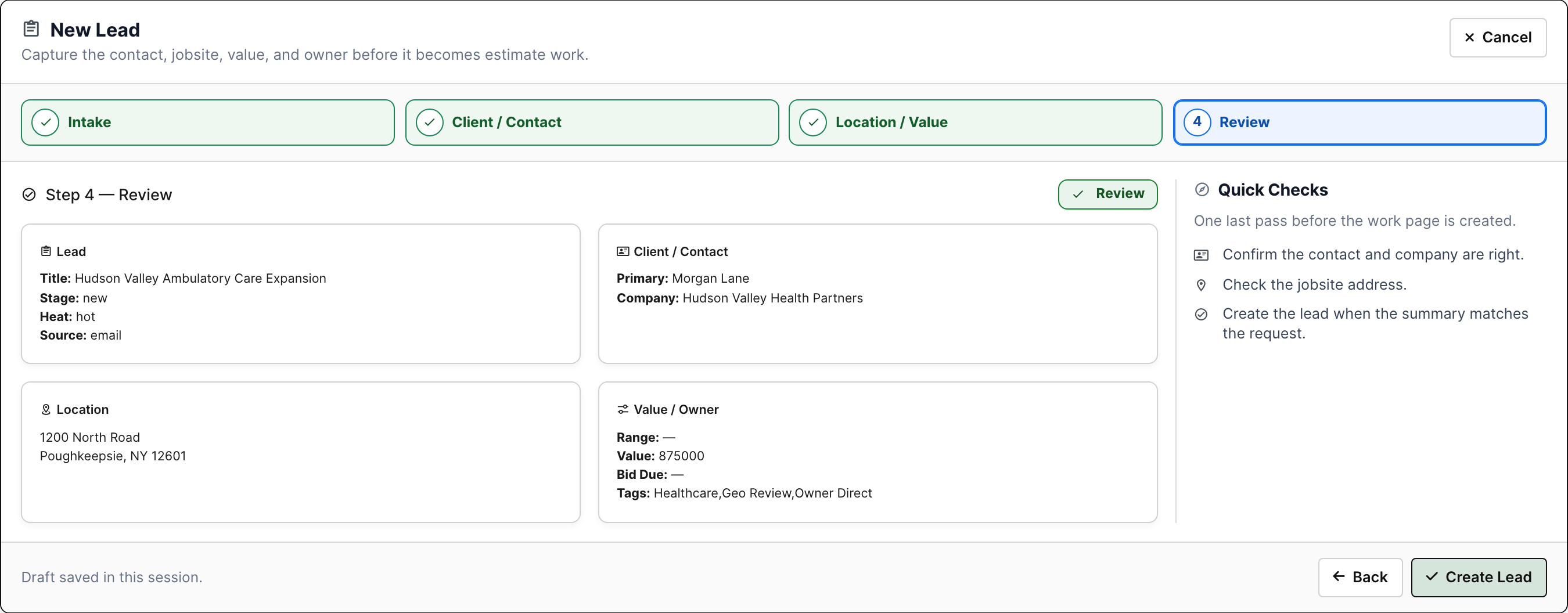
The intake flow is not just a name and phone number. It captures the source, company, contact, jobsite, value range, owner, heat, tags, timing, and notes that tell the team whether this belongs in sales follow-up, service, estimating, or the no-bid pile.

  • Create leads from bid invites, calls, website inquiries, relationship notes, referrals, or service opportunities.
  • Tie the lead to a real company/contact instead of a loose inbox thread.
  • Capture jobsite and value context early so geography and capacity can be part of the chase decision.
New lead intake wizard
Lead intake captures source, customer/contact, jobsite, value, owner, tags, and review context before the opportunity hits the log.

Run the hub like a sales backlog

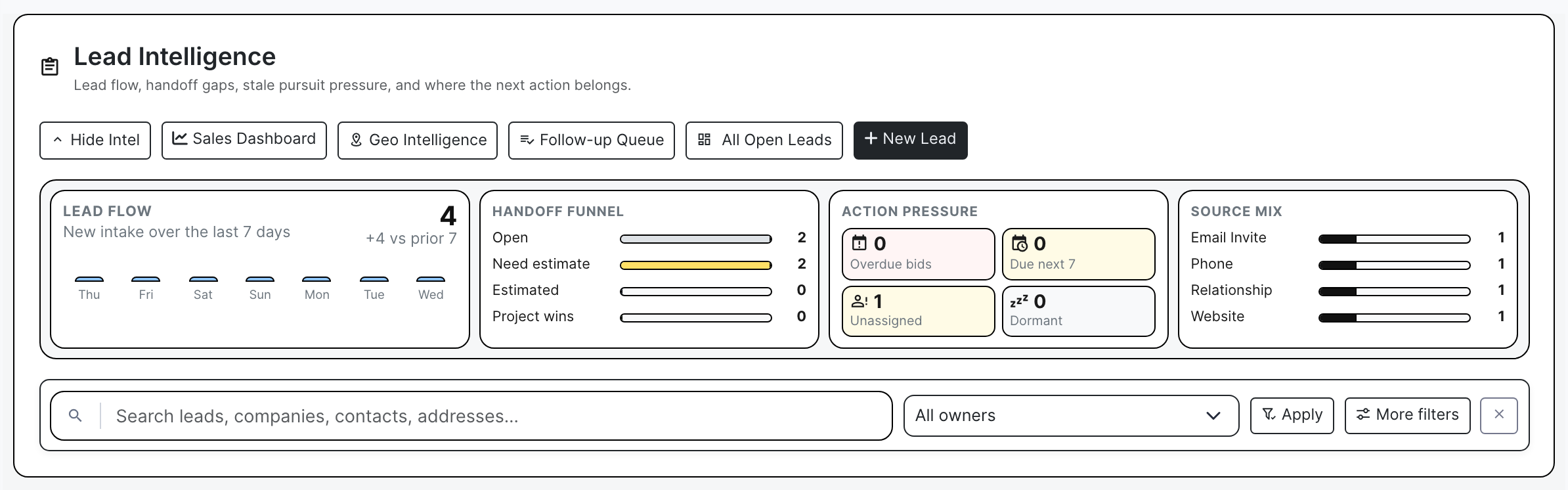
The hub shows where sales work is piling up: new leads, hot pursuits, unassigned work, follow-ups due, estimate-needed opportunities, source mix, handoff funnel, and action pressure. A manager can see whether the team is moving work forward or letting it age.

  • Filter by lifecycle, owner, source, heat, stage, and search text.
  • Spot leads that need an estimate, owner assignment, follow-up, or closeout.
  • Use the row actions to work the next step without treating the lead list as a static spreadsheet.
Lead hub intelligence
The hub exposes flow, funnel, source mix, pressure, and the live lead log before a user opens a record.

Work follow-ups as a queue, not a memory test

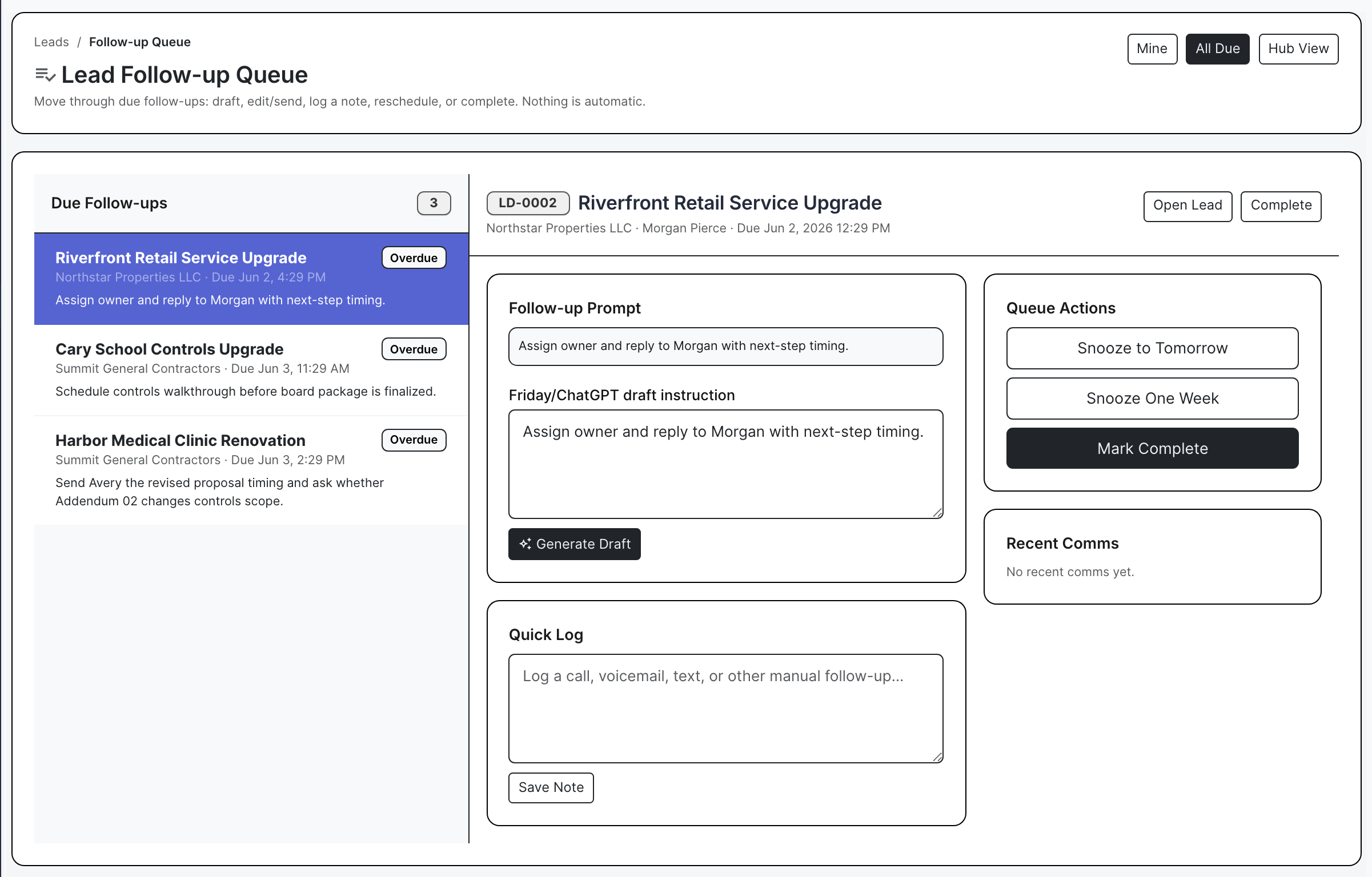
Contractor sales usually fails in the quiet places: no callback, no reply to the GC, no owner assigned, no next date. The follow-up queue pulls due and overdue work into one place so the user can generate a draft, log a call, snooze the reminder, complete it, or open the full lead.

  • Prioritize overdue calls and emails by lead, company, owner, due date, source, and value.
  • Use Friday drafts as a writing assist, then review before sending.
  • Quick-log what happened so the next person sees the sales history.
Lead follow-up queue
The queue turns stale calls and emails into explicit actions with draft, log, snooze, complete, and open-lead controls.

Qualify the work before estimating spends time

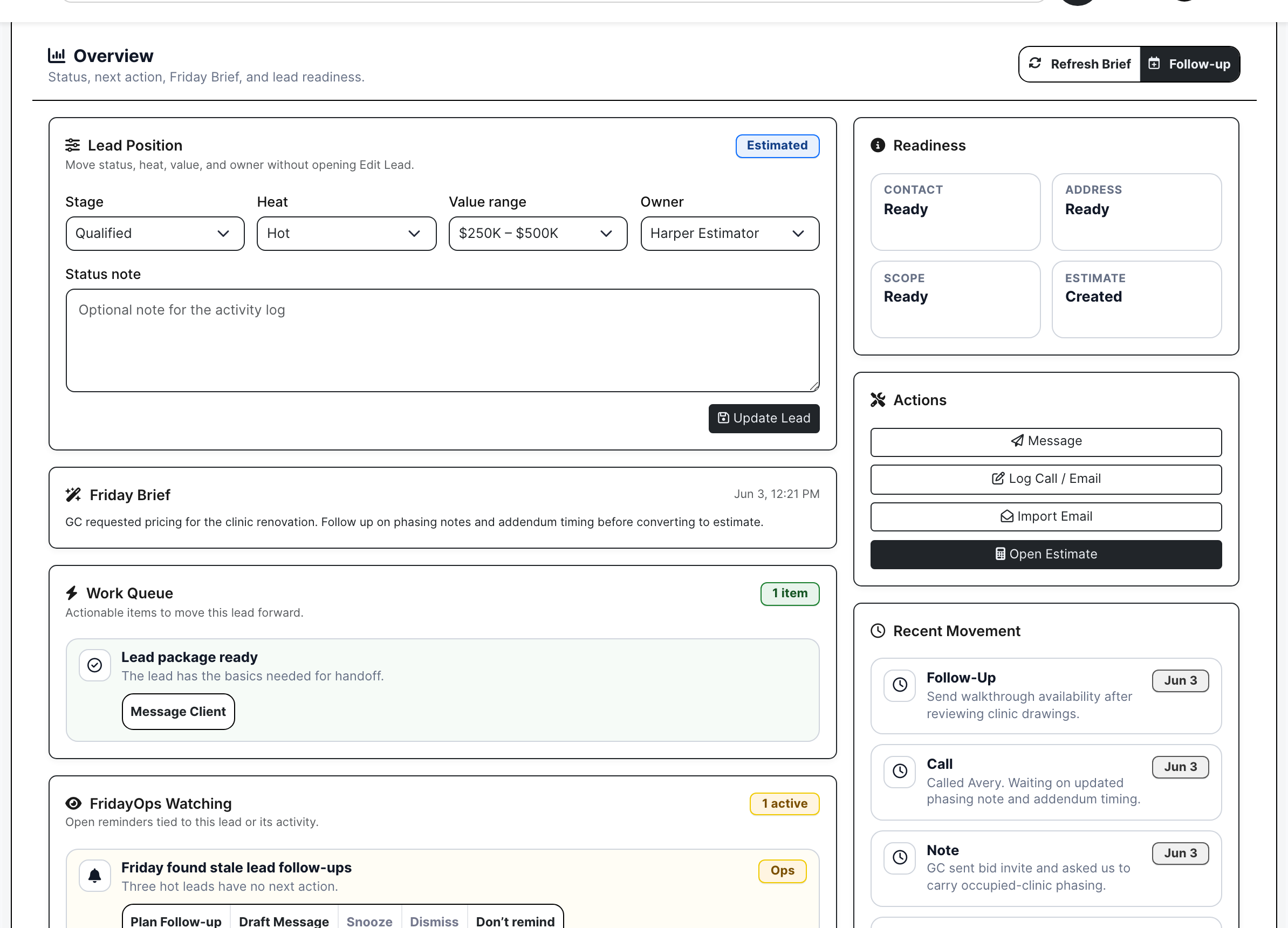
The lead work page is the pre-estimate job file. It keeps readiness, source, owner, company, contact, heat, maturity, timing, value range, next action, Friday brief, recent movement, and location together so estimating is not starting from a forwarded email with missing context.

  • Review readiness signals like missing contact, jobsite, scope notes, files, photos, or follow-up.
  • Keep client contact, internal owner, action queue, and recent activity visible.
  • Create or open the estimate only when the opportunity is real enough to price.
Lead work page readiness and action queue
The work page shows readiness, action queue, Friday brief, recent movement, and estimate handoff context.

Develop pursuits instead of bidding everything

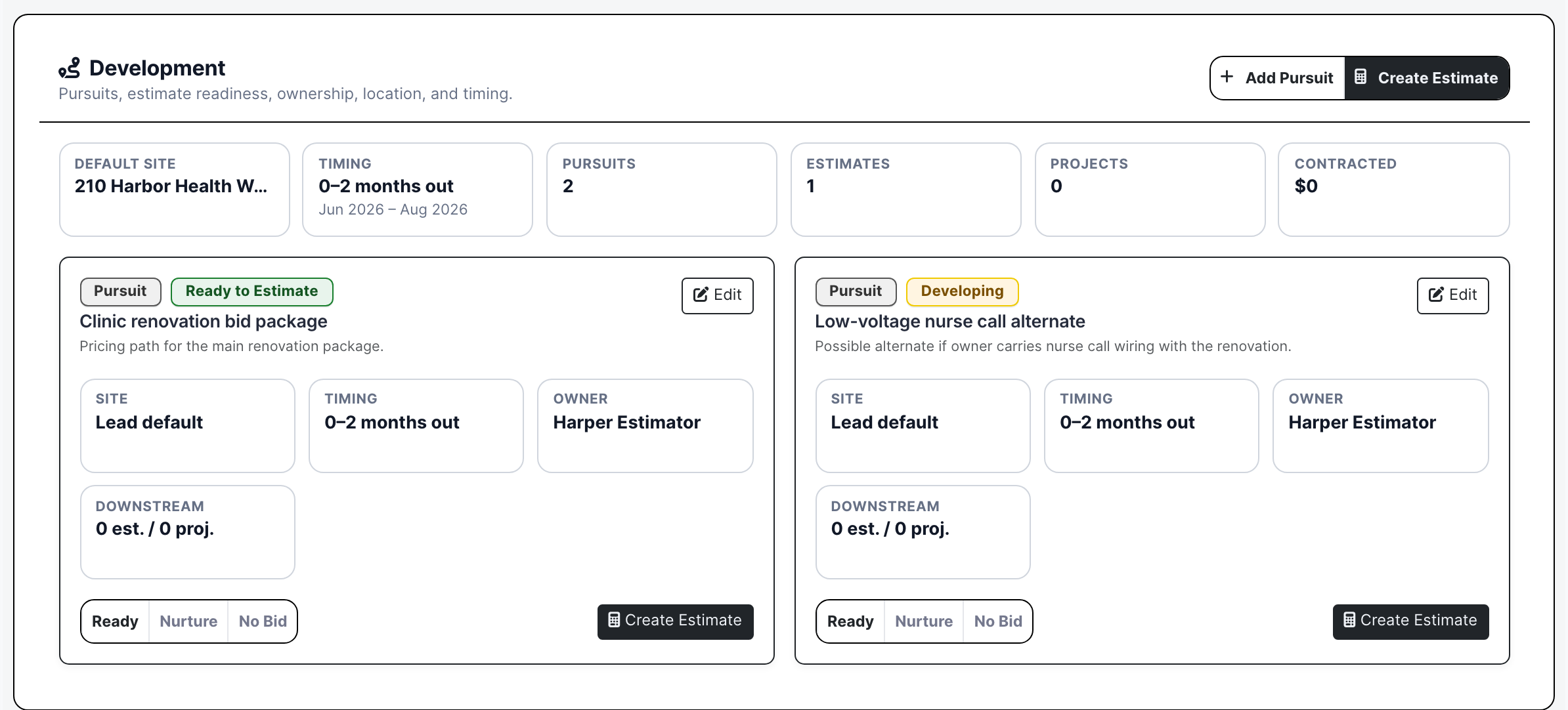
Some leads have multiple paths: main bid, alternate package, service opportunity, budget path, future phase, or no-bid decision. Development gives those pursuits a stage, owner, probability, strategic priority, value range, time horizon, and estimate action.

  • Separate ready-to-estimate work from nurture, dormant, watch, no-bid, and lost paths.
  • Track expected decision, start, and completion windows before committing estimating time.
  • Create the estimate from the pursuit without retyping source, customer, location, or notes.
Lead pursuit development
Development is where sales decides whether the opportunity is ready to price, should be nurtured, or should be no-bid.

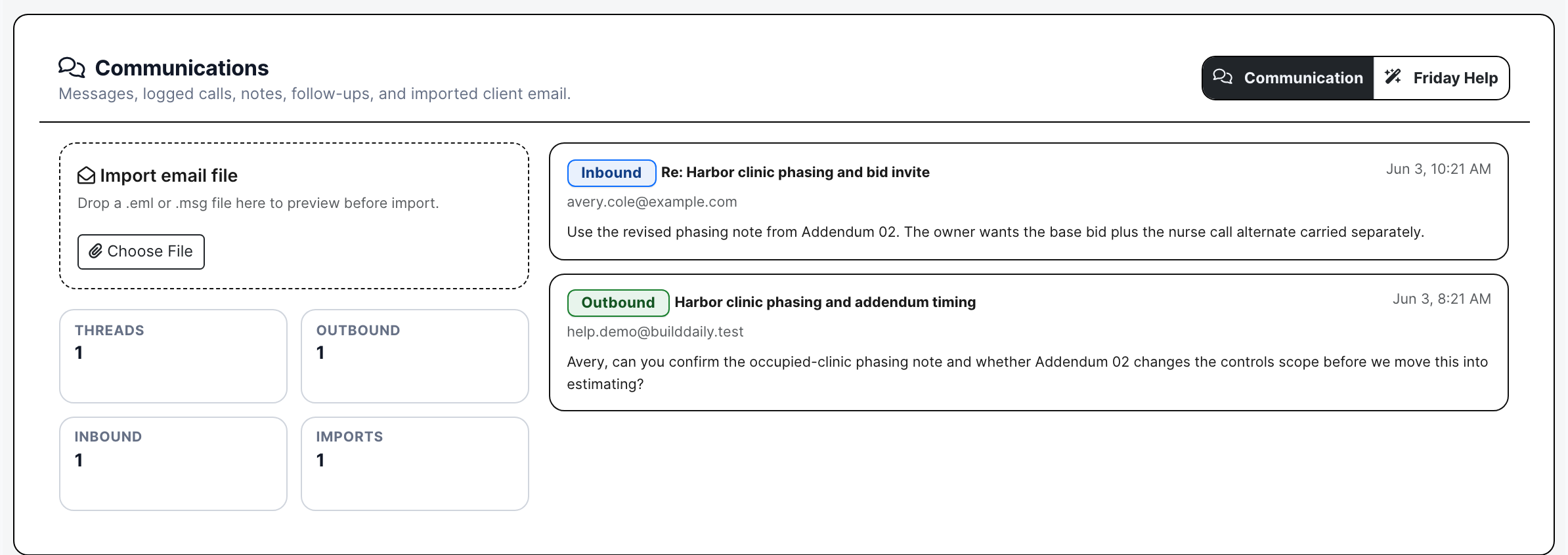
Keep calls, emails, and inbound context with the opportunity

Sales history should not be trapped in one person's inbox. Communications keeps inbound email, outbound follow-ups, Postmark-style delivery/open context, manual call logs, message threads, attachments, imported email intelligence, and Friday follow-up drafts on the lead.

  • Import customer or GC emails and attachments into the opportunity record.
  • Track what was sent, what came back, and whether the next response is still open.
  • Use Friday to draft follow-up language while the user stays in control of sending.
Lead communications and imported email
Communications keeps inbound, outbound, manual logs, attachments, and follow-up drafting tied to the opportunity.

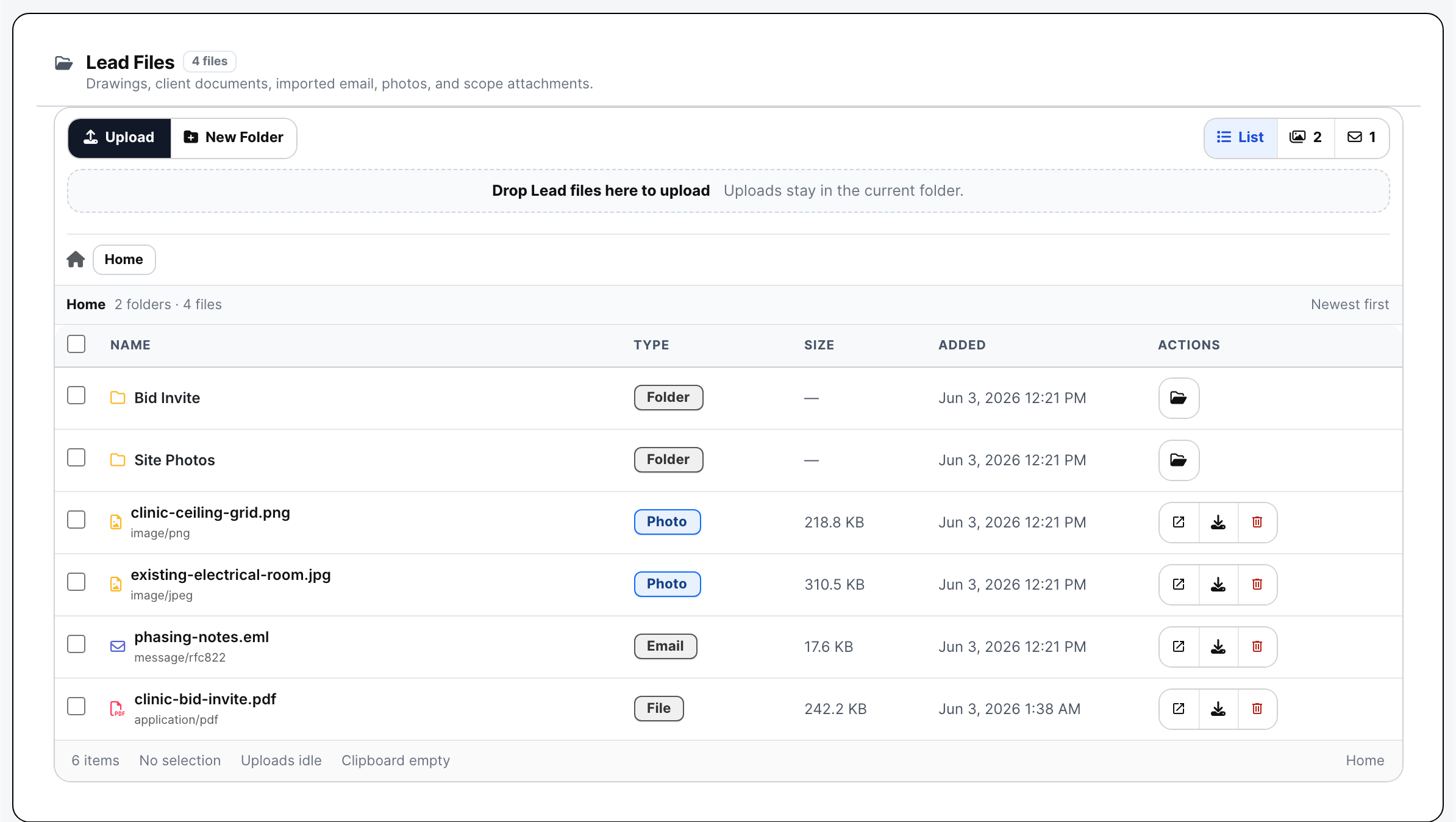
Store early files and photos before an estimate folder exists

Bid invites, ceiling photos, phasing notes, sketches, early drawings, site photos, and email attachments often arrive before the estimator opens an estimate. Lead files give that material a home so the handoff does not depend on forwarding old emails.

  • Create folders for bid invites, site photos, early drawings, and qualification notes.
  • Upload, preview, open, download, rename, move, delete, and organize files.
  • Keep photos and attachments available when the lead moves into estimating.
Lead file manager with early pursuit files
The file manager shows early opportunity material before the formal estimate file structure exists.

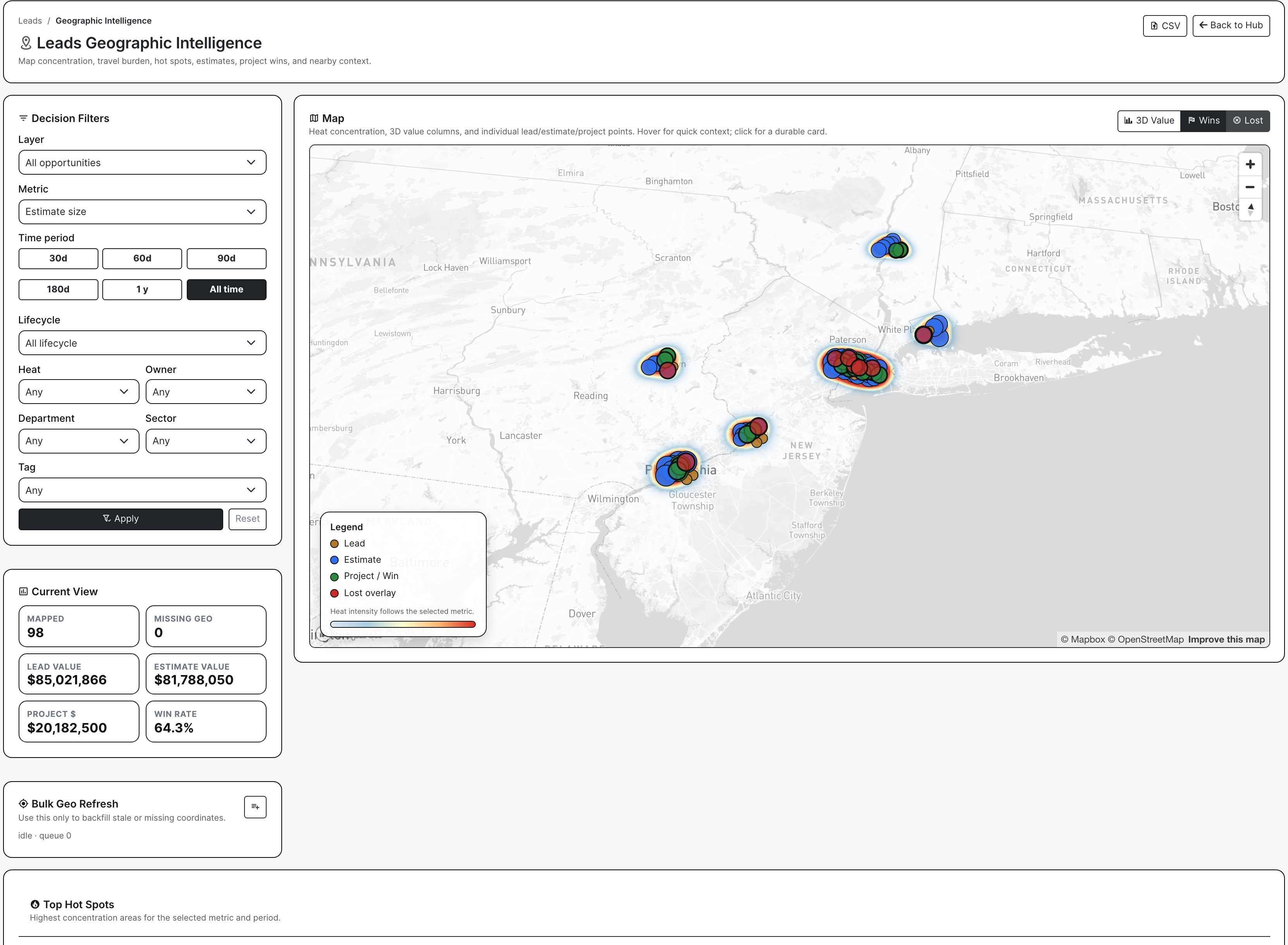
Use geography as a sales decision, not decoration

Geographic intelligence is critical for leads. It shows where opportunities are concentrating, where estimates carry the most value, where projects are being won, where losses are clustering, and whether a pursuit fits travel, service territory, manpower, and nearby-work reality.

  • Filter the map by layer, metric, time period, lifecycle, heat, owner, department, sector, and tag.
  • Switch between concentration, lead size, estimate size, project contract size, win density, and manpower.
  • Export CSV or GeoJSON when a sales leader wants territory, source, or market review outside the page.
Leads geographic intelligence with populated map
The geographic board shows dense opportunity concentration, estimate value, project wins, loss overlays, filters, and export controls.

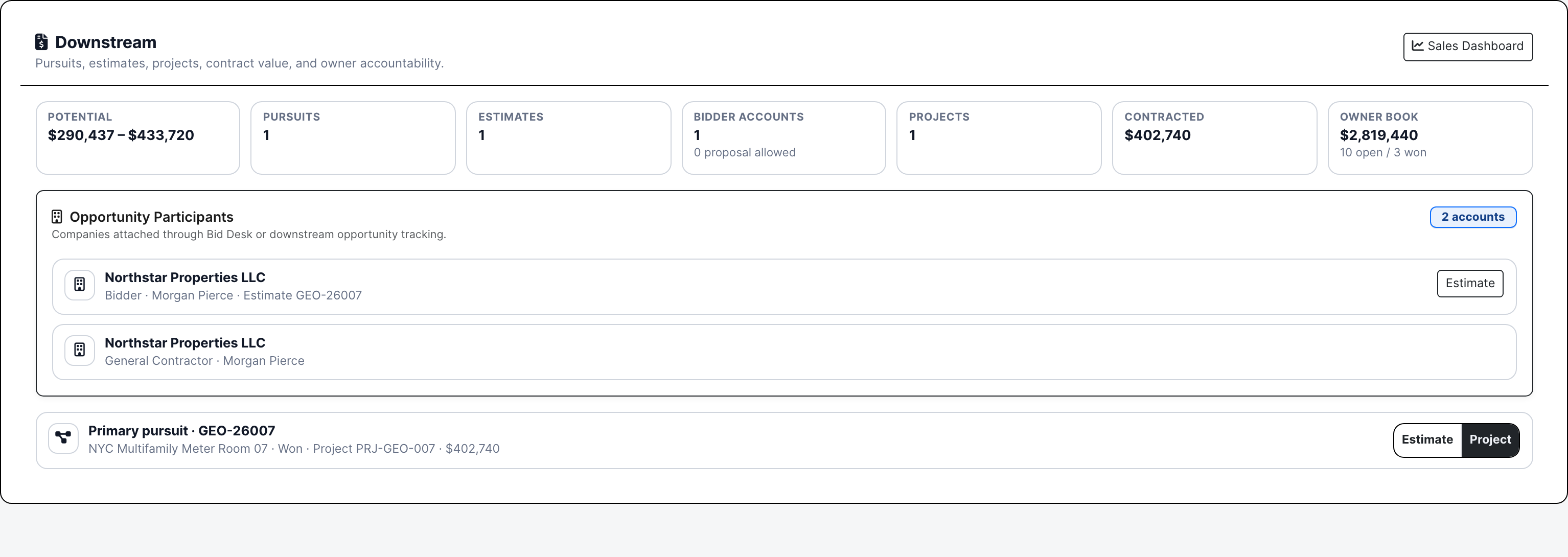
Keep the estimate and project handoff traceable

When a qualified lead becomes an estimate, BuildDaily keeps the source, company, contact, location, notes, files, pursuit state, participants, and downstream records visible. The sales record still matters after estimating starts because it explains where the work came from and who owns the relationship.

  • Create or open estimates from the lead and preserve the origin record.
  • See downstream estimates, projects, participants, contract value, and accountability.
  • Use the estimate handoff to avoid re-entering customer, jobsite, source, and early file context.
Lead downstream estimates and projects
Downstream shows pursuits, estimates, projects, participants, value, and handoff accountability from the lead record.

Close the loop on sales performance

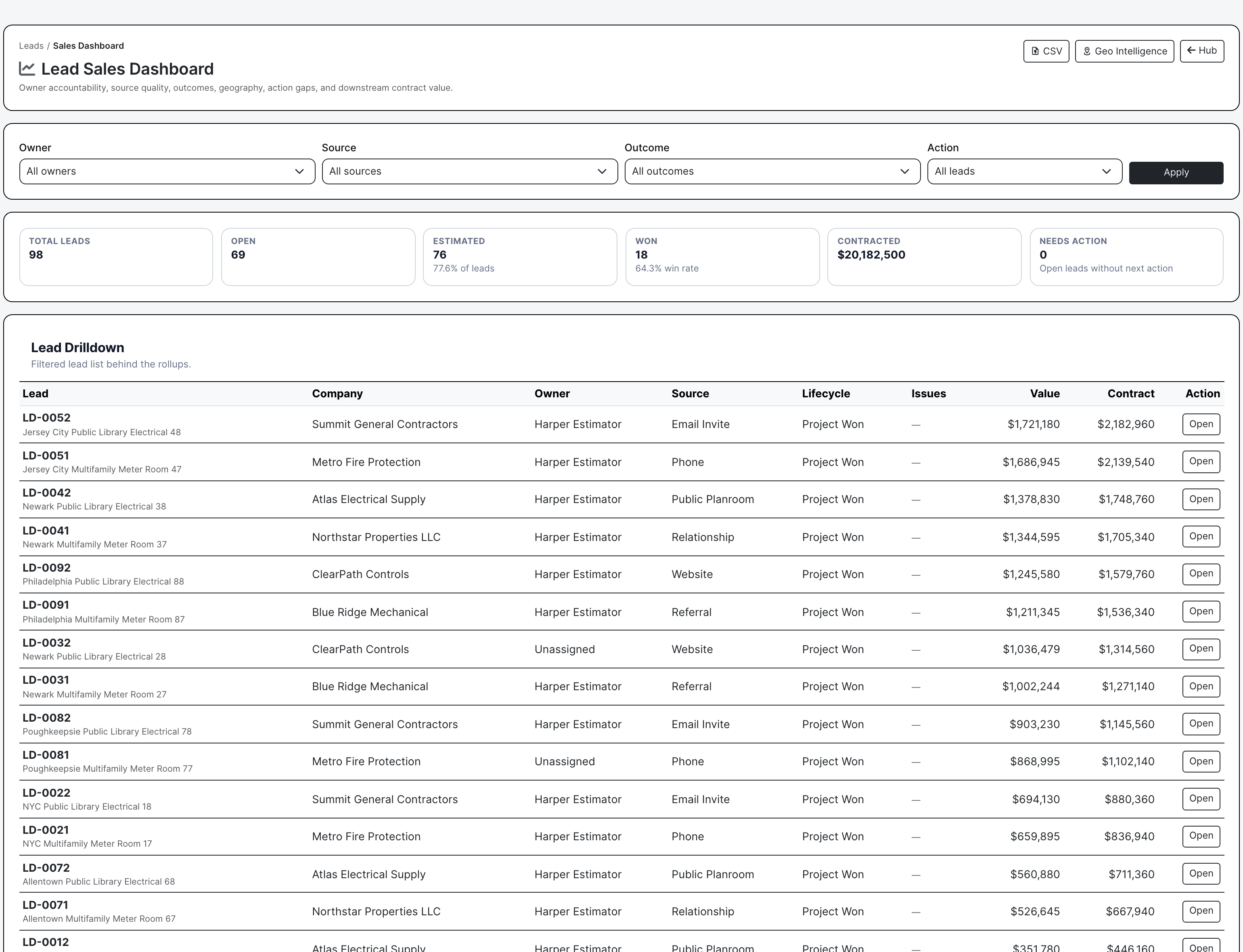
Leads only become useful history when the outcome is recorded. BuildDaily tracks won, lost, not pursuing, no response, duplicate, junk, follow-up later, competitor, lost value, comparable outcomes, owner performance, source quality, action gaps, and downstream contract value.

  • Record closeout reasons so losses and no-bids teach the company something.
  • Review owner accountability, source quality, outcomes, action gaps, value, and geography.
  • Use the sales dashboard to see whether business development is creating estimating work and project wins.
Lead sales dashboard with populated results
Sales reporting ties owner accountability, source quality, lifecycle, outcomes, action gaps, geography, and value together.

Team Responsibilities

Who uses lead intelligence

Business development

Own intake, source tracking, follow-up, relationship notes, qualification, email history, and the decision to pursue, nurture, no-bid, or hand off to estimating.

Estimating

Receive leads with customer, contact, jobsite, files, scope notes, timing, geography, and pursuit context already attached before opening the estimate.

Owners and sales leaders

Review stale work, owner accountability, source quality, estimated value, wins/losses, action gaps, and geographic concentration before chasing the next market.

Service and operations

Route service opportunities or relationship work into a lead when the call is really a future project, agreement, upgrade, or estimating opportunity.

Coverage

Lead and sales work BuildDaily covers

Contractor needs BuildDaily does it
Structured intake Yes
Captures source, company, contact, owner, heat, stage, jobsite, value range, timing, tags, and opening notes.
Hub triage Yes
Shows lead flow, handoff funnel, action pressure, source mix, lifecycle filters, hot leads, unassigned work, estimate-needed signals, and live row actions.
Follow-up queue Yes
Surfaces due and overdue sales work with draft generation, quick log, snooze, complete, and open-lead actions.
Friday follow-up assist Yes
Drafts lead follow-up language from the record while leaving review and sending under user control.
Work-page readiness Yes
Flags missing contact, jobsite, scope notes, files, photos, and next action before a lead gets handed to estimating.
Pursuit development Yes
Tracks multiple pursuit paths, stages, probability, strategic priority, expected dates, value range, ready/nurture/no-bid choices, and estimate creation.
Activity history Yes
Keeps notes, calls, open follow-ups, completed follow-ups, quick actions, FridayOps watches, and recent movement on the lead.
Communications Yes
Logs inbound email, outbound messages, message threads, manual calls/meetings, attachments, imported email context, and Friday drafts.
Files and photos Yes
Stores bid invites, site photos, drawings, sketches, email attachments, folders, uploads, downloads, previews, moves, renames, and deletes before the estimate exists.
Geographic sales intelligence Yes
Maps leads, estimates, project wins, losses, value, manpower, concentration, territory filters, hot spots, CSV export, and GeoJSON export.
Estimate handoff Yes
Creates or opens estimates from the lead so source, customer, contact, location, files, notes, participants, and pursuit context do not get retyped.
Outcome closeout Yes
Records won, lost, not pursuing, no response, duplicate, junk, future follow-up, competitor, lost value, comparable outcomes, and downstream value.
Sales dashboard Yes
Shows owner accountability, source quality, lifecycle, action gaps, outcome mix, contract value, geo hot spots, and CSV export.

Sales Surfaces

Where lead work happens

Lead hub surfaces

Hub Pipeline counts, lifecycle pressure, source mix, handoff funnel, action pressure, filters, search, lead list, row signals, and bulk actions.
Follow-up Queue Due and overdue lead follow-ups with generated draft controls, quick logs, snooze, complete, and direct lead actions.
Sales Dashboard Owner accountability, source quality, outcomes, action gaps, geography, downstream contract value, filters, and CSV export.
Geo Intelligence Mapped lead/estimate/project concentration, estimate value, project wins, losses, hot spots, territory filters, CSV export, and GeoJSON export.

Lead work tabs

Overview Lead position, readiness, Friday brief, work queue, FridayOps watches, quick actions, recent movement, and open-estimate action.
Development Pursuits, maturity, probability, strategic priority, expected dates, value range, site visit timing, ready/nurture/no-bid decisions, and estimate creation.
Activity Timeline, notes, calls, open follow-ups, completed follow-ups, quick communication actions, and planned next steps.
Communications Email import, inbound/outbound messages, message threads, manual logs, attachments, Friday drafts, and communication history.
Files Folders, uploads, early pursuit files, photos, email attachments, download/open/actions, and file organization before estimate setup.
Photos Lead photo review and upload path for field photos, client images, and early site evidence attached to the opportunity.
Downstream Pursuits, estimates, projects, opportunity participants, contract value, owner book, and handoff accountability.
Estimates Estimates created from the lead plus Bid Desk participant context and create/open estimate actions.
Location Address, geocode/route, map, distance, travel band, nearby leads/estimates/projects, and territory guidance.
Outcome Final disposition, reason, lost/unpursued value, future follow-up, lineage, comparable outcomes, estimates, and project links.

Operating Rhythm

How sales work stays accountable

Capture the sales signal

  • Create the lead from a bid invite, call, website inquiry, relationship note, referral, public planroom, or service opportunity.
  • Set customer/contact, source, jobsite, value, heat, owner, timing, and tags.
  • Attach early notes, files, photos, and emails before the estimate exists.

Decide what deserves estimating

  • Use readiness, follow-ups, files, photos, communications, pursuits, and geography to qualify the opportunity.
  • Choose ready to estimate, nurture, dormant, no-bid, lost, or future follow-up instead of bidding everything by default.
  • Create the estimate only when the lead has enough context to price.

Use geography to prioritize the market

  • Review concentration, estimate value, project wins, losses, hot spots, and territory filters.
  • Look at travel burden, nearby work, service territory, owner/source patterns, and whether the market is producing wins.
  • Export CSV or GeoJSON when leadership wants a territory or sales review.

Measure the sales result

  • Track whether the lead became an estimate, project, lost bid, no-response, duplicate, junk, or follow-up-later record.
  • Compare owners, sources, value, lifecycle, action gaps, outcome mix, and downstream contract value.
  • Use sales history to decide where to spend BD and estimating time next.

Walk through Lead management that turns sales noise into qualified estimating work

We can walk through the module around the way your company actually handles the work.

Request access