BuildDaily

Estimating

Estimating that carries the bid from lead to project

Run a bid from first setup through files, vendor quote packages, no-login public planrooms, addendums, estimate RFIs, alternates, takeoff, customer proposal PDFs, Bid Desk delivery, competitor tracking, public bid results, and project conversion.

Bid Workflow

How the bid moves from setup to proposal and results

Estimate setup

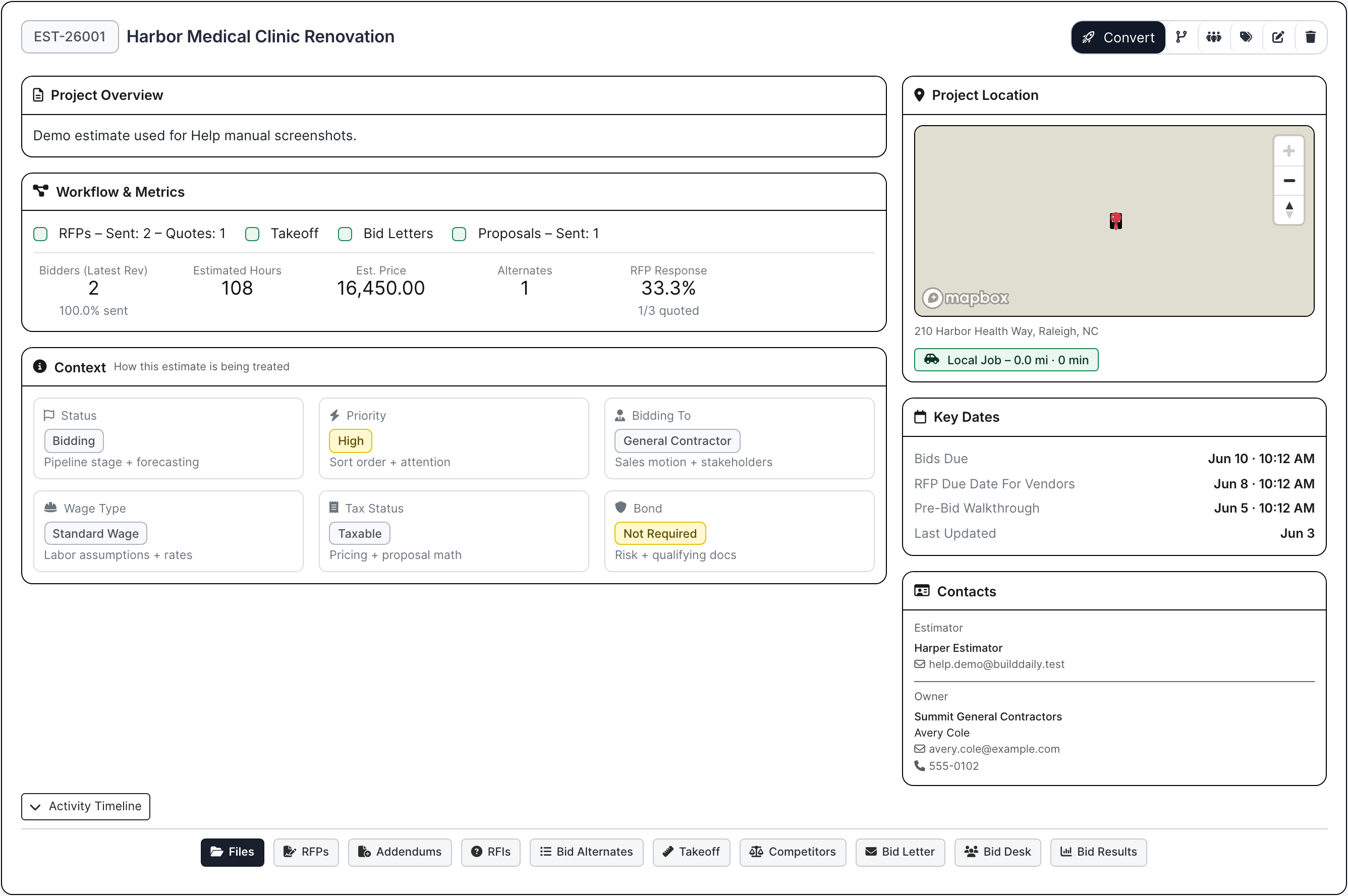
Start the bid with the job, customer, owner, estimator, location, bid due date, vendor quote deadline, pre-bid walk, wage/tax/bond flags, priority, contacts, and conversion status. This is the control record the estimator works from, not a loose folder of notes.

  • Track bid due dates, vendor due-back dates, and pre-bid walkthroughs
  • Keep owner, customer, estimator, and contact information visible
  • Carry lead source and conversion context into the eventual project
Estimate setup and context
Estimate header and context cards keep the bid facts visible while the estimator works.

Files

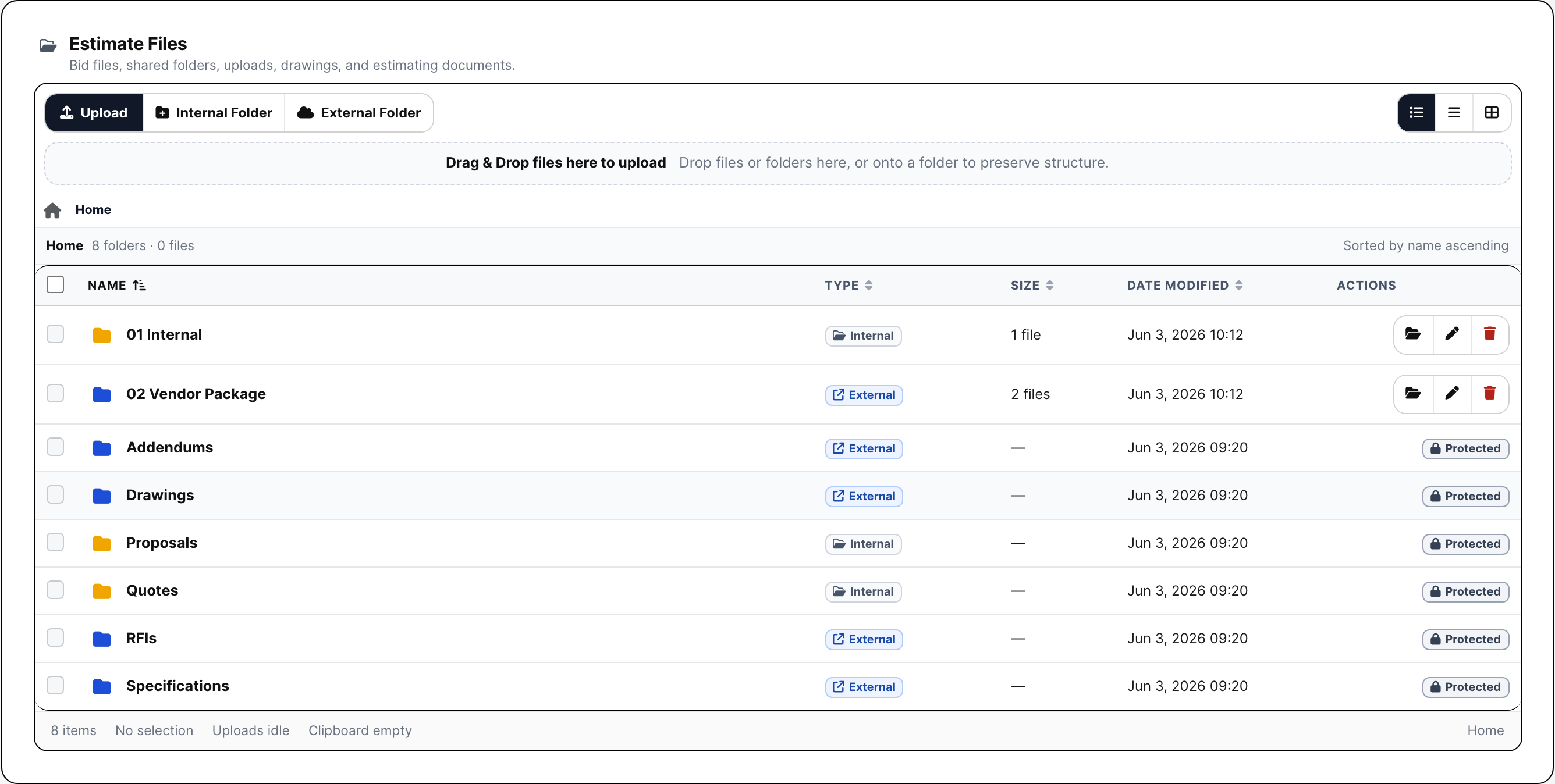
Use the Files tab as the bid file manager. Drawings, specs, addenda, RFP package files, quotes, internal scope notes, and proposal drafts stay organized before the work becomes a project.

  • Separate internal folders from bidder-facing folders
  • Upload folders and preserve bid-package structure
  • Preview, download, rename, protect, delete, and zip files
Estimate files panel
The file manager shows the actual folder and package controls, not just the side navigation.

Vendor RFPs

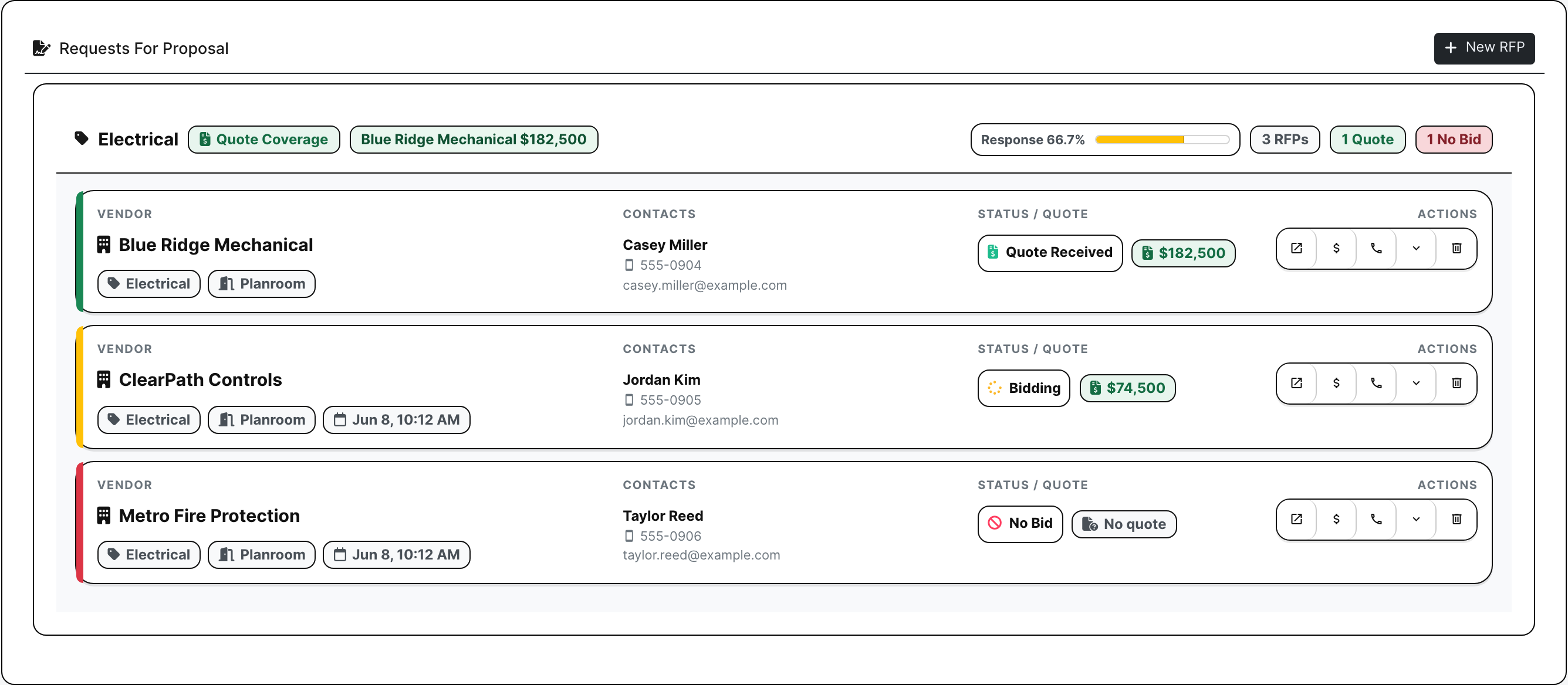
The RFP tab is for sending quote requests to vendors and subs. The estimator builds scope groups, picks invited bidders, sends packages, tracks who received/opened/responded, records no-bids, and keeps quote cards on the bid.

  • Build scope-based RFP groups and bidder lists
  • Track sent, opened, downloaded, bidding, no-bid, and quote received status
  • Keep quote amounts, notes, and follow-up on the estimate
Vendor RFP tab
Vendor RFPs show real bidder status, quote amounts, response activity, and follow-up data.

No-login public planroom

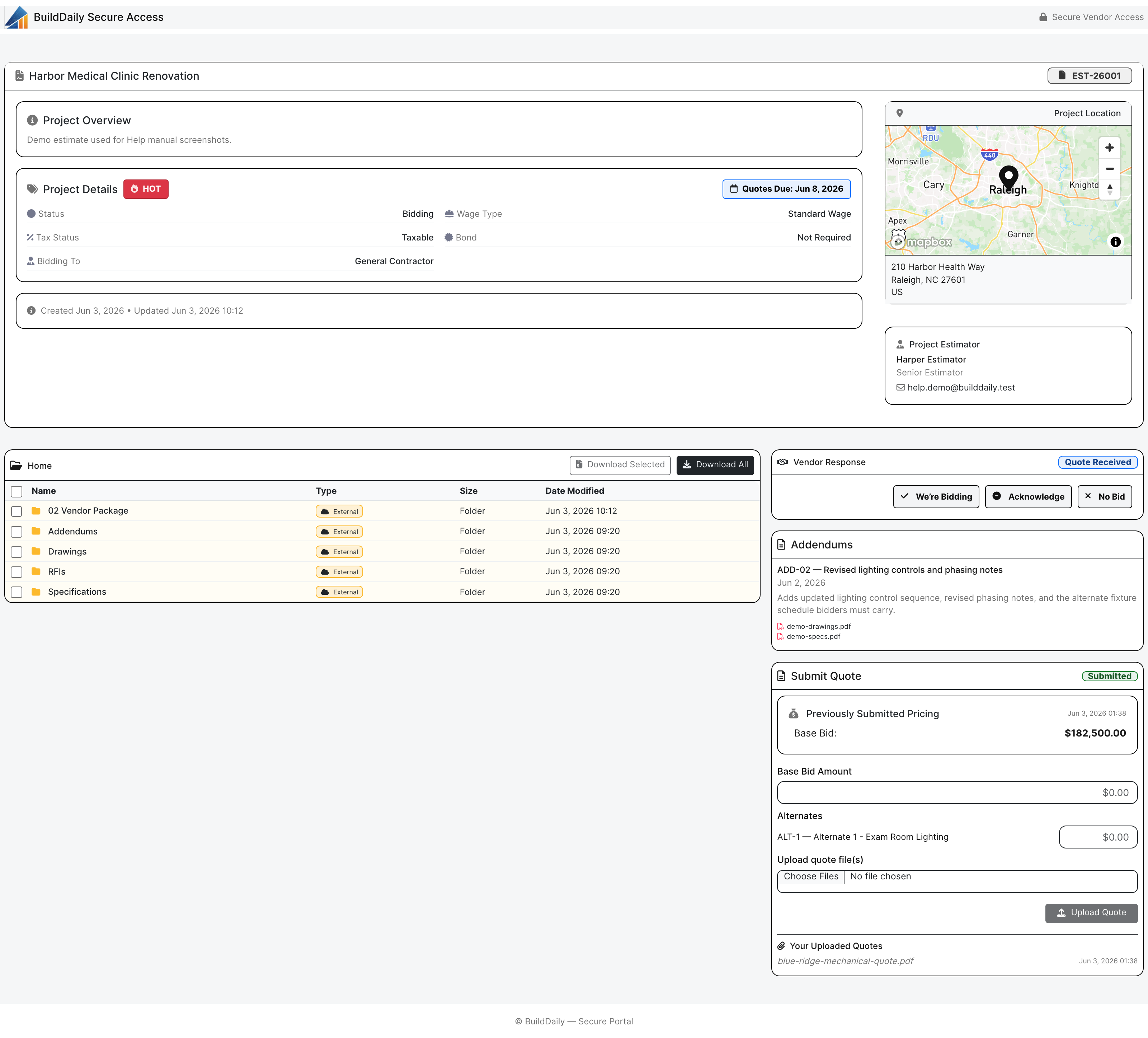
Invited vendors get a secure public link where they can review the bid package, download files, see addendums, answer the RFP, and upload a quote. They do not need a BuildDaily account just to price the job.

  • Give bidders package access without internal app access
  • Expose files, addenda, response status, and quote upload in one outside page
  • Avoid the account-creation friction vendors complain about in heavy portals
Public RFP planroom
This is the active public bidder planroom route, with files, addendum context, and quote upload workflow.

Addendums

When the bid package changes, addendums stay attached to the estimate. The team can post the addendum, attach revised files, notify invited vendors, and keep proof of who was sent the update.

  • Post addendums against the bid package
  • Attach revised drawings, specs, or scope notes
  • Notify original RFP recipients and preserve the notification trail
Estimate addendum workflow
Addendums show files, notification status, and recipient activity on the estimate.

Estimate RFIs

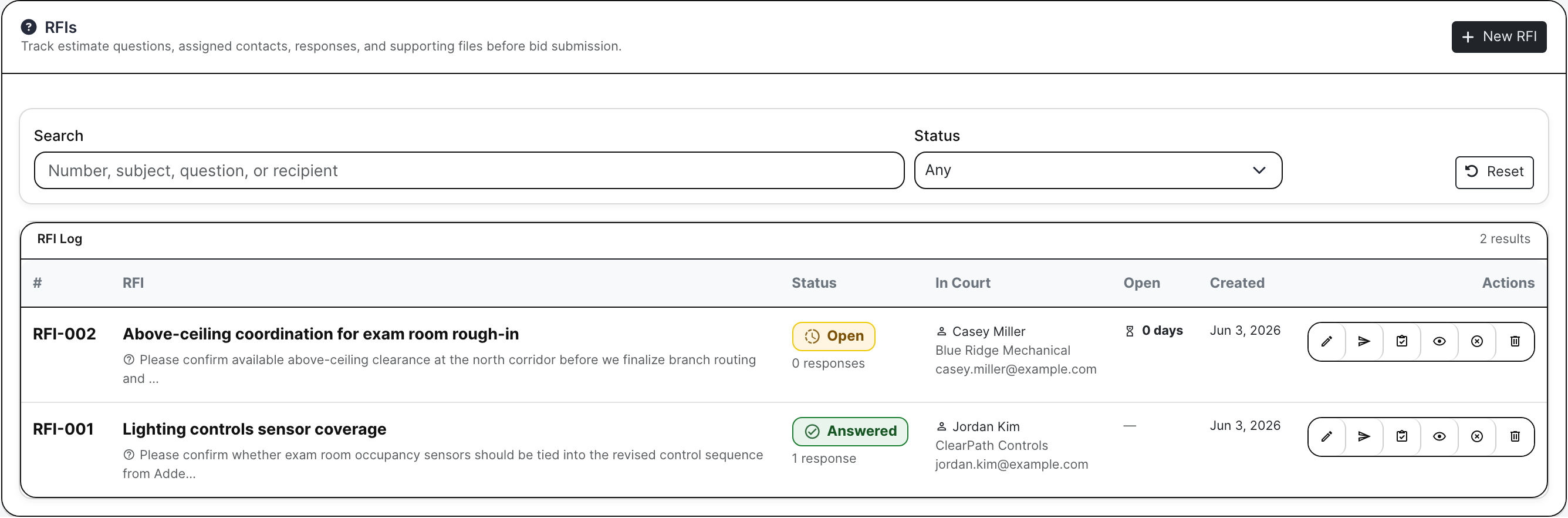
Pre-award questions need a record. Estimate RFIs keep bidder questions, drawing/spec references, contacts, due dates, distributions, responses, and closeout actions connected to the bid.

  • Log vendor questions and internal estimating questions
  • Track official responses and who received them
  • Carry answered RFIs into proposal clarifications where needed
Estimate RFIs workflow
Estimate RFIs keep pre-award questions, references, responses, and actions attached to the bid.

Bid alternates

Alternates keep option pricing from polluting the base bid. Estimators can track alternate descriptions, vendor coverage, acceptance status, and pricing impact before the customer proposal is built.

  • Separate base scope from add/deduct options
  • Track accepted, pending, or rejected alternates
  • Use alternate language and pricing in the proposal package
Bid alternate workflow
Alternates keep optional scope and pricing organized beside the base bid.

Takeoff

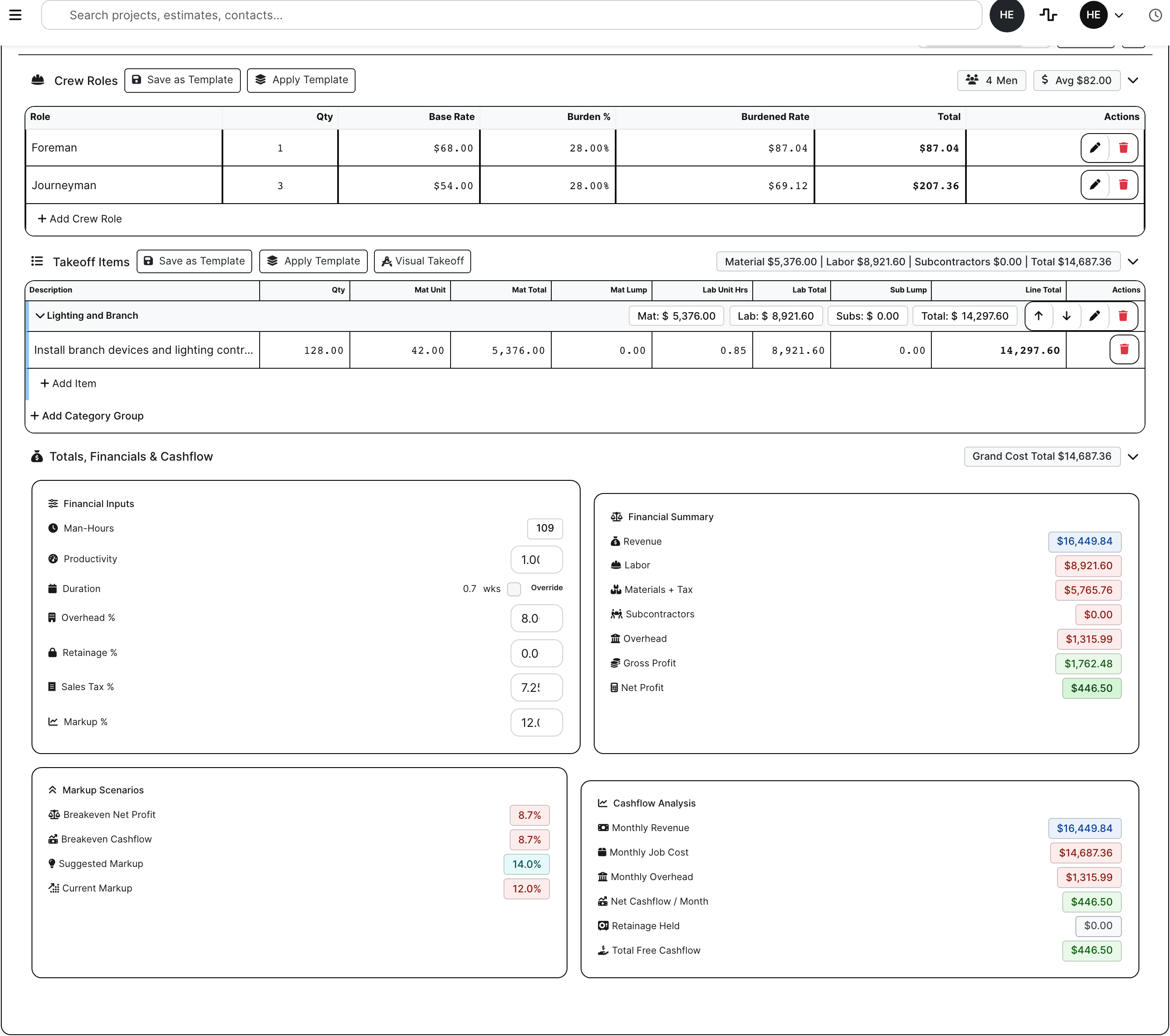
Takeoff keeps quantity work tied to the bid record. Users can track rows, templates, units, quantities, labor/material factors, totals, and visual takeoff launch where enabled.

  • Use templates instead of rebuilding common scope rows
  • Track quantities, unit costs, labor, material, and totals
  • Launch visual takeoff where the workflow is enabled
Estimate takeoff workflow
Takeoff keeps quantity and pricing work with the estimate.

Bid Letters

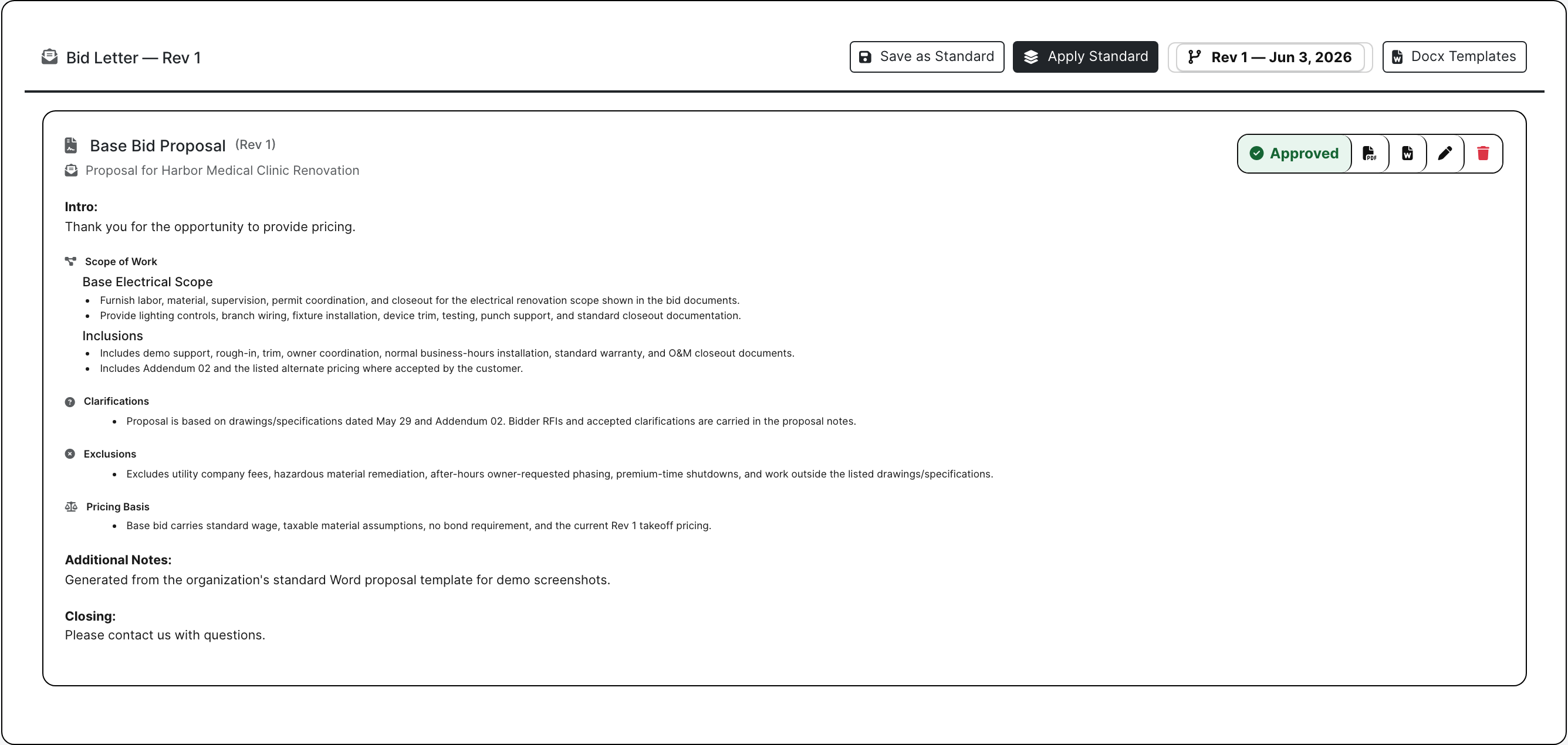
Bid Letters are where the estimator builds the actual proposal going to customers and GCs. The user writes scope, inclusions, exclusions, clarifications, pricing basis, alternates, and proposal language, then BuildDaily renders the package from the contractor's Word template into a PDF.

  • Build scope, inclusions, exclusions, clarifications, and alternates
  • Use company Word templates instead of rebuilding proposals by hand
  • Generate the proposal PDF that Bid Desk sends to customers
Bid Letter proposal builder
Bid Letter is the proposal builder that feeds customer proposal sending.

Bid Desk

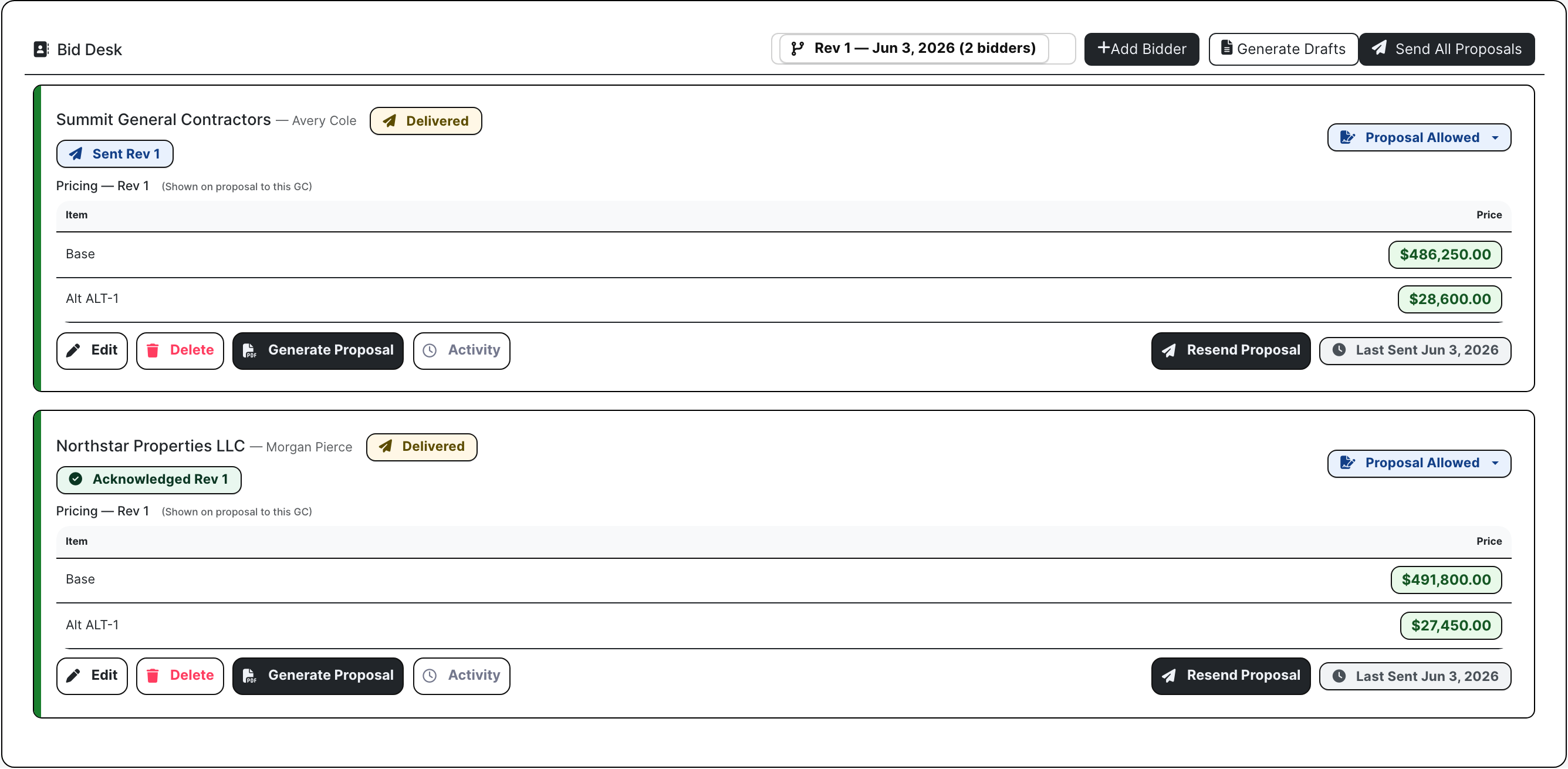
Bid Desk is the customer proposal desk. This is where the contractor chooses the GCs/customers receiving the bid, generates proposal drafts, reviews each recipient's proposal amount, sends or resends proposals, and watches delivery/open activity.

  • Create customer and GC proposal drafts
  • Review recipient pricing and proposal readiness
  • Send proposals in bulk and track delivery/open telemetry
Bid Desk customer proposal workflow
Bid Desk is customer proposal distribution, including per-recipient proposal actions.

Competitor tracking

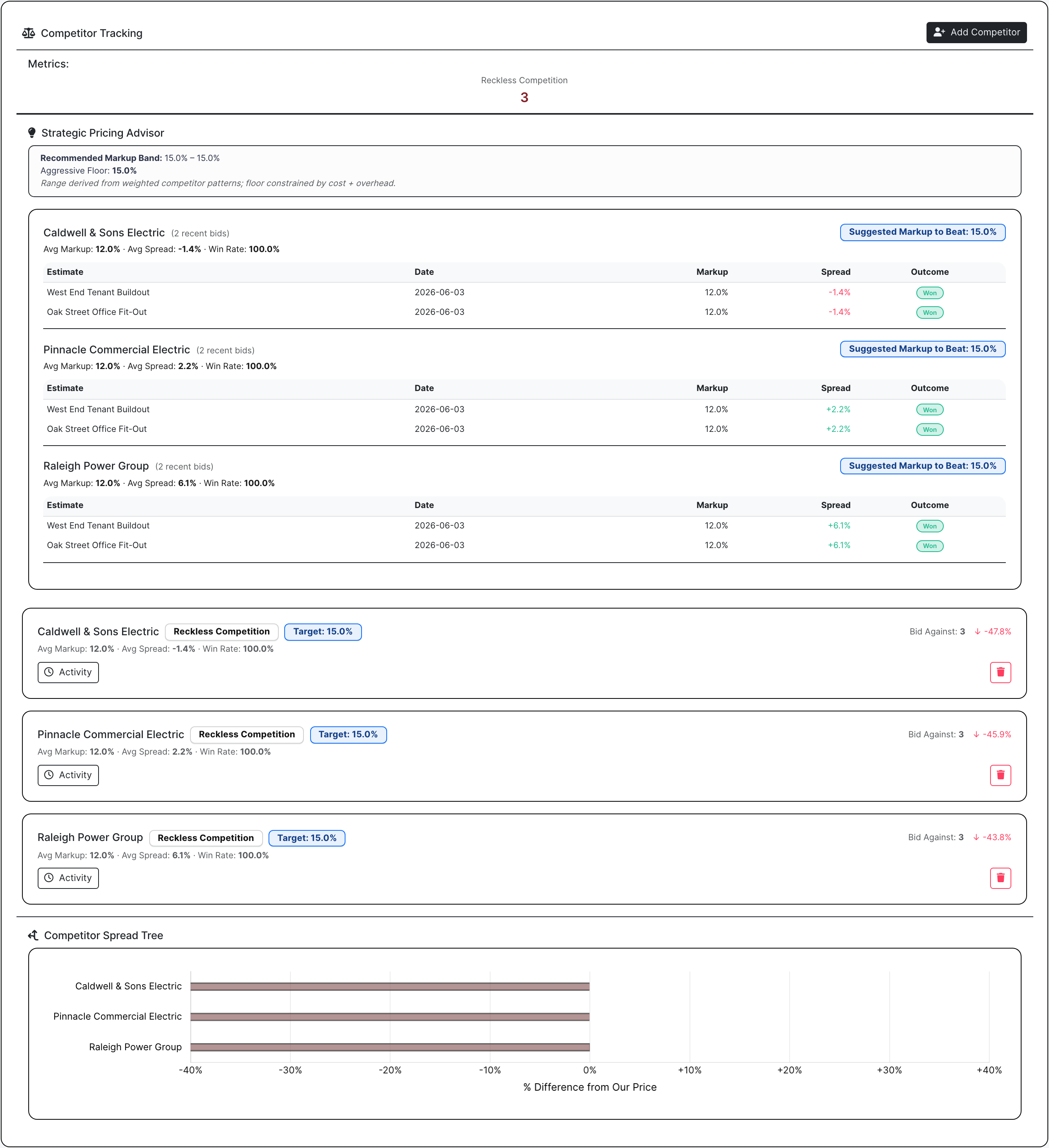
Competitor tracking is for the firms the contractor keeps running into at bid openings. Estimators can record who bid, who was apparent low, who was awarded, notes about the market, and how their own numbers compare over time.

  • Track repeated competitors and public-bid patterns
  • Record apparent low bidders, awarded contractors, notes, and spreads
  • Use history to understand where pricing is winning or missing
Estimate competitor tracking
Competitor tracking shows the actual competitive history and spread context.

Bid Results and project conversion

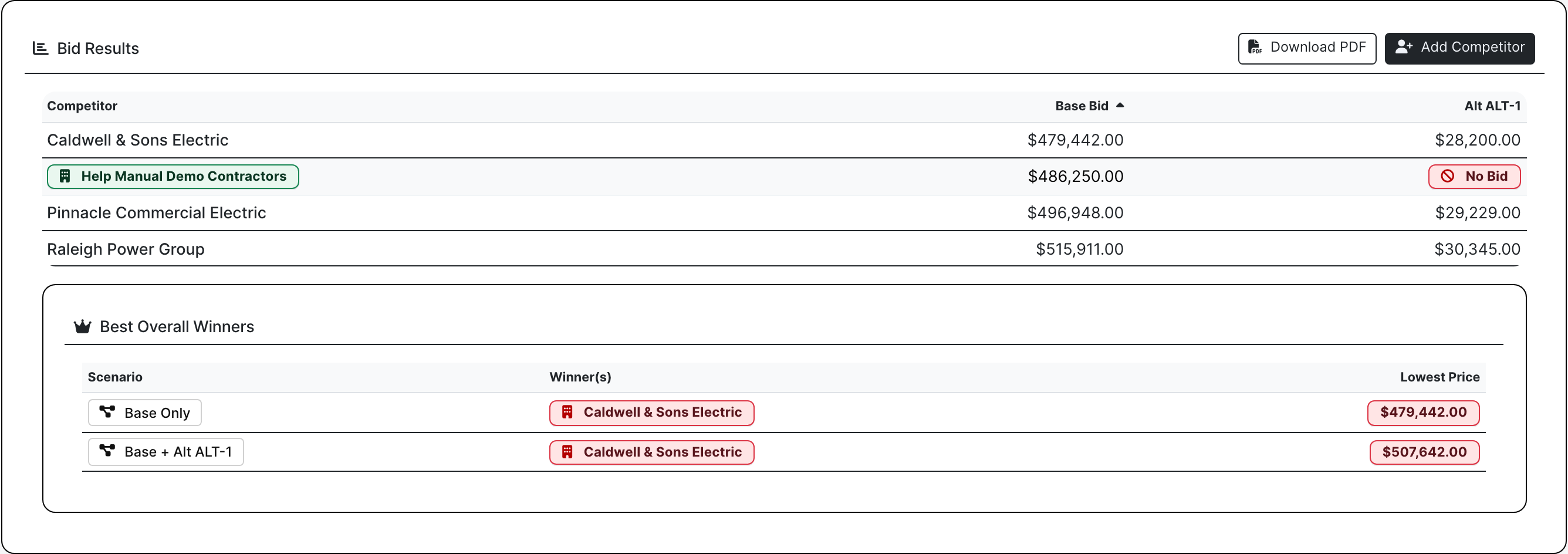
Bid Results captures bid-day outcomes, especially public-sector bid openings where contractors learn how they performed against the field. Once the job is won, the estimate can convert into a project with customer, location, files, proposal history, and bid context intact.

  • Compare submitted numbers against other bidders and scenarios
  • Record winners, apparent lows, alternates, and result notes
  • Convert the awarded estimate into a project without losing the bid history
Bid Results pricing comparison
Bid Results is the bid-opening and award-decision view, separate from Bid Desk proposal sending.

Bid Proof

Estimating screens tied to real bid work

Estimate work page with workflow tabs
The estimate work page starts with bid identity, due dates, contacts, activity, and the working tabs estimators use every day.
Estimate file manager with bid folders
Files keep drawings, specs, addenda, internal notes, RFP material, proposals, quotes, and protected bidder packages organized before award.
Estimate RFP tab with vendor quote status
RFPs are for vendor and subcontractor quote packages: scopes, invited bidders, planroom access, opened/received status, no-bids, and quote cards.
Real public RFP planroom
The public RFP planroom lets vendors open the package and upload quotes from a secure link without creating a BuildDaily account or fighting a portal login.
Estimate addendums tab
Addendums stay tied to the bid package, notify invited vendors, and keep revised files with the estimate.
Estimate RFIs tab
Estimate RFIs keep pre-award questions, drawing/spec references, recipients, official answers, and closeout actions attached to the bid.
Estimate alternates tab
Alternates keep base bid pricing and option pricing separated so proposal language and vendor coverage do not get mixed together.
Estimate takeoff tab
Takeoff rows, templates, quantities, units, crew math, and visual takeoff launch stay on the bid record.
Bid Letter proposal builder
Bid Letters build the customer proposal: scope, inclusions, exclusions, clarifications, alternates, and PDF output from a Word template.
Bid Desk proposal sending
Bid Desk is the customer proposal desk: choose GCs/customers, create proposal drafts, review recipient pricing, and send all proposals.
Estimate competitor tracking
Competitor tracking records who else bid, apparent lows, awarded contractors, notes, and performance against firms you see in public bid results.
Bid Results comparison
Bid Results is the comparison table for pricing scenarios, competitors, quote coverage, and award decisions.

Team Responsibilities

Who owns the estimating workflow

Preconstruction manager

Open the estimate, confirm dates and contacts, review files, scope groups, addendums, RFIs, alternates, takeoff, competitor notes, and whether the bid is ready to submit.

Estimator

Issue vendor RFPs, collect quotes through the public planroom, manage pre-award questions, build the Bid Letter PDF, and send proposals from Bid Desk.

Vendor or subcontractor

Use a secure planroom link to review files, see addendums, respond to the RFP, and upload quotes without creating a BuildDaily login.

Owner or executive

Review proposal activity, bid results, competitor patterns, apparent lows, awarded contractors, and whether the estimate should convert into a project.

Coverage

Bid work BuildDaily covers

Contractor needs BuildDaily does it
Estimate setup Yes
Capture job, customer, owner, contacts, dates, priority, wage, tax, bond, notes, and bid status.
Bid file manager Yes
Manage folders, uploads, previews, downloads, internal/external files, protected package folders, and zip packages.
Vendor RFPs Yes
Build scope groups, invite bidders, send RFPs, track sent/opened/downloaded/no-bid/quote-upload status, and follow up.
No-login public RFP planroom Yes
Give vendors a secure outside package with files, addendums, response status, and quote upload without requiring a BuildDaily account.
Addendums Yes
Post bid-package changes, attach revised files, notify invited vendors, and preserve the notification trail.
Estimate RFIs Yes
Track pre-award questions, drawing/spec references, recipients, official answers, distributions, and closeout actions.
Bid alternates Yes
Keep add/deduct options, alternate descriptions, pricing impact, vendor coverage, and proposal language separate from the base bid.
Takeoff Yes
Track takeoff rows, templates, quantities, units, labor/material factors, totals, and visual takeoff launch where enabled.
Bid Letters Yes
Build customer proposal scope, inclusions, exclusions, clarifications, alternates, pricing basis, and PDF output from Word templates.
Bid Desk proposals Yes
Generate proposal drafts, review per-recipient proposal amounts, send to customers/GCs, resend when needed, and track delivery/open telemetry.
Competitor tracking Yes
Record who else bid, apparent lows, awards, notes, and repeated competitors from public bid openings.
Bid Results Yes
Compare public-sector bid outcomes, submitted numbers, alternates, winners, scenarios, and performance against other bidders before project conversion.
Convert to project Yes
Move the awarded estimate into a project with customer, location, files, proposal history, and bid context intact.

Estimate Surfaces

Where the bid work happens

Estimate work tabs

Files Bid file manager for drawings, specs, addenda, quotes, internal notes, proposal files, protected folders, download, zip, and folder actions.
RFPs Vendor and subcontractor quote requests with scope groups, bidder lists, planroom access, send/open/download status, no-bids, and uploaded quotes.
Addendums Bid-package change log with revised files, vendor notifications, recipient status, and package history.
RFIs Pre-award questions, drawing/spec references, contacts, distributions, official responses, and closeout actions.
Bid Alternates Base bid separation from add/deduct options, alternate status, vendor coverage, and proposal-ready option language.
Takeoff Takeoff rows, templates, units, quantities, labor/material factors, totals, and visual takeoff launch where enabled.
Competitors Competitive history for public bid openings, apparent lows, awards, repeated competitors, spreads, and pricing notes.
Bid Letter Customer proposal builder for scope, inclusions, exclusions, clarifications, alternates, pricing basis, Word-template output, and PDF generation.
Bid Desk Customer/GC proposal distribution with recipients, proposal drafts, proposal amounts, send/resend actions, and delivery/open telemetry.
Bid Results Bid-opening results, competitor comparison, alternates, winners, apparent lows, and award-decision history.

Operating Rhythm

How the bid stays moving

Assemble the bid

  • Create or promote the estimate, confirm dates and contacts, upload files, build scope groups, and keep all bid facts on one record.
  • Separate internal files from vendor-facing package material so bidders only see what they should see.
  • Use addendums, RFIs, alternates, and takeoff without losing the thread of the original bid.

Get vendor numbers

  • Send RFPs to vendors and subcontractors by scope.
  • Let bidders use a no-login public planroom to review files and upload quotes.
  • Track opened, downloaded, bidding, no-bid, and quote-received status before bid day.

Send the customer proposal

  • Build scope, inclusions, exclusions, clarifications, pricing basis, and alternates in Bid Letters.
  • Generate the proposal PDF from the contractor's Word template.
  • Use Bid Desk to send or resend proposals to customers and GCs and review delivery/open activity.

Learn from bid day

  • Track competitors, apparent lows, awarded contractors, bid spreads, and public-sector result history.
  • Compare BuildDaily's numbers against the bidders the contractor sees repeatedly.
  • Convert the awarded estimate into a project with files, contacts, proposal history, and bid context intact.

Walk through Estimating that carries the bid from lead to project

We can walk through the module around the way your company actually handles the work.

Request access