BuildDaily

Documents and Signatures

Send agreements for signature without leaving the job record

Documents gives BuildDaily a DocuSign-style envelope workflow inside the contractor operating system. Build a reusable DOCX template, merge real job or customer data, upload a finished PDF when that is the better starting point, place signing fields, send a secure signing link, track who viewed or signed, route the company countersignature, and download the executed package back against the project, service agreement, change order, subcontract, HR acknowledgement, or other source record.

Signing Workflow

From contractor paperwork to an executed package

Start from the work that needs the signature

The envelope can be bound to the thing the office is trying to close: a service agreement, change order approval, subcontract package, customer authorization, HR acknowledgement, or general agreement.

  • Keep source module and source record context on the envelope
  • Use idempotency keys so retries do not create duplicate live packets
  • Return the executed package to the workflow that created it

Use templates when the document should be generated

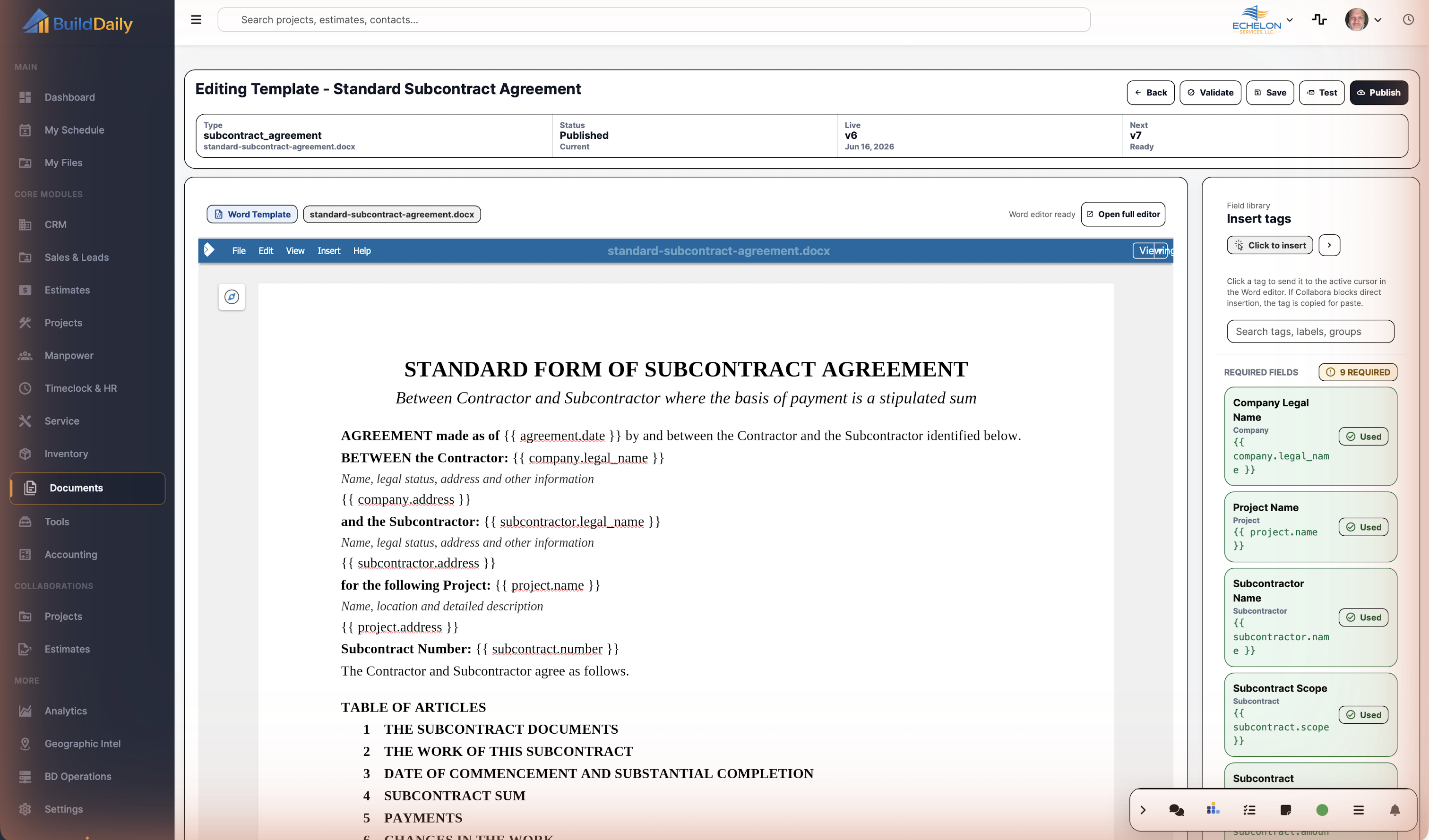
A DOCX template can carry merge fields, signer roles, signing tags, document type, module usage, versions, validation, and publishing. That lets the office reuse the right contract language without retyping job data.

  • Upload and maintain DOCX templates
  • Validate tags before publishing
  • Publish controlled versions instead of editing a loose Word file

Use PDF envelopes when the packet already exists

If the final PDF has already been prepared, Documents can create a PDF-first envelope, place fields in the designer, and run it through the same signer, countersignature, audit, and executed-package pipeline.

  • Upload or generate a source PDF
  • Place signature, initials, date, checkbox, and text fields
  • Send through the same public signing route

Documents Proof

Actual Documents screens with demo agreements

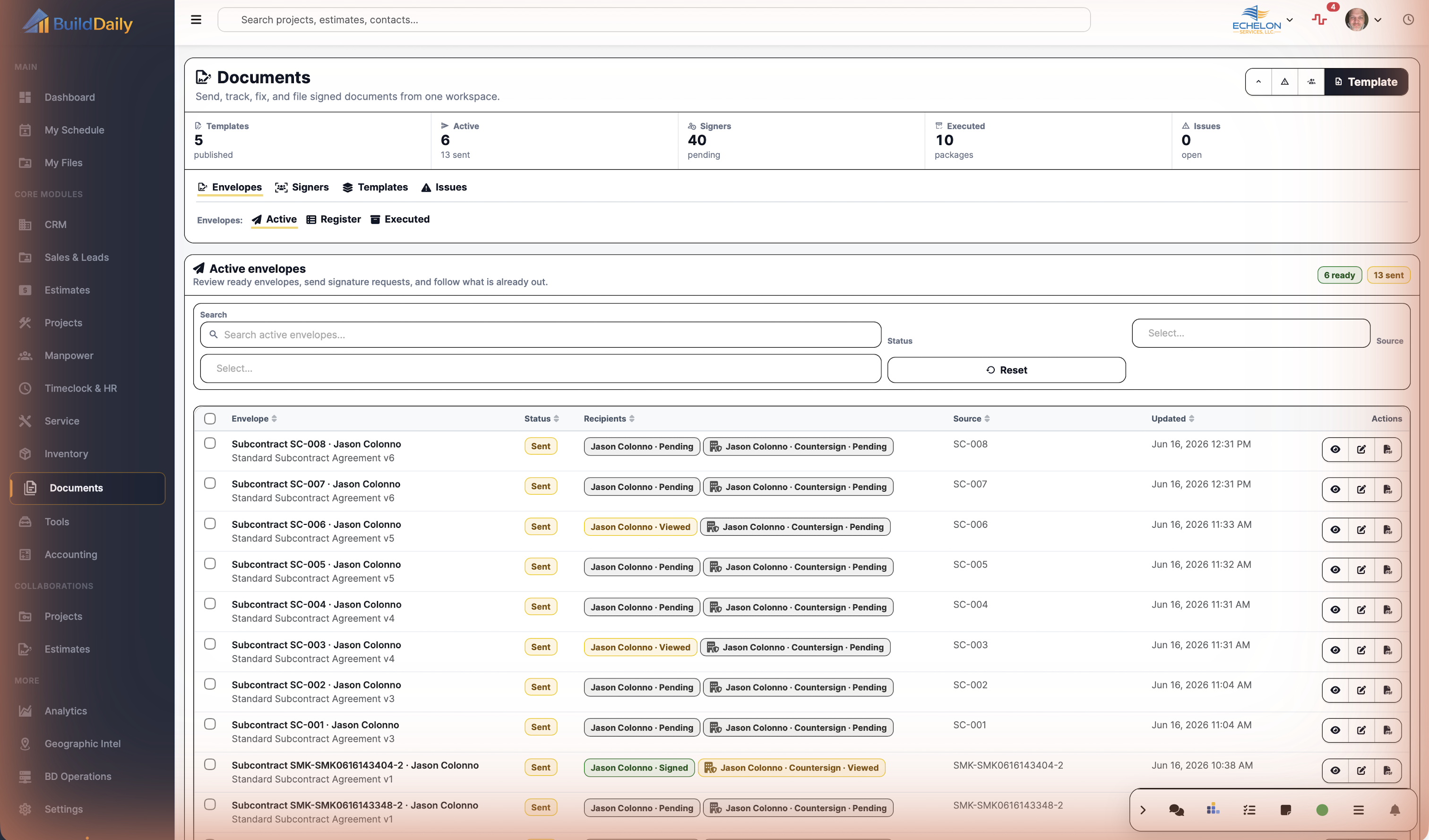
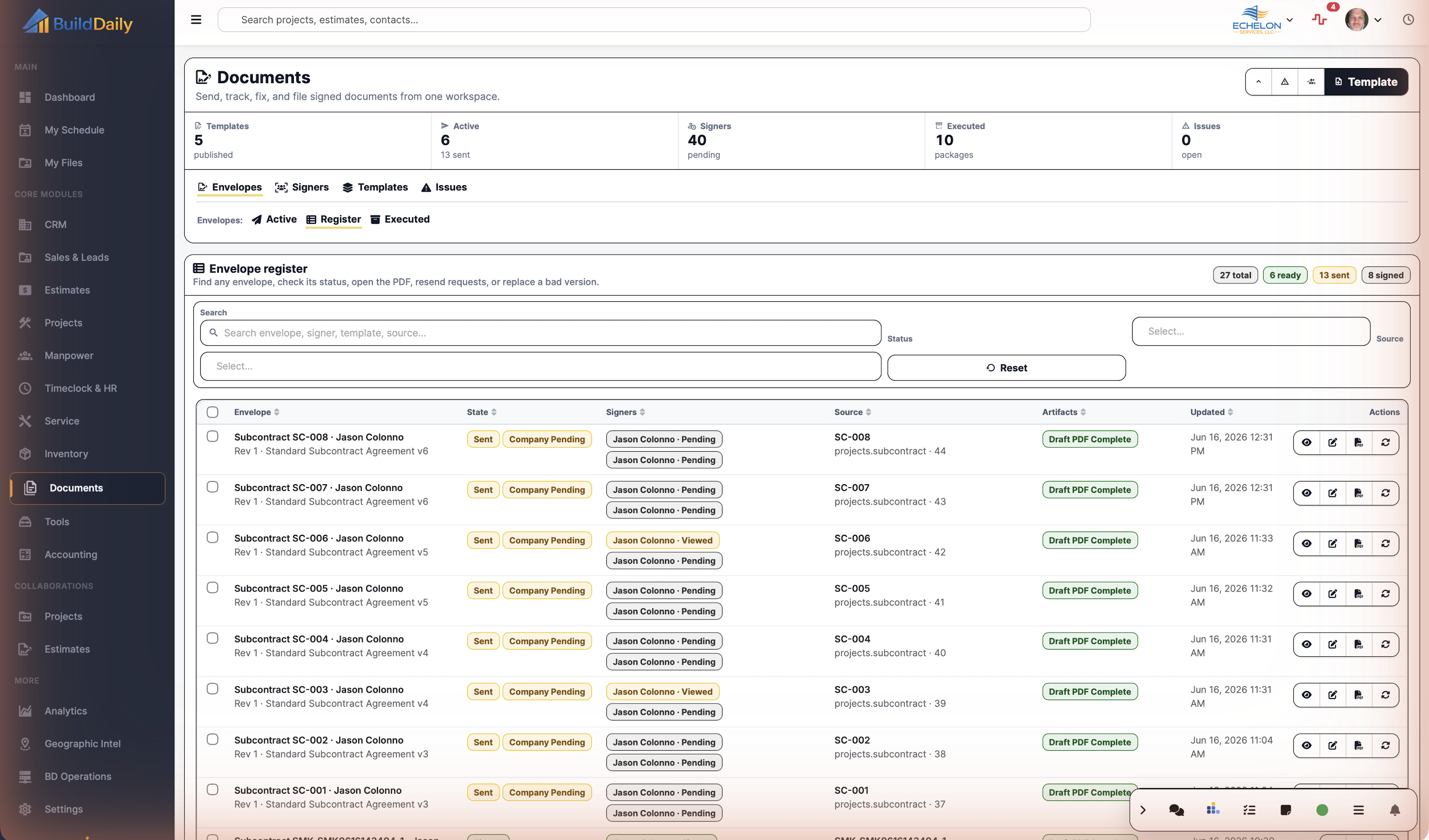
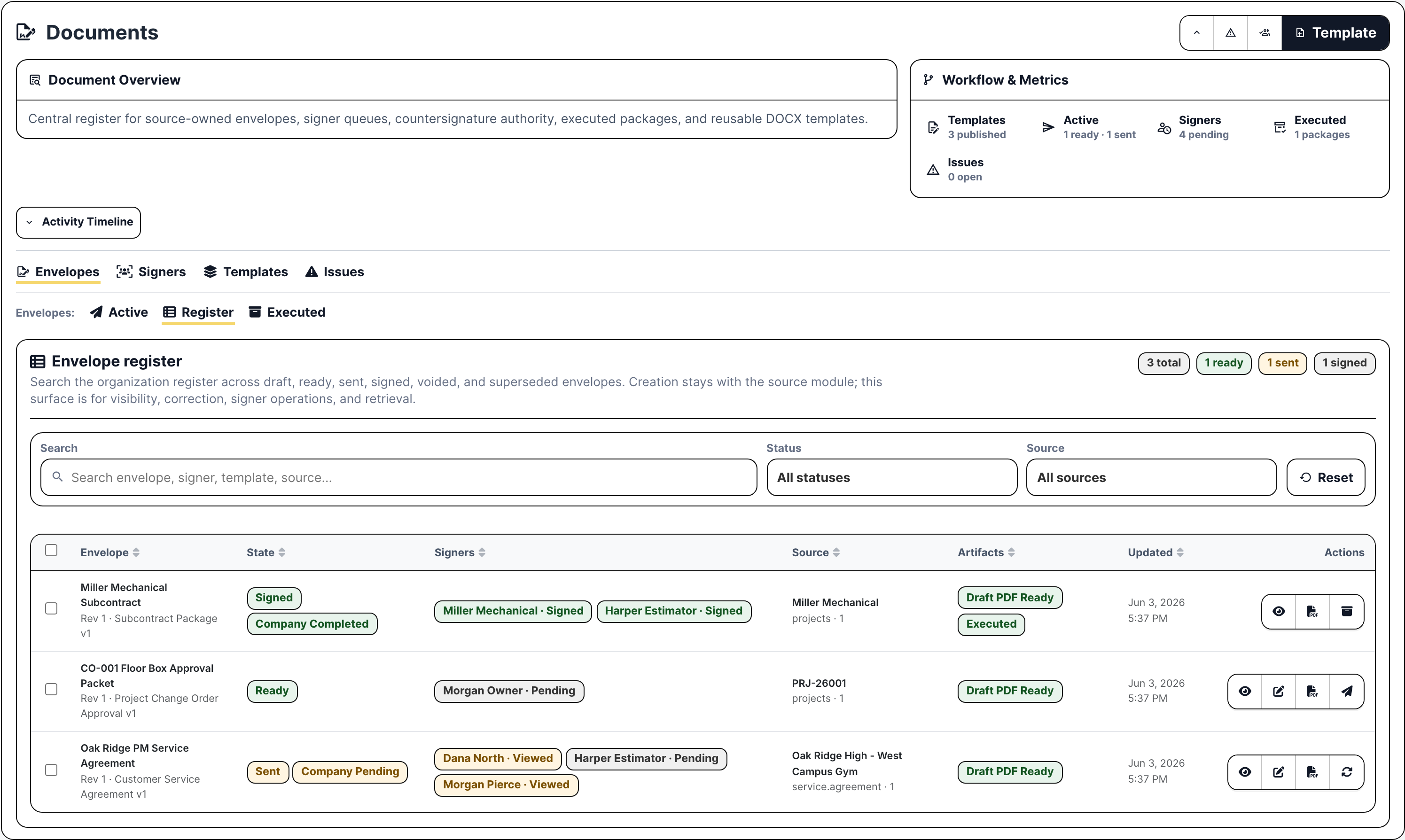
Documents envelope register with signed ready and sent agreements
The envelope register shows signed, ready, and sent packets with source records, signer status, draft PDF readiness, executed status, and follow-up actions.
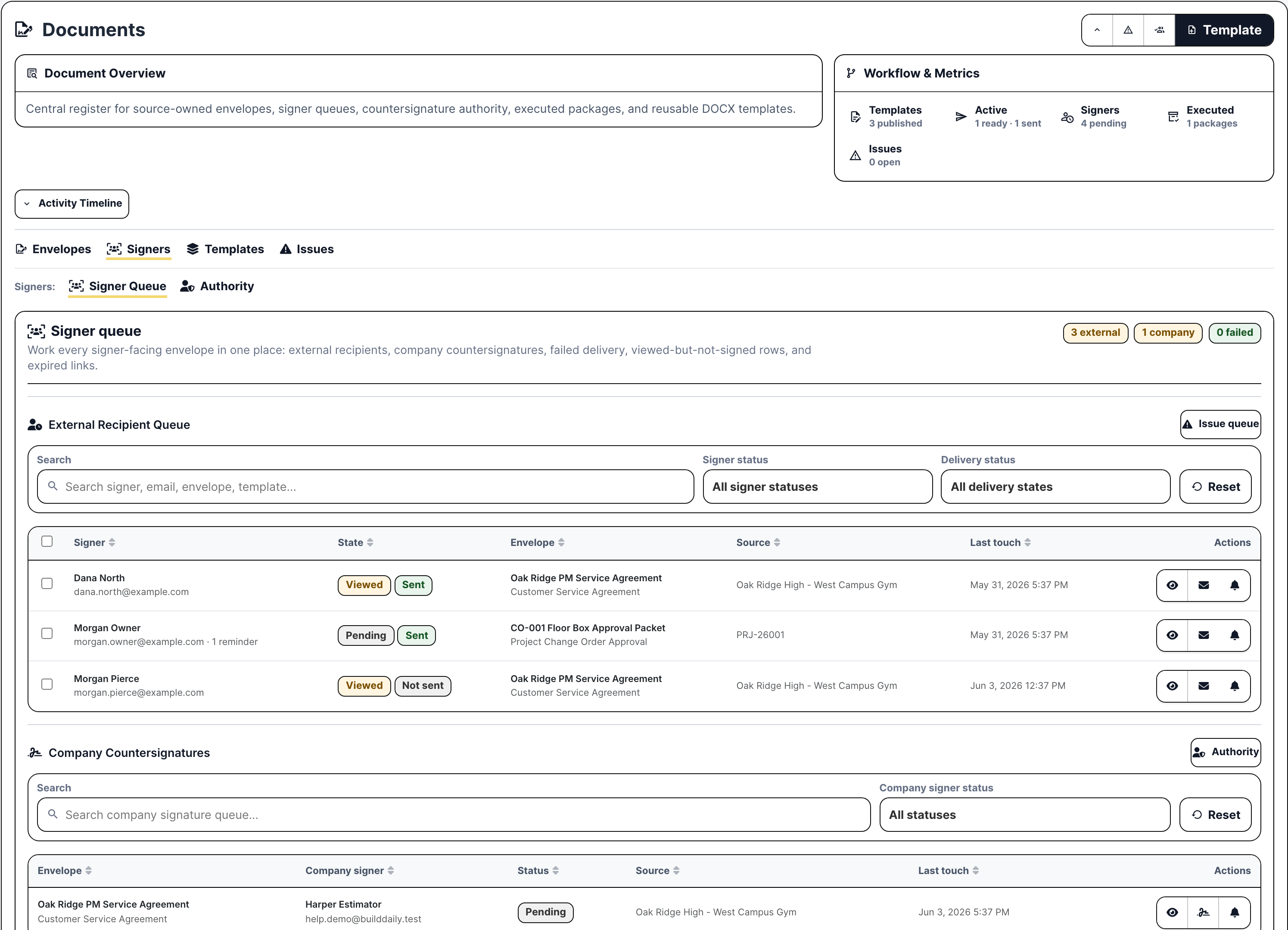
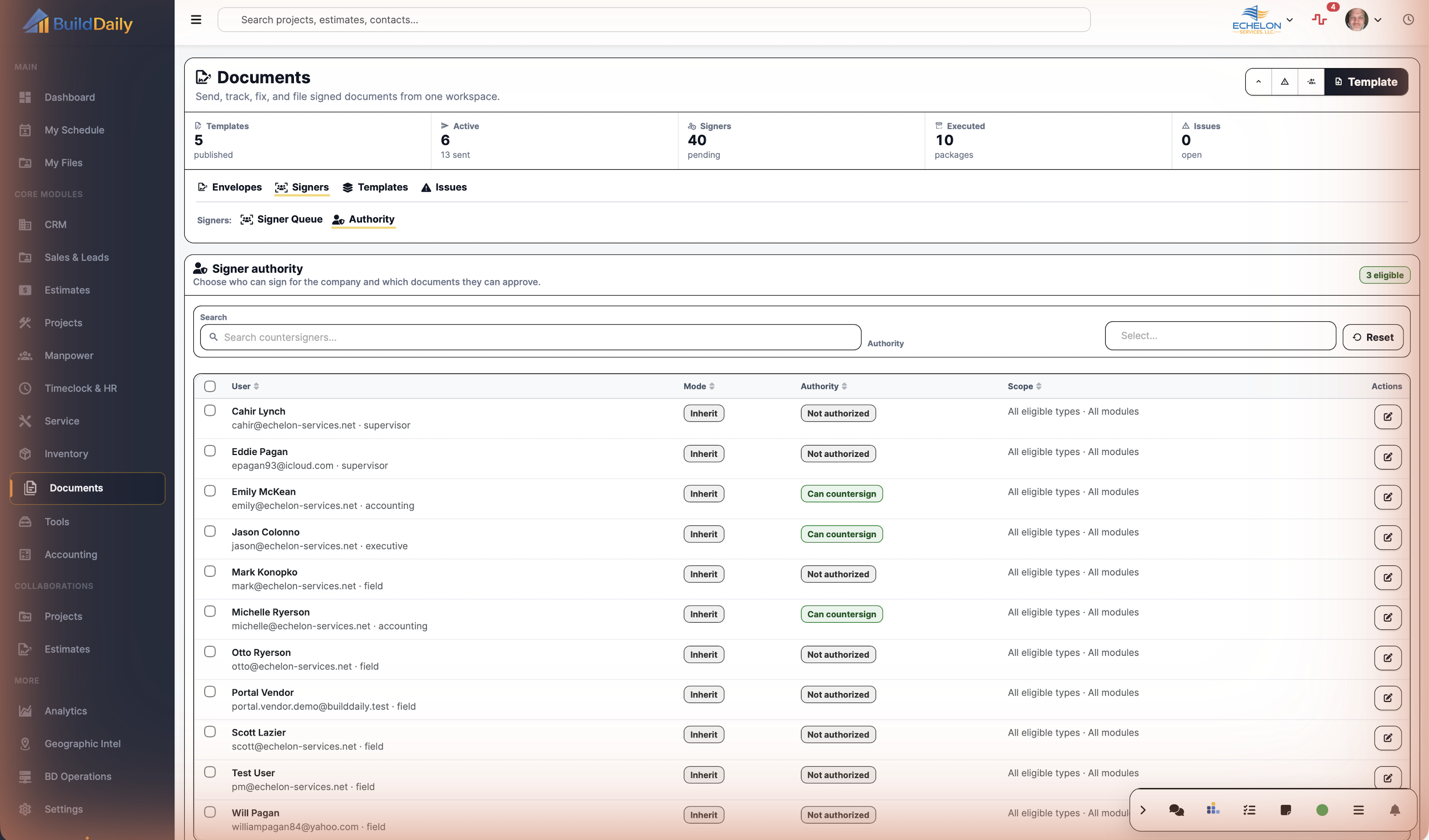
Documents signer queue with external recipients and company countersignature
The signer queue separates external recipients from company countersignatures, including viewed, pending, sent, reminder, and source-record context.
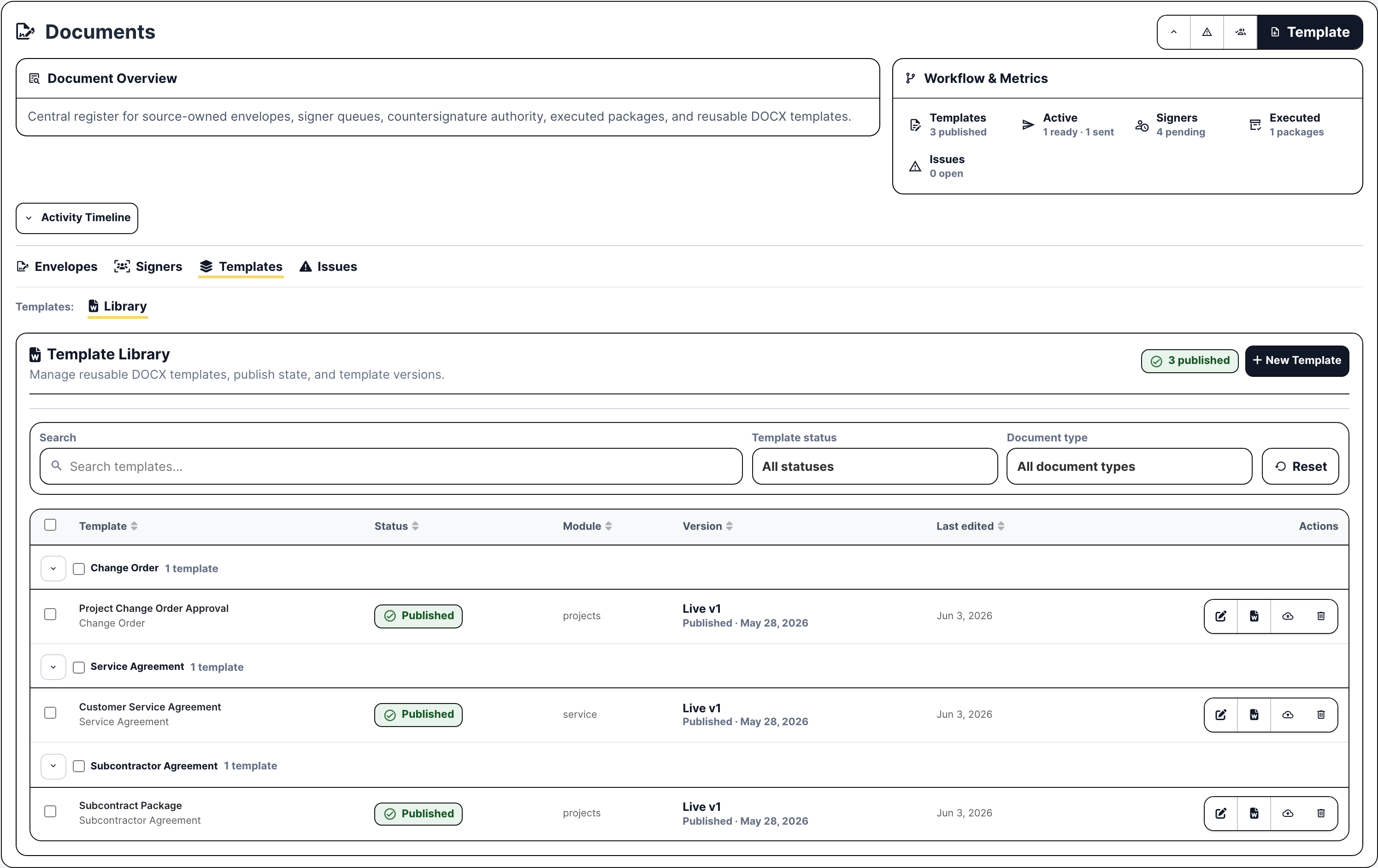
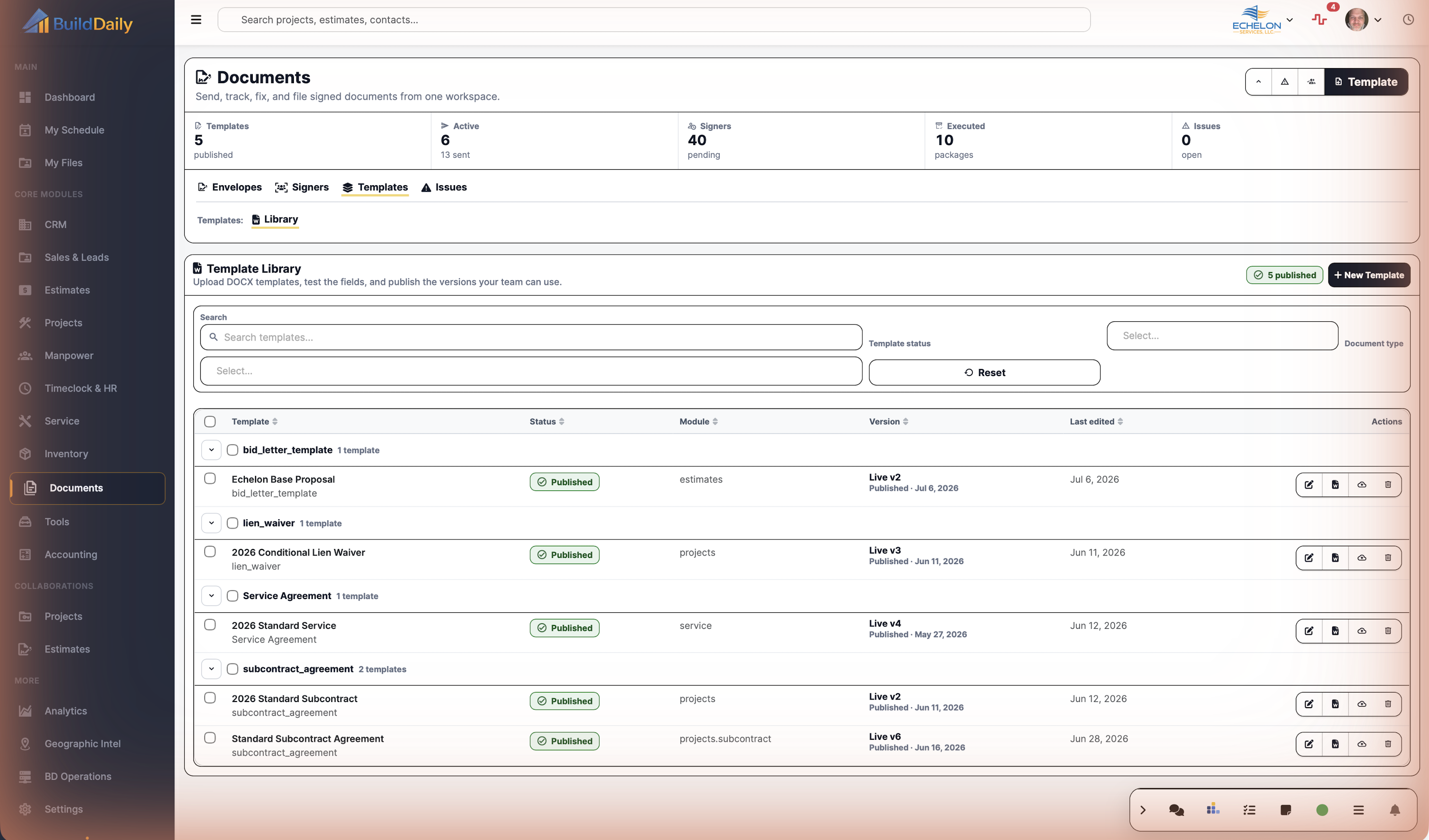
Documents template library with published DOCX templates
Template Library manages reusable DOCX agreement templates, document types, published versions, source modules, and template editing actions.
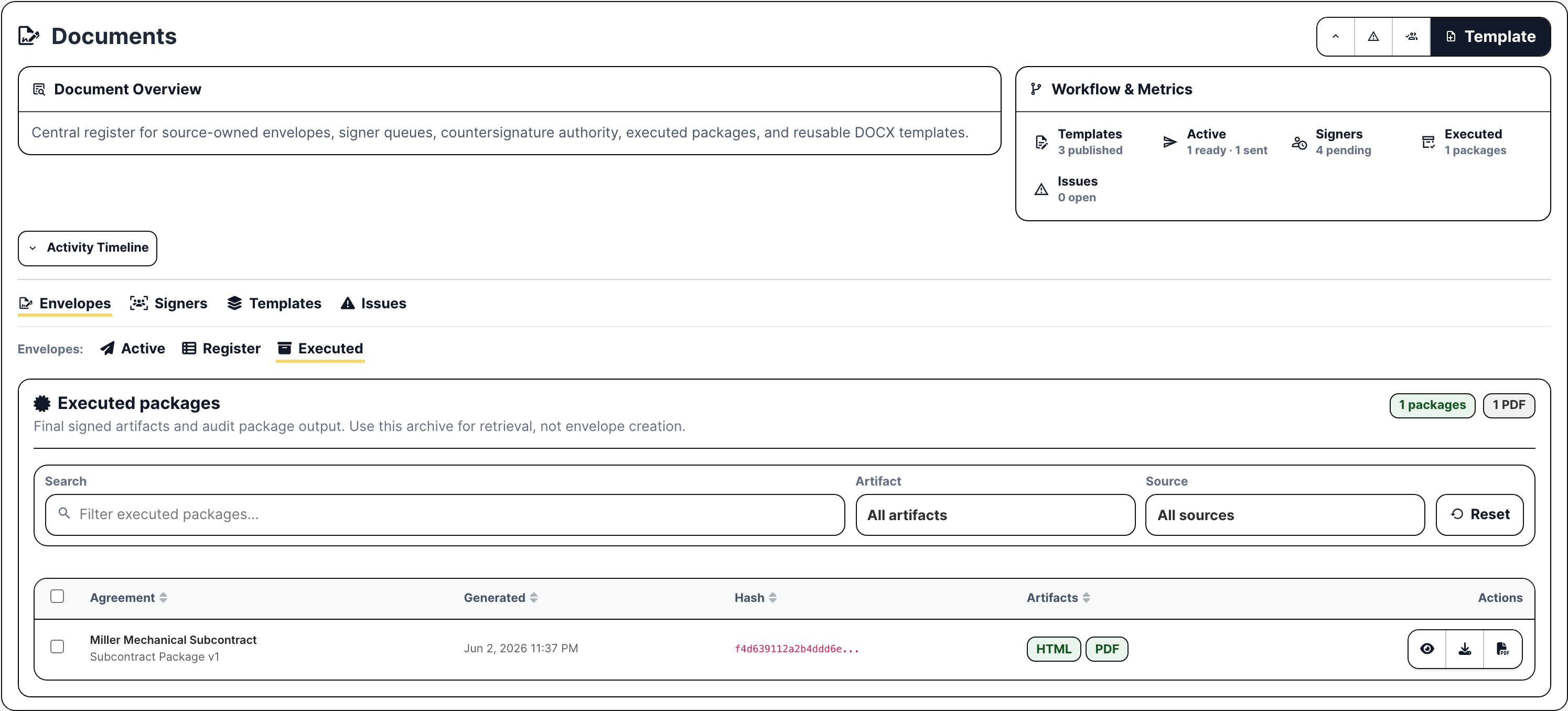
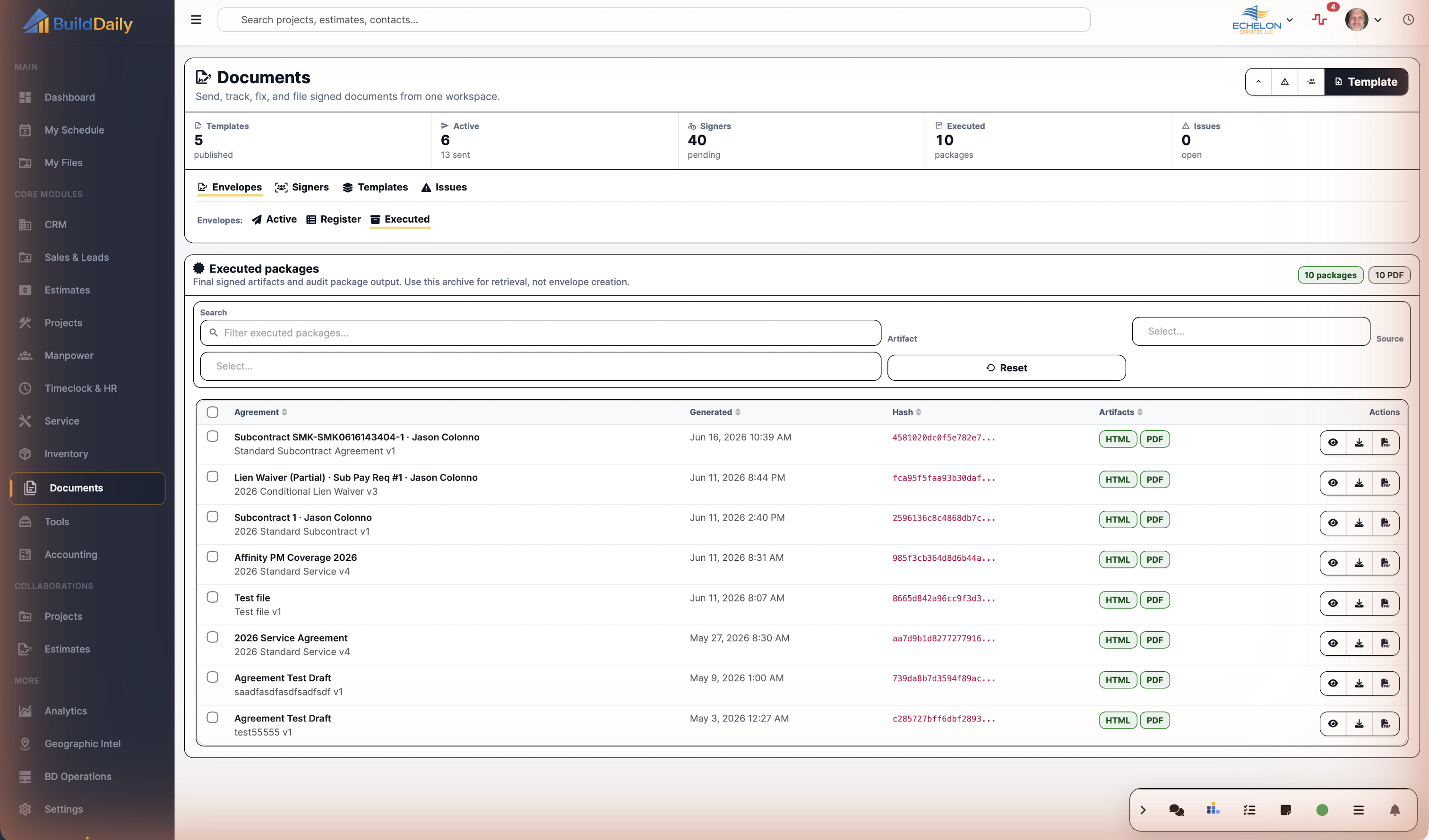
Documents executed package archive with PDF and HTML artifacts
Executed packages preserve the final signed artifact, package hash, PDF/HTML outputs, generated date, and retrieval actions.
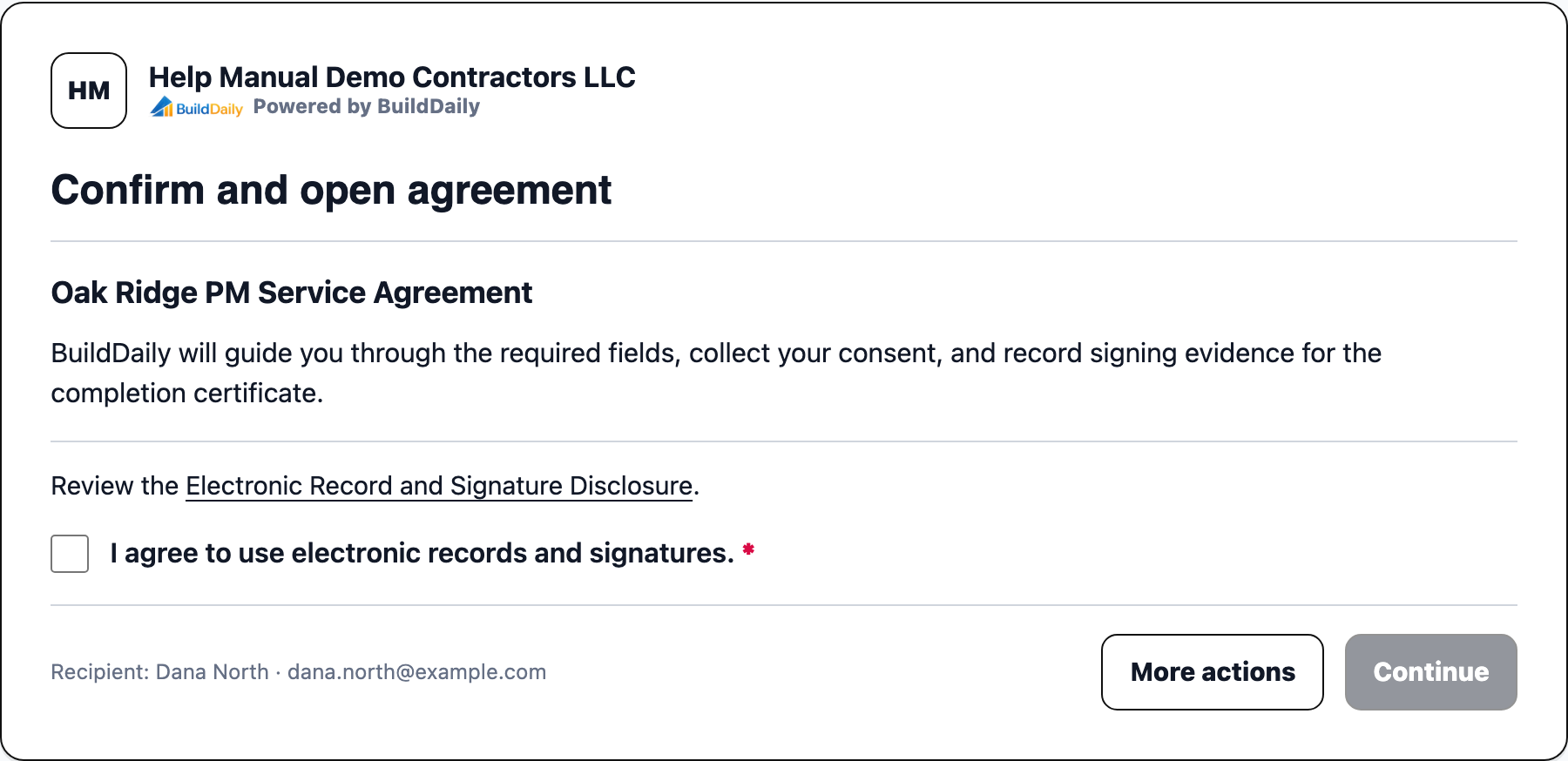
Public agreement signing preflight page
The public signer preflight asks the recipient to confirm electronic records and signatures before opening the guided signing session.

Document Control

The signature work contractors need under control

Control the version being signed

Published template versions prevent the office from quietly changing the agreement after it is already in circulation. Draft changes can be prepared, tested, and published when ready.

Know who is holding the packet

The signer queue makes viewed, pending, sent, failed, and company countersignature states visible so the PM, service manager, or contract admin knows who needs a call or reminder.

Keep signed work attached to the money

Executed agreements stay tied to the job, ticket, change order, subcontract, or HR record that depends on them, which matters when billing, scheduling, purchasing, or closeout asks for backup.

Coverage

Agreement and signature work BuildDaily covers

Contractor needs BuildDaily does it
Reusable agreement templates Yes
Upload DOCX templates, assign document types, manage published/draft/archived state, edit source files, validate tags, test, and publish versions.
Source-record envelopes Yes
Create envelopes from contractor workflows with source module, source object, source purpose, source label, recipients, and retry context.
PDF-first signing packets Yes
Create envelopes from uploaded or generated PDFs and place signing fields without forcing the office to rebuild the document as a template first.
External signing links Yes
Give recipients a secure public signing path with consent preflight, guided fields, finish-later, decline, forwarding controls where allowed, and telemetry.
Company countersignature Yes
Route internal authorized representatives and keep company signature work separate from outside recipient work.
Signer follow-up Yes
Track viewed, pending, sent, failed, declined, expired, and reminded states for recipients and countersigners.
Field placement Yes
Support signature, initials, signed date, checkbox, and text fields on generated or uploaded PDFs.
Executed packages Yes
Create retrievable executed artifacts with package hash, PDF/HTML outputs, audit history, and download/view actions.
Exception handling Yes
Expose failed delivery, declined signers, expired links, draft PDF failures, package failures, voids, superseded packets, corrections, and completion handoff issues.

Buyer Context

Why this matters operationally

The signature chase is part of the job

A signed service agreement affects dispatch and billing. A signed change order affects project cost and owner approval. A signed subcontract affects purchasing and compliance. The signature is not a separate office errand; it changes the record the contractor is managing.

The familiar envelope idea, with BuildDaily context

The flow feels like the signing tools contractors already understand: envelope, recipients, secure link, consent, required fields, reminders, decline handling, and executed copy. The difference is that the packet is born from the job, ticket, subcontract, or HR record instead of being reattached afterward.

Signed paperwork needs evidence, not just a PDF

BuildDaily tracks signer state, delivery state, viewed/signed timestamps, public signing telemetry, audit events, access controls where configured, package generation, and completion handoff so the office can see what happened.

Envelope Path

How an agreement moves from draft to signed

1

Prepare the template or PDF

The office either publishes a reusable DOCX template with merge fields and signer roles, or starts from an uploaded/generated PDF that already contains the final language.

2

Create the envelope from a real source

The agreement gets title, document type, recipient, signer role, source module, source object, source purpose, and retry context so the packet stays attached to the contractor workflow that needs it.

3

Render and place fields

BuildDaily produces the draft PDF where applicable, lets the user review the packet, attach support files, and place signature, initials, signed-date, checkbox, or text fields before sending.

4

Send the signing link

External recipients get a secure public signing path with electronic-record consent. Company countersigners can be routed separately when an authorized representative needs to sign after the customer, vendor, employee, or owner.

5

Work the queue

The signer queue shows who has viewed, who is still pending, which delivery failed, which company signature is waiting, and which envelope needs a reminder, correction, void, or replacement.

6

Finish with a retrievable package

When the packet is complete, BuildDaily creates the executed package and keeps the final artifact, package hash, audit trail, and source context available for operations, billing, HR, or project closeout.

Documents Areas

The signing desk by job to be done

Envelope desk

Active envelopes Ready and sent agreements with recipient status, source record, draft PDF state, and send/review actions.
Envelope register Full draft, ready, sent, signed, voided, and superseded history for retrieval, correction, and signer operations.
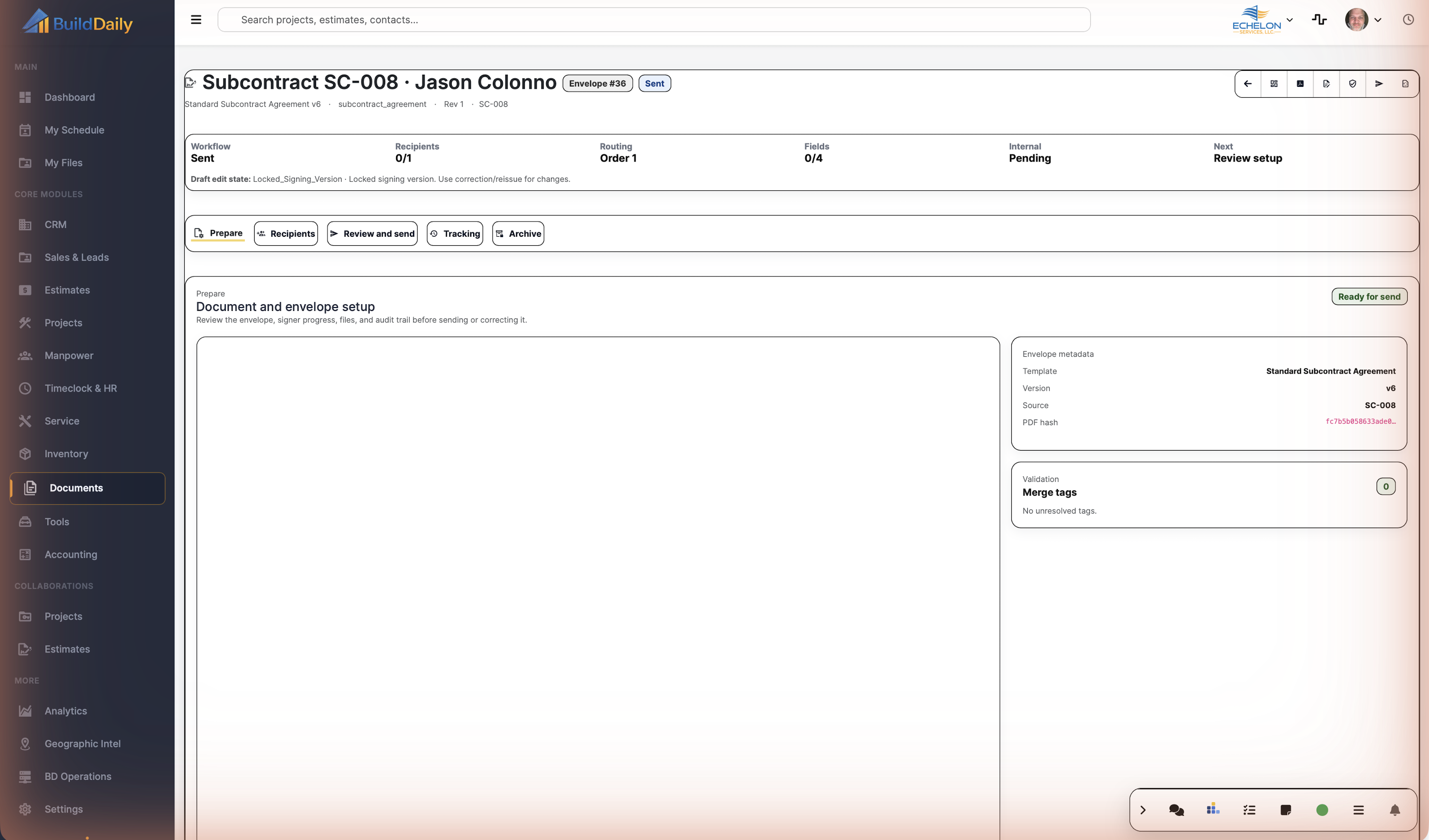
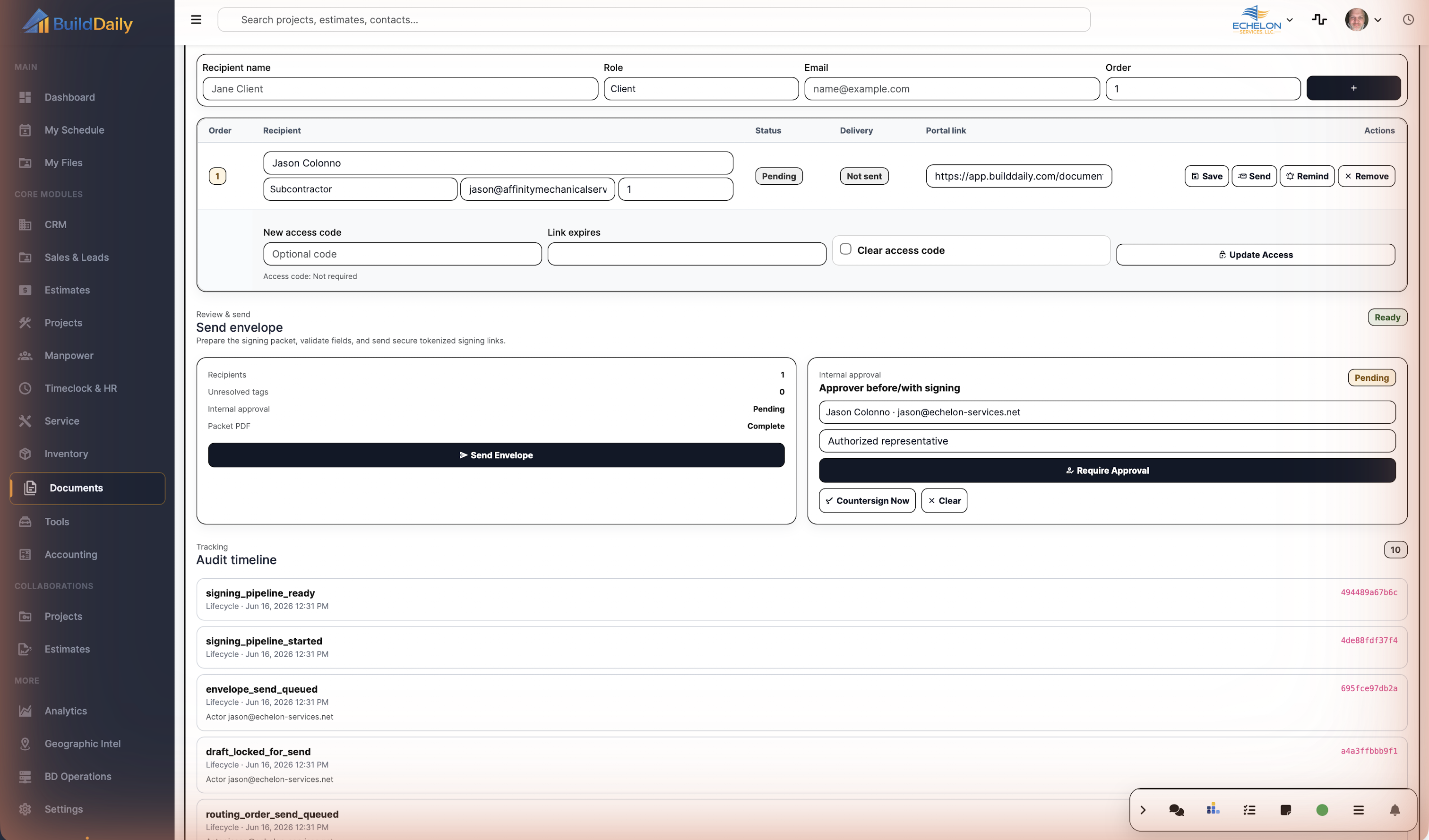
Agreement detail Packet review, rerender, support-file upload, signer creation, send, reminder, void, supersede, correction, countersign, and package actions.
PDF field designer Field placement for generated or uploaded PDFs: signature, initials, signed date, checkbox, and text.

Signer desk

External recipient queue Customers, owners, vendors, employees, or subcontractors waiting to view, sign, or respond.
Company countersignatures Internal authorized-representative signatures tracked separately from outside recipients.
Signer security Access-code and expiration controls where a recipient needs tighter access.
Reminders Individual and pending-recipient reminders without rebuilding the agreement.

Template desk

Template Library Reusable DOCX templates grouped by document type, status, module usage, version, and last edit date.
New Template DOCX upload, document type, name, description, and draft creation before publishing.
Template Builder Setup, field insertion, validation, test runs, source PDF queueing, and publish control.
DOCX Editor Edit the source DOCX for the next version instead of rebuilding the agreement from scratch.

Execution and issues

Executed Library Completed packages with HTML/PDF artifacts, generated date, package hash, view, download, and PDF actions.
Audit Timeline Events across envelope creation, delivery, viewing, signing, reminders, countersignature, completion, and package generation.
Issue Queue Failed delivery, declined signers, expired links, draft-PDF failures, package failures, and completion handoff problems.
Source Panel Embedded envelope creation from other BuildDaily modules using the same signing runtime.

Public signer path

Preflight Recipient confirms electronic-record and signature consent before opening the agreement.
Guided Signing Required fields, adopted signature/initials, text fields, date fields, and completion controls.
Finish Later Recipient can return to the secure link before completion.
Decline or Forward Recipient can decline, and forwarding can be allowed or blocked based on the workflow.

Operational Reality

What the office can control after the packet is sent

Service agreement approval

  • Generate the agreement from the customer or service context instead of typing the same names, addresses, and terms again.
  • Send the customer a signing link and watch viewed/signed status before scheduling covered work.
  • Keep the executed agreement available when dispatch, billing, or renewal work needs proof.

Change order or owner approval

  • Start the packet from the project record that owns the scope change.
  • Send the signer a controlled public link and track whether they opened, declined, or completed it.
  • Use the executed package as backup for billing and project history.

Subcontract and company countersignature

  • Route the outside signer first, then keep the company countersignature visible until an authorized representative finishes.
  • Use authority controls so the company signature is not an informal email approval.
  • Download the executed package when both sides are complete.

Problem packet recovery

  • Send reminders when a recipient has viewed but not signed.
  • Void, supersede, or correct envelopes when the wrong packet went out or the agreement changed.
  • Use failure queues for delivery issues, expired links, PDF generation failures, and completion handoff problems.

Practical Comparison

How to think about it against familiar tools

Compared with DocuSign-style tools

The signing motion is familiar: envelope, recipients, secure public link, consent, required fields, reminders, declined state, and executed copy. BuildDaily's reason to own the workflow is contractor context: the envelope stays tied to the project, service agreement, change order, subcontract, HR file, or other source record.

Compared with Word files in a shared drive

A folder full of templates does not tell the office which version was used, which signer is waiting, whether the PDF rendered, whether the customer viewed the packet, or whether the final copy is attached to the right job.

Compared with generic file storage

File storage answers where a document sits. Documents answers what generated it, who still owes a signature, what evidence exists, what broke, and which executed package belongs to the work.

Walk through Send agreements for signature without leaving the job record

We can walk through the module around the way your company actually handles the work.

Request access