BuildDaily

Support

Support tickets that keep the problem and the proof together

When a PM, service manager, dispatcher, or office admin hits a BuildDaily issue, Support gives them a visible ticket instead of a side text or buried email. The request carries the module, priority, evidence, reply thread, owner, due date, and next step so the contractor knows what support is waiting on.

Support Workflow

How a product issue moves from contractor report to support action

The contractor can report the issue without losing context

A support request can be opened from the app with a subject, message, category, priority, module key, and attachments. That matters when the issue is tied to a service invoice, public review link, manpower map, or other screen the user was already working in.

  • Capture the issue while the person still remembers what happened
  • Attach screenshots, PDFs, logs, or other backup
  • Keep the same thread visible when support replies or asks for more detail
Customer support ticket thread
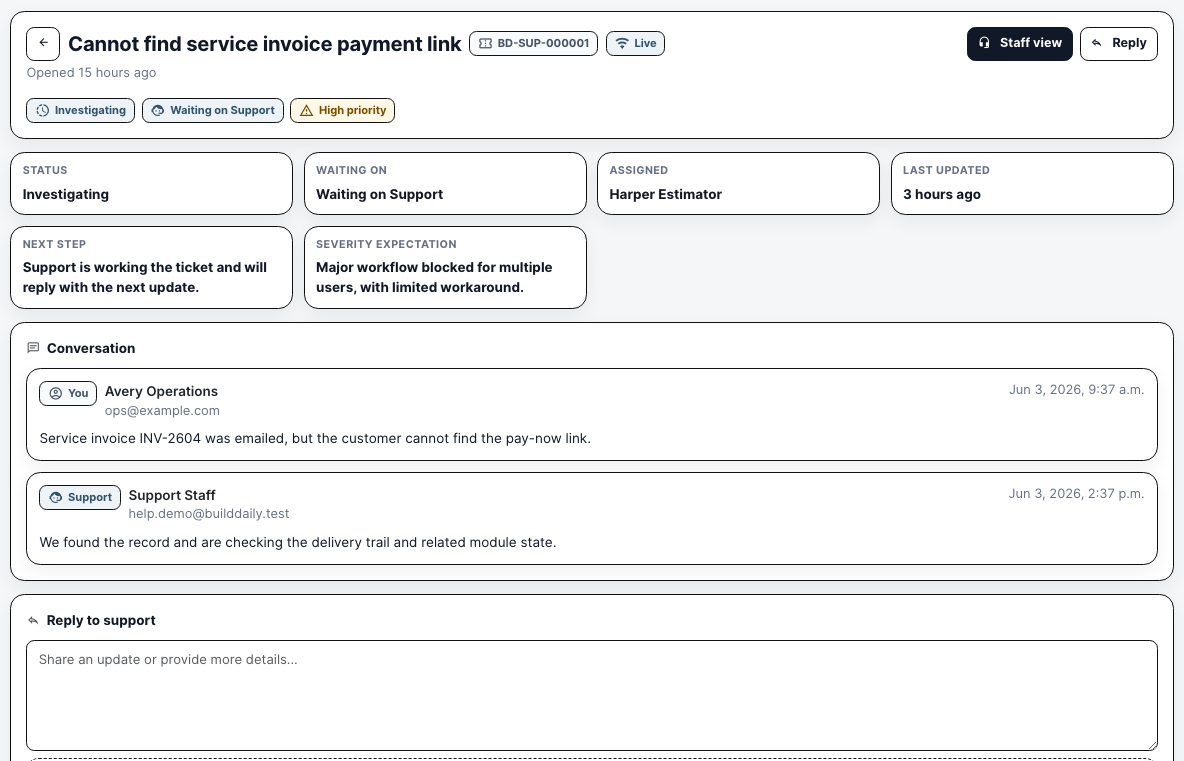
The customer ticket keeps status, owner, severity, next step, replies, and activity in one visible trail.

Support staff work from queues instead of a loose inbox

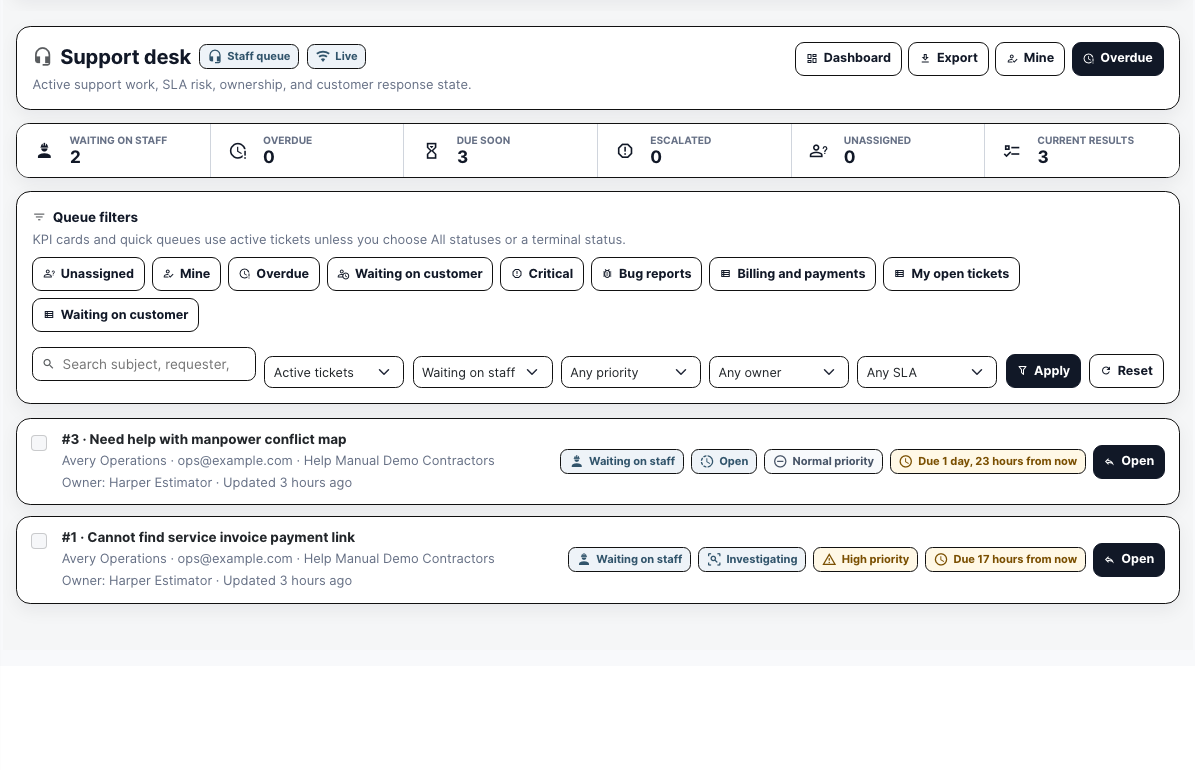
The staff desk filters tickets by active status, waiting state, priority, owner, SLA pressure, saved views, and search. A support lead can see what is waiting on staff, what is due soon, and which tickets need an answer before the day gets away.

  • Separate tickets waiting on staff from tickets waiting on the customer
  • Use saved queues such as Mine, Overdue, Billing and payments, or Waiting on customer
  • Open the ticket row with requester, organization, owner, priority, status, and due window already visible
Support desk queue
The queue turns incoming help work into assignable rows with response pressure visible.

The ticket detail is where support makes the operating decision

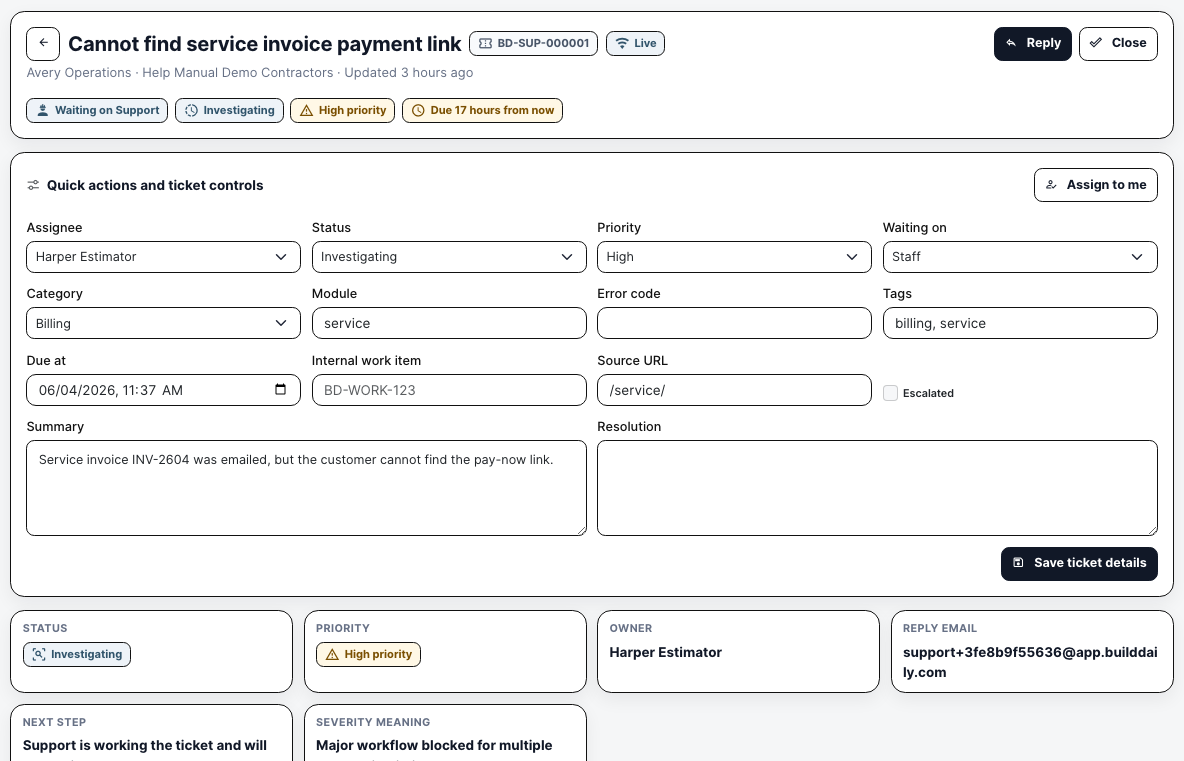
The staff view is not just a conversation. It is where support sets ownership, priority, status, module, source URL, tags, due date, summary, resolution, and escalation state. That keeps the operational facts with the thread.

  • Assign or take ownership when a ticket needs a clear owner
  • Change status and waiting state as the issue moves
  • Record source URL, module, tags, due date, summary, and escalation context
Support ticket controls
Ticket controls make triage explicit instead of relying on memory.

Replies, internal notes, and attachments stay in the same record

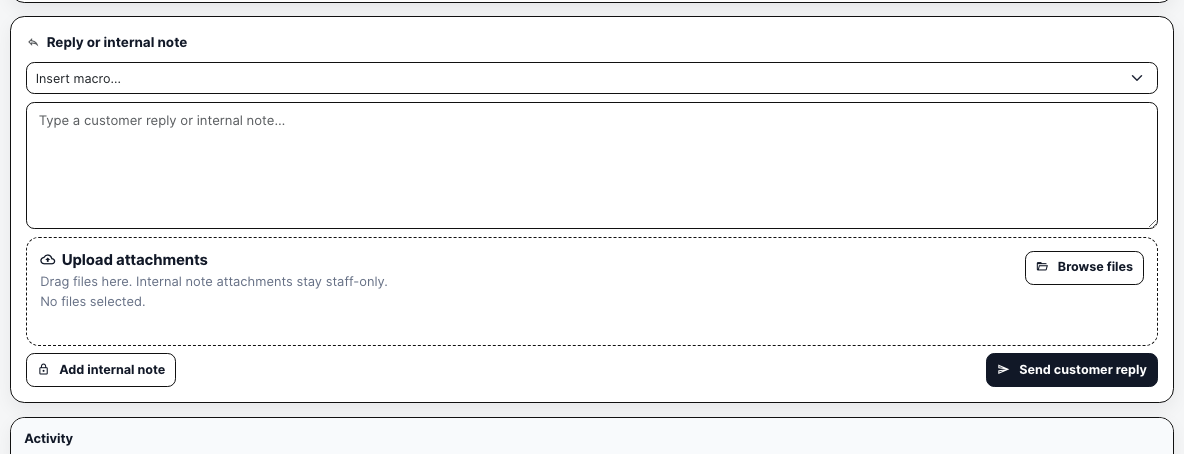
Support can send the customer a reply, add a staff-only note, insert a saved macro, and upload backup from the same reply panel. The customer gets the visible thread; staff keep the investigation notes and evidence with the ticket.

  • Send customer-facing replies from the ticket
  • Add internal notes that are not emailed to the requester
  • Attach files to the reply or internal note
Support reply controls
Reply controls separate customer communication from internal troubleshooting without splitting the record.

Support Proof

Actual Support screens with seeded ticket examples

Support desk queue with active tickets and SLA filters
The support desk shows active requests, staff/customer waiting state, priority, due windows, saved queues, owners, and the ticket rows that need action.
Support staff ticket detail with assignment priority module source URL and summary controls
Staff can set owner, status, priority, waiting state, category, module, source URL, due date, tags, summary, resolution, and escalation state from the ticket detail.
Customer support ticket thread with status owner and conversation
The customer-facing ticket shows status, who support is waiting on, assigned owner, next step, severity expectation, conversation, reply box, attachments, and activity.
Support staff reply area with macro internal note attachments and customer reply actions
The staff reply panel supports macros, customer replies, internal notes, and attachments so the answer and private troubleshooting notes stay on the ticket.

Operating Roles

The support decisions this workflow keeps visible

Contractor user

Opens the ticket, explains the problem, attaches evidence, checks status, replies when support needs more information, and can reopen a closed ticket if the issue is not actually fixed.

Operations or office lead

Keeps visibility into active support issues that may block billing, service, project reviews, manpower planning, or other day-to-day BuildDaily work.

Support staff

Owns the queue, sets priority and waiting state, replies to the customer, adds internal notes, escalates when needed, and closes the ticket with the resolution trail intact.

Coverage

Support questions contractors and staff need answered

Contractor needs BuildDaily does it
Can the user see their own requests? Yes
My Support lists the user's tickets with status, priority, owner, last activity, and customer-facing detail pages.
Can support see what needs action today? Yes
The support desk exposes waiting-on-staff, overdue, due-soon, escalated, unassigned, current-result counts, quick queues, and filters.
Can the ticket point to the affected part of the app? Yes
Tickets carry module key, source URL, page title, category, tags, error code, and summary fields.
Can evidence travel with the request? Yes
Customers and staff can attach screenshots, PDFs, logs, and other allowed files, with download controls on the ticket thread.
Can staff separate public replies from internal work? Yes
The staff reply panel supports customer replies, staff-only internal notes, macros, and attachments.
Can ownership and urgency be controlled? Yes
Staff can assign tickets, assign to self, set status, priority, waiting state, due date, category, tags, and escalation state.
Can a closed issue come back? Yes
Tickets support close and reopen paths; a customer reply on a closed ticket reopens the request and alerts support.
Can support find repeated problems? Yes
The staff detail shows requester history, related signals, linked-ticket controls, module context, tags, and escalation records.

Buyer Context

Why this matters operationally

A billing issue needs more than a subject line

If a customer cannot find a service invoice payment link, support needs the invoice context, source screen, screenshot, delivery trail, priority, and reply history. The ticket carries that evidence instead of making someone reconstruct it from chat.

Waiting state changes the next move

A ticket waiting on staff is an action item for support. A ticket waiting on the customer is a follow-up question. Separating those states keeps both sides honest about who owes the next answer.

Support work can block real contractor work

A stale public review link, invoice issue, or manpower map question can stop billing, owner review, or scheduling. Support makes those blockers visible enough to triage, escalate, and resolve.

Ticket Path

From a field problem to a tracked answer

1

Report the issue

The user opens a ticket, explains what happened, chooses category and priority, adds module context where available, and attaches backup.

2

Triage the queue

Support works from active queues, filters by waiting state and SLA pressure, assigns an owner, and opens the ticket that needs the next move.

3

Work the ticket detail

Staff update priority, status, category, module, source URL, due date, summary, tags, and escalation state so the operating context stays current.

4

Reply or investigate privately

Support sends customer-facing replies when the requester needs an update and adds internal notes when the team is still troubleshooting.

5

Close, reopen, or escalate

The ticket can be closed when resolved, reopened by a customer reply, linked to related tickets, or escalated to another team when the issue needs deeper work.

Support Surfaces

The screens that move a ticket

Customer-facing support

My Support Customer ticket list with visible status, priority, owner, and last activity.
Ticket Detail Customer thread with next step, severity expectation, replies, attachments, and activity.
New Ticket Form for subject, message, category, priority, module context, and attachments.
Attachment Download Controlled download route for files attached to a support ticket.

Staff support desk

Support Desk Queue with counts, saved views, status/waiting/priority/owner/SLA filters, search, export, and open actions.
Dashboard Support analytics for open tickets, waiting state, due pressure, priority/category breakdown, and workload.
Staff Ticket Detail Assignment, status, priority, waiting state, module, source URL, tags, due date, summary, resolution, reply, internal note, escalation, and related-ticket work.
Presence and Live Updates Ticket and queue websocket routes keep status, assignment, replies, and counts moving while users work.

Operating Rhythm

How the workflow stays moving

Where it lives

  • This module is part of the project work page, so records stay tied to the job, customer, team, files, schedule, and financial context.
  • The project navigation is the customer clue: users do not hunt for this work in a separate app. They open the project and choose the correct tab.

What a contractor can do

  • Customer support home
  • Customer ticket list and detail
  • Attachment downloads
  • New support tickets
  • Internal support dashboard
  • Support desk list
  • Ticket detail
  • Reply
  • Close and reopen
  • Quick assign
  • Presence
  • Escalate
  • API creation

Walk through Support tickets that keep the problem and the proof together

We can walk through the module around the way your company actually handles the work.

Request access