BuildDaily

Contractor CRM

CRM that remembers the work behind every company

Contractors do not need a polite address book. They need to know who the owner rep is, which GC opened the proposal, which vendor owes pricing, which sub has an expired COI, which customer has an open service call, what projects and T&M tickets touched the account, and what AR/AP work is sitting behind the relationship.

CRM Workflow

The company record contractors come back to during bids, jobs, service, and billing

Start with the company list, not a pile of duplicate contacts

The CRM list is where the office finds the right customer, GC, vendor, subcontractor, supplier, competitor, or service account. Search by company, contact, city, phone, tag, CSI division, or type, then open the work page instead of retyping the same company across modules.

  • Search companies, contacts, cities, phones, tags, types, and CSI divisions
  • Create companies or people without leaving the CRM list
  • See company count, contact count, role mix, and 30-day activity across CRM, leads, estimates, projects, and service
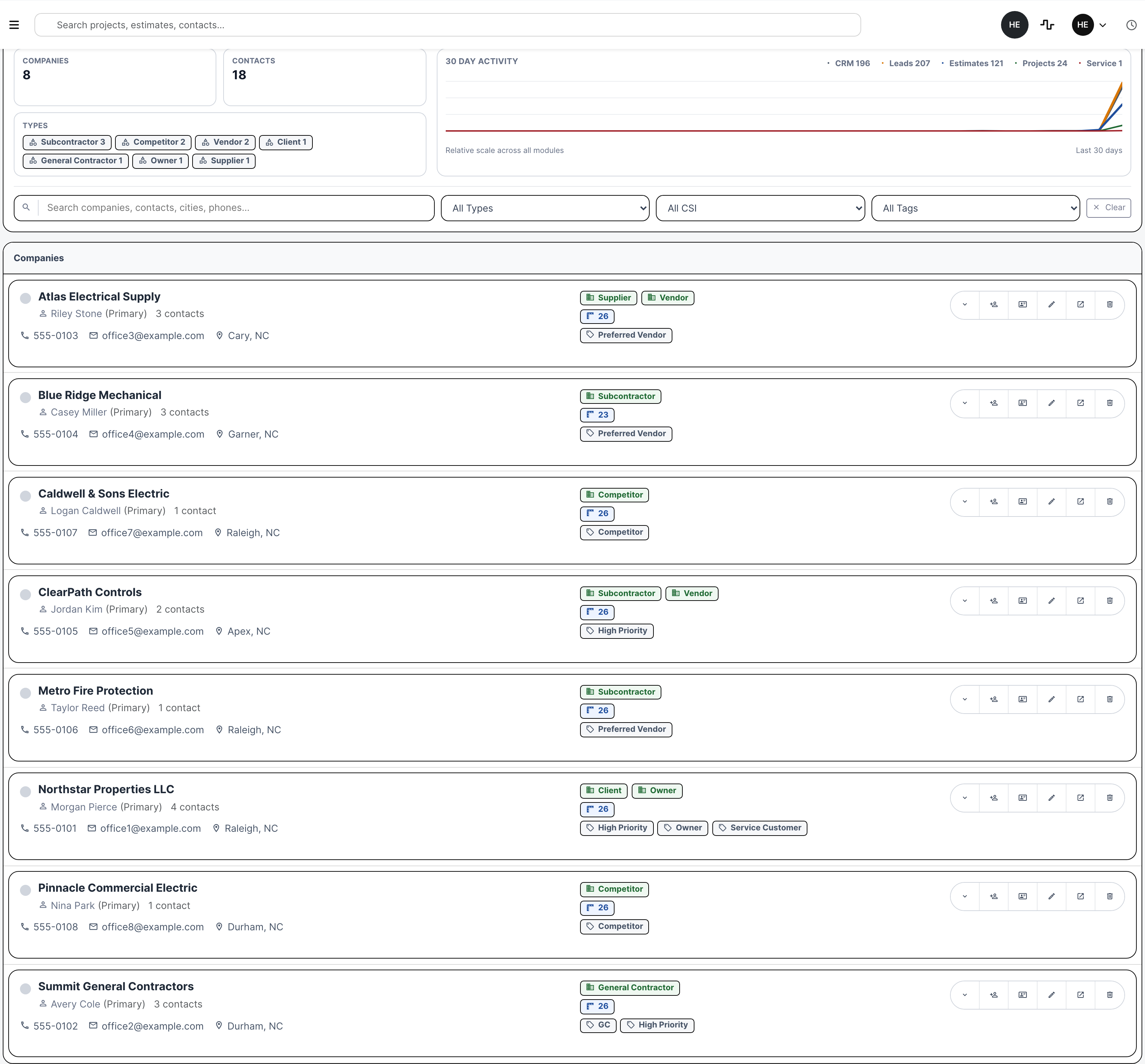
CRM company list with populated contractor companies
The CRM list shows populated contractor companies, contacts, filters, type chips, and activity rollup.

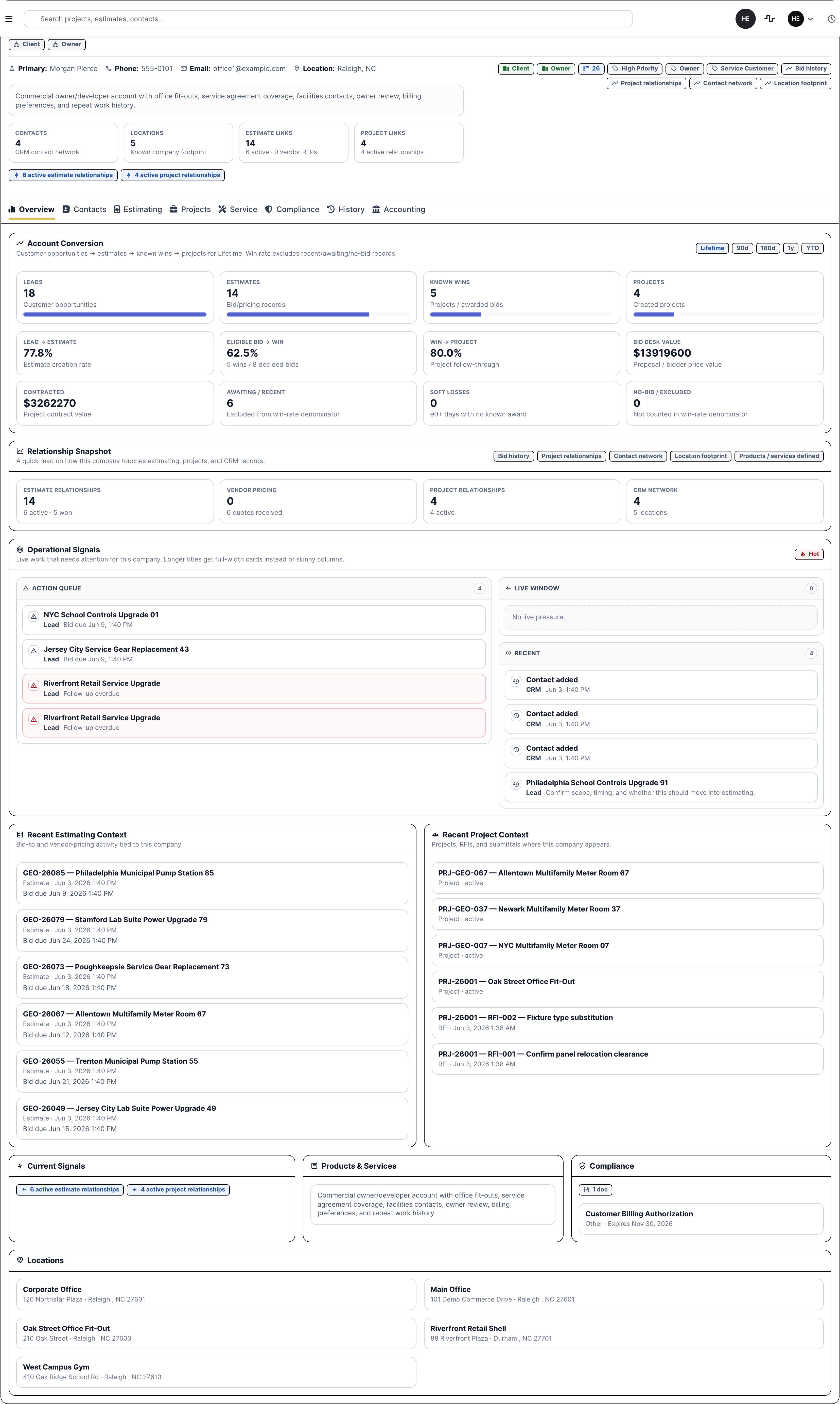
The company work page shows why the relationship matters

A contractor can open one company and see whether it is an owner, customer, GC, vendor, sub, supplier, or competitor, plus the primary contact, location footprint, current signals, estimating links, project links, service history, compliance, and accounting context.

  • Keep role chips, tags, CSI divisions, contact count, location count, estimate links, and project links visible
  • Surface current signals like active estimates, vendor quotes, project relationships, service demand, and compliance risk
  • Use the same record for customer, vendor, sub, supplier, owner, and competitor history
CRM company overview with relationship signals
The company work page makes Northstar's customer, owner, project, service, billing, and compliance context visible.

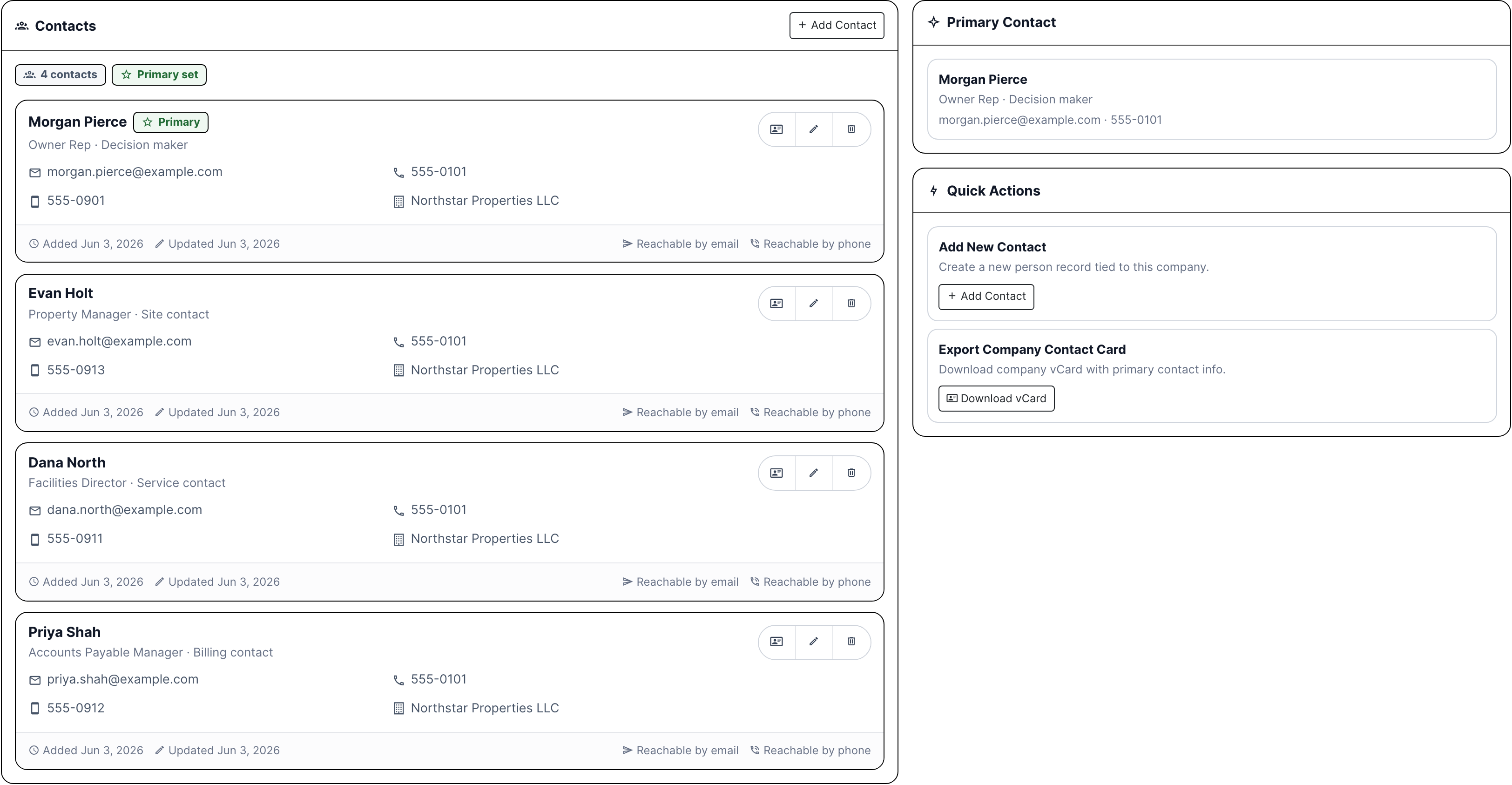
Contacts and locations stay tied to actual jobs and service sites

CRM stores the people a contractor actually calls: owner reps, facilities directors, AP contacts, estimators, project executives, quote desks, safety contacts, and site contacts. Locations cover corporate offices, job sites, service sites, warehouses, and billing addresses.

  • Add contact cards with role, title, phone, mobile, email, primary flag, and vCard export
  • Track company locations separately from the main address
  • Keep billing contacts and service contacts from getting buried in one generic notes field
CRM contacts tab with owner, facilities, AP, and site contacts
Contacts show the people contractors need for decisions, service calls, AP, and site coordination.

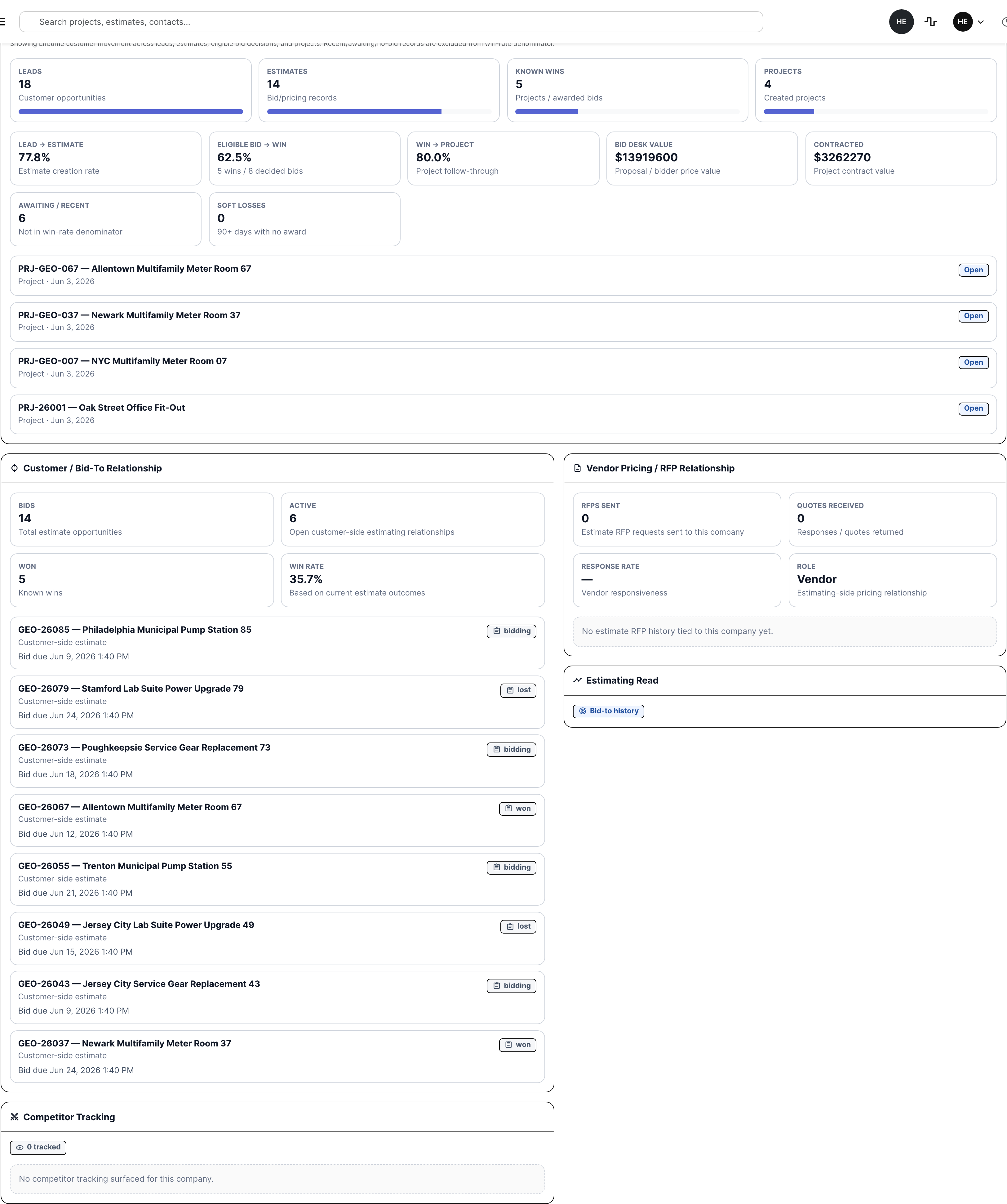
Estimating history shows customer work, vendor response, and competitor overlap

The estimating tab separates three very different CRM relationships: customers you bid to, vendors/subs you ask for pricing, and competitors you track from bid results. That matters when deciding who gets follow-up, who covers scope, and who keeps beating you in a market.

  • Show customer bid history, active bids, wins, win rate, and account conversion
  • Track vendor RFPs sent, quotes received, response rate, and recent quote requests
  • Track competitor companies against estimate and bid result history
CRM estimating tab with customer and vendor relationship context
Estimating context shows bid-to history, vendor RFP response, proposal value, and project conversion from the company record.

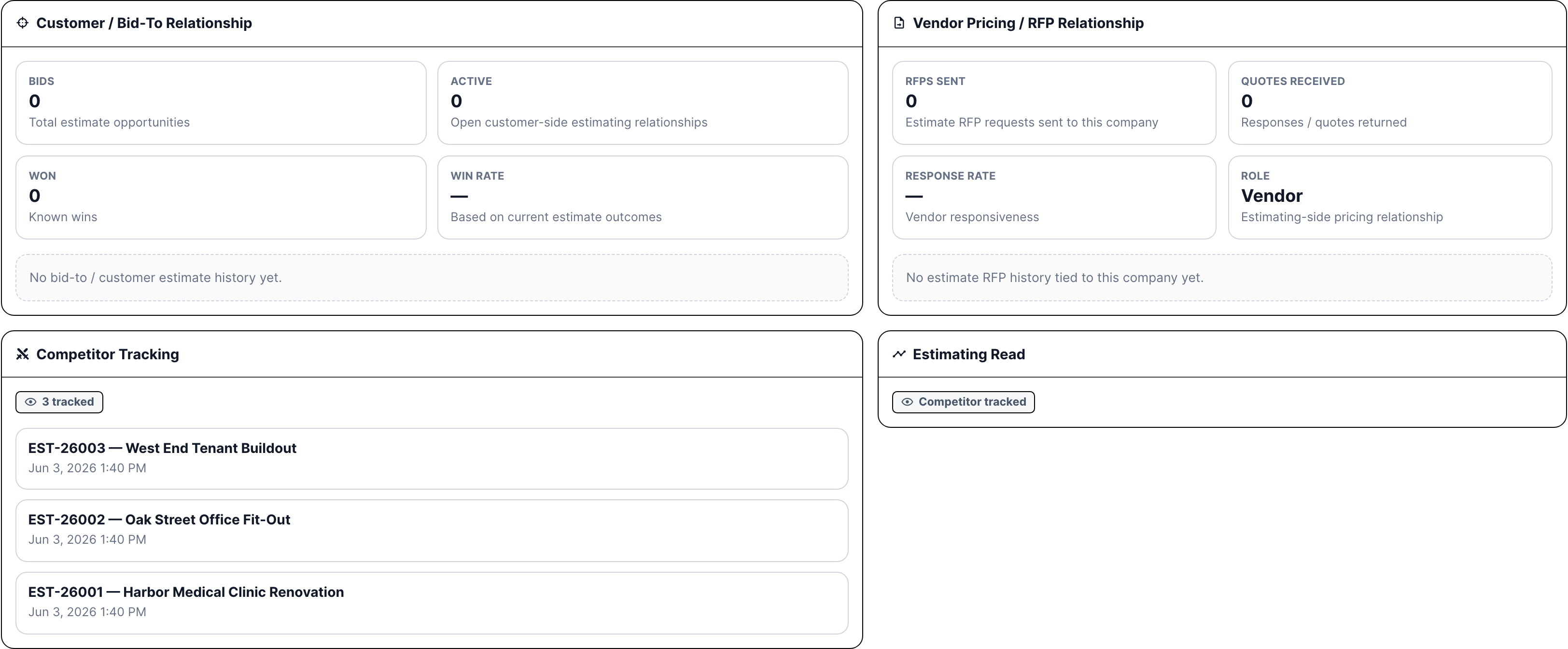
Competitor tracking belongs in CRM too

A competitor is still a company worth remembering. If Caldwell or Pinnacle keeps appearing in public bid results, CRM can show that history instead of leaving it in someone else's spreadsheet.

  • Keep competitor companies in the same searchable company list
  • Tie competitor records to estimates and bid result comparisons
  • Give leadership a durable history of who shows up, where, and at what spread
CRM competitor tracking on a company estimating tab
Competitor companies show tracked estimate history instead of disappearing into one-off bid notes.

Project history shows every way the company touches the job

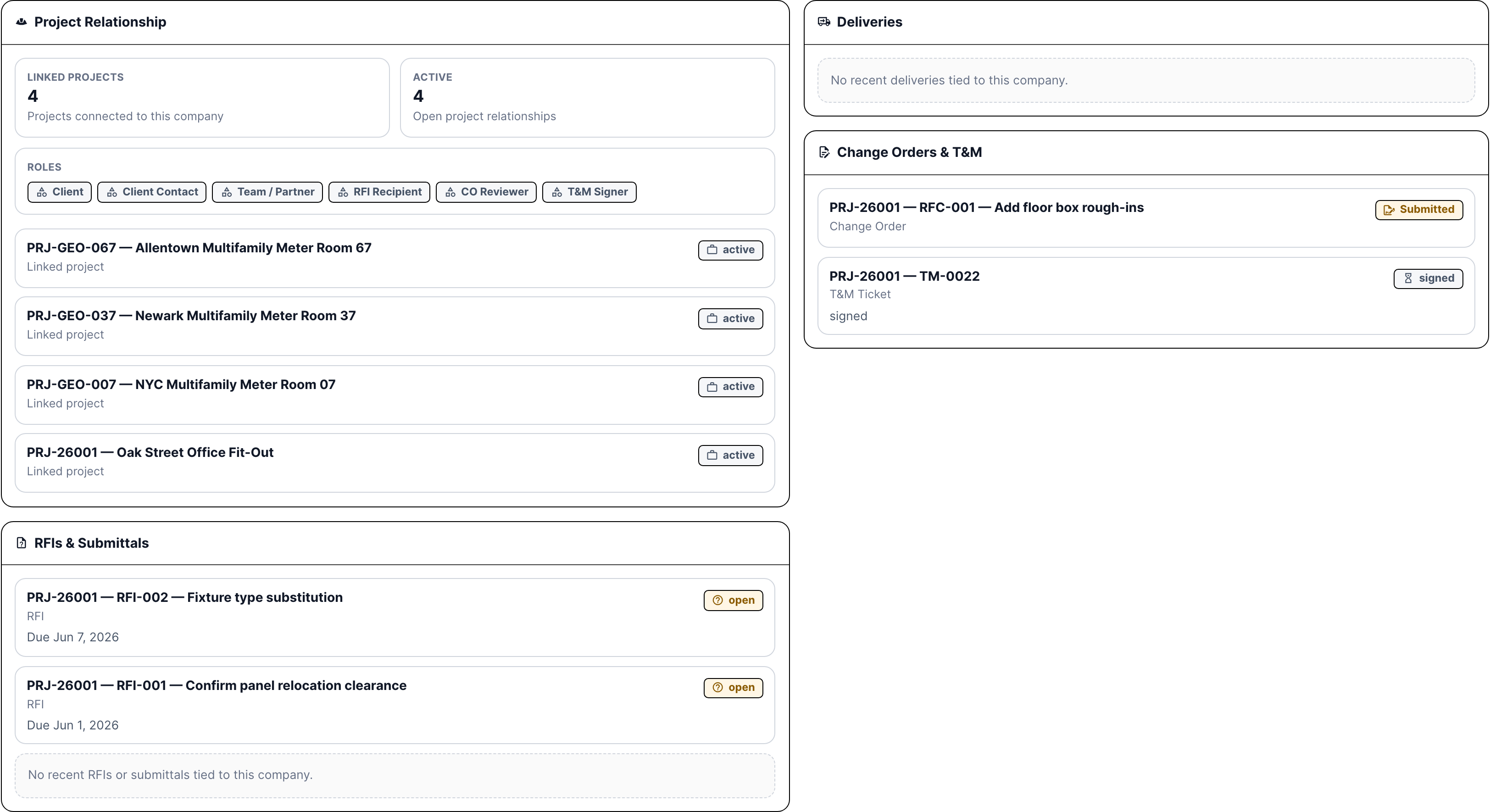
A company might be the client, client contact, team member, pricing recipient, submittal vendor, delivery vendor, change order reviewer, T&M signer, or RFI recipient. CRM pulls those roles into the company page so PMs are not hunting through project logs.

  • Show linked projects and active project relationships
  • Show project roles like client, team partner, RFI recipient, submittal vendor, delivery vendor, CO reviewer, and T&M signer
  • Bring recent RFIs, submittals, deliveries, change orders, and T&M tickets back to the relationship
CRM projects tab with project roles and records
Project context shows linked jobs, roles, RFIs, submittals, deliveries, change orders, and T&M relationships.

Service history shares the same customer record

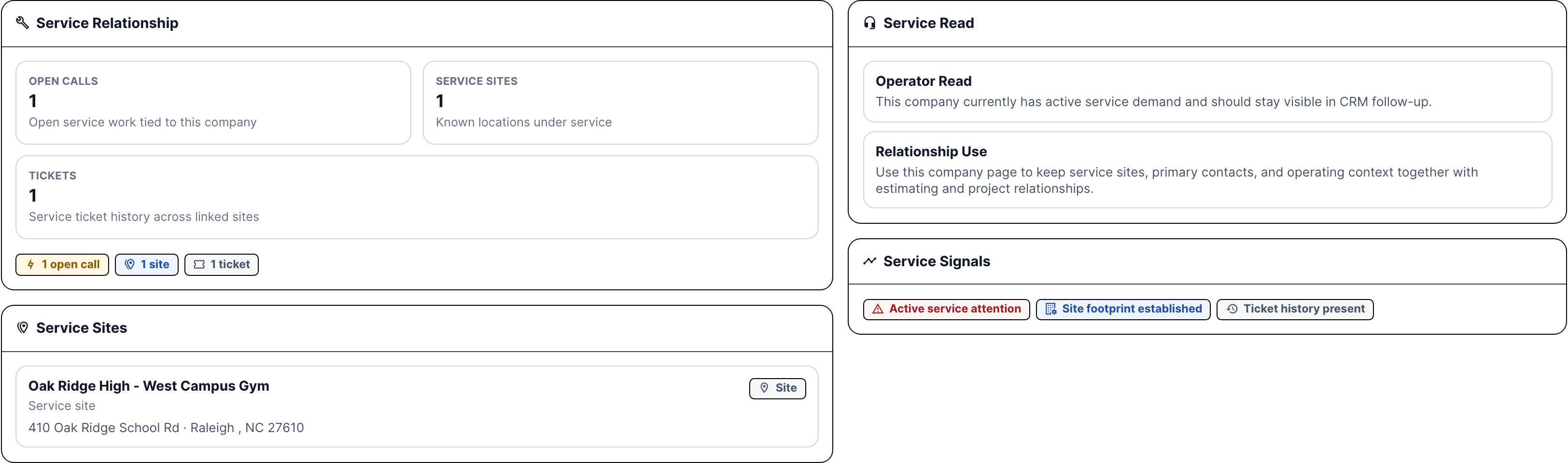
Service teams see the customer, site footprint, open calls, tickets, agreement-covered equipment, and service-side signals from the same CRM company used by estimating and projects. The office does not have to maintain a separate service customer list.

  • Show open service calls and ticket history tied to the company
  • Keep service sites and agreement-covered locations visible
  • Use the same contact network for dispatch, field work, invoice review, and customer follow-up
CRM service tab with service sites and open call context
Service context shows open demand, service sites, ticket history, and agreement-side relationship signals.

Compliance tells the office whether the company is safe to use

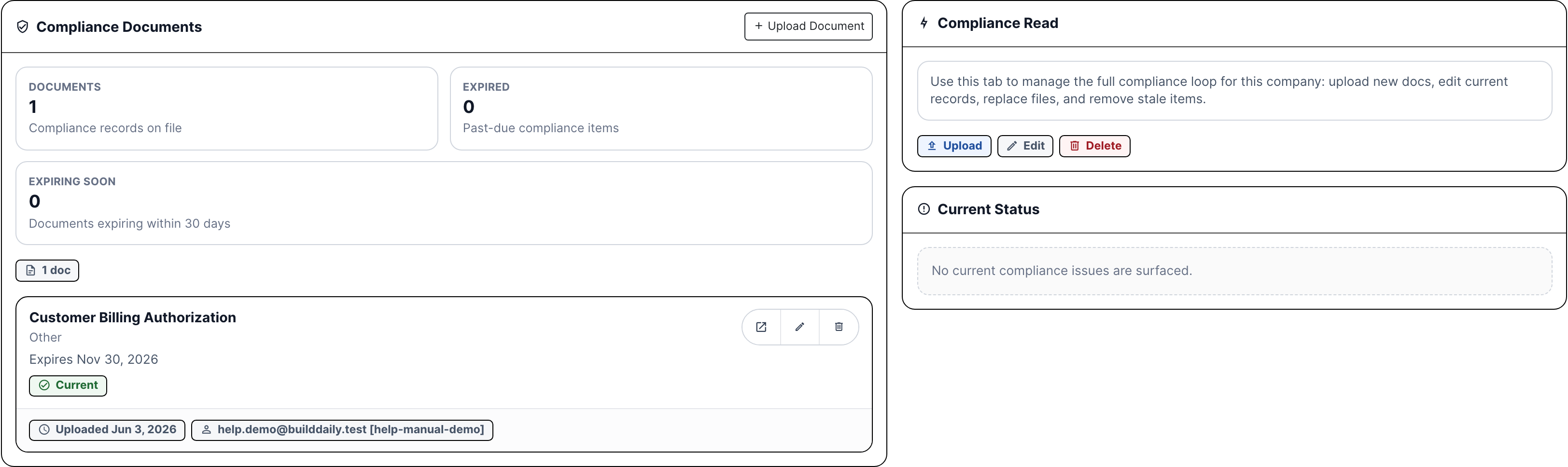
Before a vendor or sub goes onsite, the office needs current documents. CRM keeps W-9s, insurance, licenses, customer authorizations, expiration dates, expired status, expiring-soon status, and upload/edit/delete actions on the company.

  • Track insurance, licenses, W-9s, registrations, and customer authorizations
  • Show expired and expiring-soon documents before work is released
  • Keep compliance status visible to estimating, project admins, service, and accounting
CRM compliance tab with expiring and expired documents
Compliance context shows document count, expired items, expiring-soon items, file actions, and current status.

Accounting shows whether money needs attention

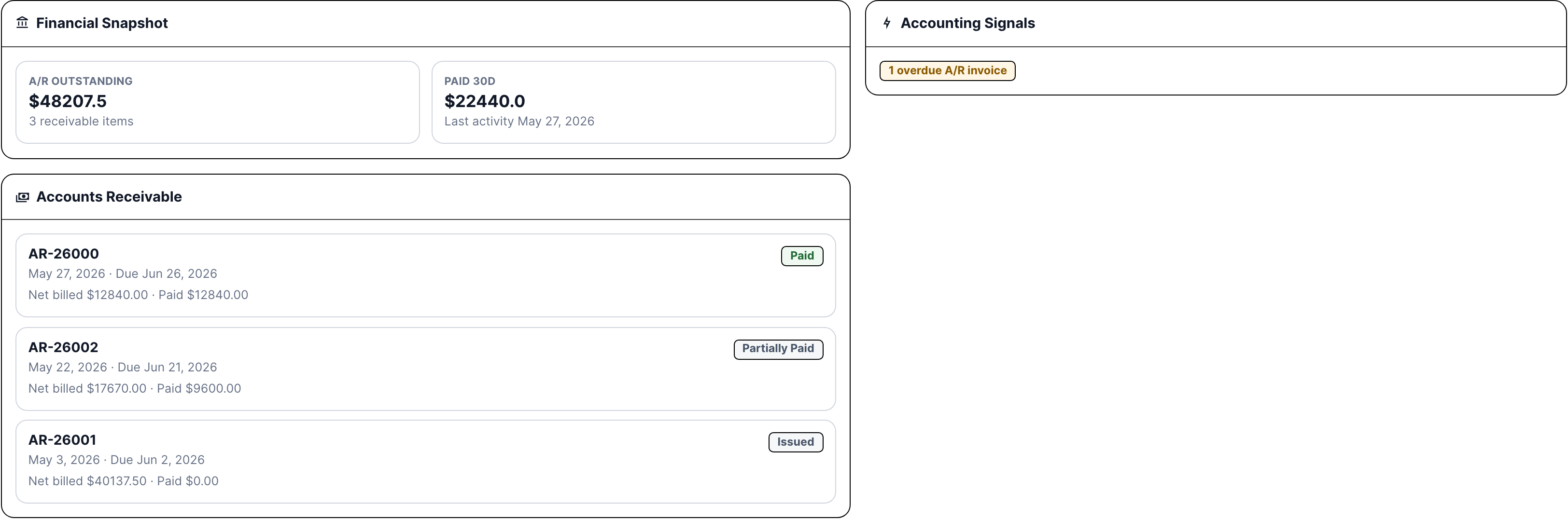
A company record can also show the money context behind the relationship: overdue A/R, A/P bills due soon, purchase orders, subcontract billing, paid activity, and approval signals. It is enough context to know who needs a call before work or invoices move.

  • Show A/R outstanding, A/P outstanding, paid activity, overdue invoices, due bills, and approval needs
  • Surface purchase orders and subcontracts tied to vendors and subs
  • Keep billing preferences and AP contacts attached to the company record
CRM accounting tab with AR AP PO and subcontract context
Accounting context shows receivables, payables, purchase orders, subcontracts, and payment-related signals.

The timeline keeps relationship memory from living in one person's inbox

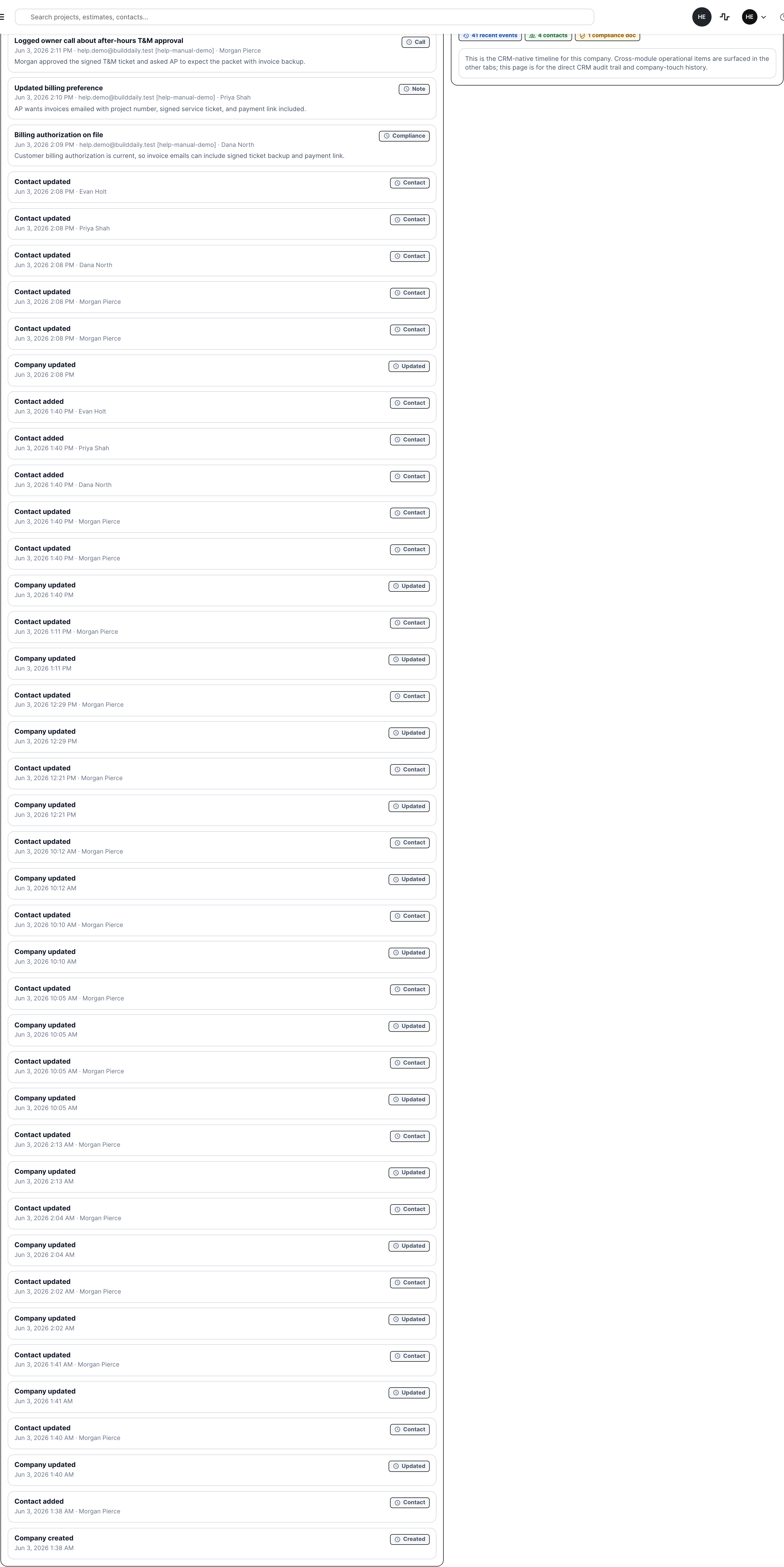
Notes, calls, compliance updates, proposal follow-ups, billing preferences, and competitor observations stay attached to the company. When someone new opens the account, they can see what happened without asking around.

  • Log calls and notes from the company record
  • Show CRM-native history alongside cross-module work tabs
  • Preserve relationship context when estimators, PMs, service, and accounting hand work to each other
CRM company history timeline
CRM history keeps call logs, notes, compliance updates, and relationship changes attached to the company.

Who Uses It

CRM is shared because contractor relationships are shared

Estimating and business development

See whether a company is a bid-to customer, a vendor/sub that owes pricing, or a competitor that keeps showing up in bid results.

PMs, supers, service, and dispatch

Find the right person, service site, project role, RFI recipient, T&M signer, or owner contact without digging through old jobs.

Accounting and admin

Check AP/AR context, billing contacts, service invoice preferences, W-9s, COIs, licenses, and compliance expiration before releasing work or invoices.

Contractor Checklist

The relationship jobs BuildDaily CRM covers

Contractor needs BuildDaily does it
One company record Yes
Use one CRM company for customers, owners, GCs, vendors, suppliers, subcontractors, service accounts, and competitors.
Search and filters Yes
Search by company, contact, phone, email, city, products/services, tags, type, and CSI division.
Contacts and vCards Yes
Track people, roles, title, email, phone, mobile, primary contact, inline creation, company vCard, and person vCard.
Locations and service sites Yes
Store headquarters, billing addresses, job sites, warehouses, service sites, and location footprint on the relationship.
Operating signals Yes
Surface active estimate, vendor quote, project, service, compliance, and accounting pressure instead of making users hunt module by module.
Customer estimating history Yes
Show bid-to records, active estimates, won work, win rate, account conversion, recent estimates, and proposal value.
Vendor RFP history Yes
Show RFPs sent, quote status, quotes received, response rate, due dates, and recent pricing requests.
Competitor intelligence Yes
Track competitor companies across estimates and bid result history so public-sector lessons do not disappear.
Project relationship history Yes
Show client roles, team roles, RFI recipients, submittal vendors, delivery vendors, CO reviewers, T&M signers, and recent project records.
Service customer history Yes
Show open calls, sites, ticket history, agreement-side context, and service signals from the same company record.
Compliance status Yes
Track insurance, licenses, W-9s, vendor docs, expiration, expiring-soon risk, and document upload/edit/delete actions.
Accounting context Yes
Expose A/R, A/P, purchase orders, subcontracts, overdue invoices, bills due soon, approval needs, and paid activity where accounting records exist.
Notes, calls, tags, and timeline Yes
Log relationship notes, calls, compliance updates, tags, and CRM-native history so context survives handoffs.

CRM Surfaces

The company list and work tabs contractors actually use

CRM list surfaces

Company list Search, filter, create companies, create standalone people, see type/tag/CSI chips, open company work pages, and export vCards.
Header rollup Company count, contact count, company type mix, and 30-day CRM/leads/estimates/projects/service activity.
Company actions Expand detail, add contact, edit company, download vCard, open work page, and soft delete where allowed.

Company work tabs

Overview Relationship metrics, account conversion, action queue, live/recent signals, estimating context, project context, compliance, locations, and products/services.
Contacts People cards, primary contact, phone/email/mobile, role, title, vCard export, add contact, edit, and delete.
Estimating Customer bid history, vendor RFP response, quote rate, account conversion, competitor tracking, and recent estimate/RFP records.
Projects Project roles, active projects, RFIs, submittals, deliveries, change orders, and T&M ticket relationships.
Service Open service calls, service sites, ticket count, service read, and service-side relationship signals.
Compliance Compliance documents, expiration status, upload/edit/delete actions, expired and expiring-soon counts.
Accounting A/R, A/P, purchase orders, subcontracts, payment activity, overdue/due/approval signals, and financial snapshot.
History CRM-native timeline for notes, calls, compliance updates, contact changes, and relationship events.

Operating Rhythm

How the workflow stays moving

Create the relationship once

  • Add the company, classify it by role, tag it, set CSI coverage, add contacts, and add locations.
  • Use the same company in leads, estimates, projects, service, documents, compliance, accounting, and support.
  • Avoid duplicate customer/vendor records by opening the company work page before creating another account.

Use the relationship during work

  • Estimators check bid-to history, vendor responsiveness, competitor overlap, proposal follow-up, and quote status.
  • PMs and supers check project roles, RFIs, submittals, deliveries, CO reviewers, and T&M signers.
  • Service and dispatch check sites, open calls, ticket history, service contacts, and agreement context.

Keep the office out of avoidable surprises

  • Admins check COIs, licenses, W-9s, billing contacts, AP preferences, and expired documents before release.
  • Accounting checks overdue A/R, upcoming A/P, purchase orders, subcontracts, and paid activity from the company page.
  • Everyone can read notes, calls, and timeline history before making the next call.

Walk through CRM that remembers the work behind every company

We can walk through the module around the way your company actually handles the work.

Request access