BuildDaily

What Is BuildDaily?

BuildDaily keeps the contractor story together from first call to bid, job, service ticket, signature, crew, and cash.

BuildDaily is construction operations software for contractors who are tired of rebuilding the same story in five places. The same customer, site, files, people, prices, signatures, ticket work, pay applications, receivables, crew assignments, and follow-ups stay close to the record that created them. A lead can become an estimate, an estimate can become a project, a service call can become a dispatched ticket and invoice, and managers can see what is slipping without asking every department for a separate spreadsheet.

How Work Moves

Follow the work end to end, not module by module

The customer record is the anchor

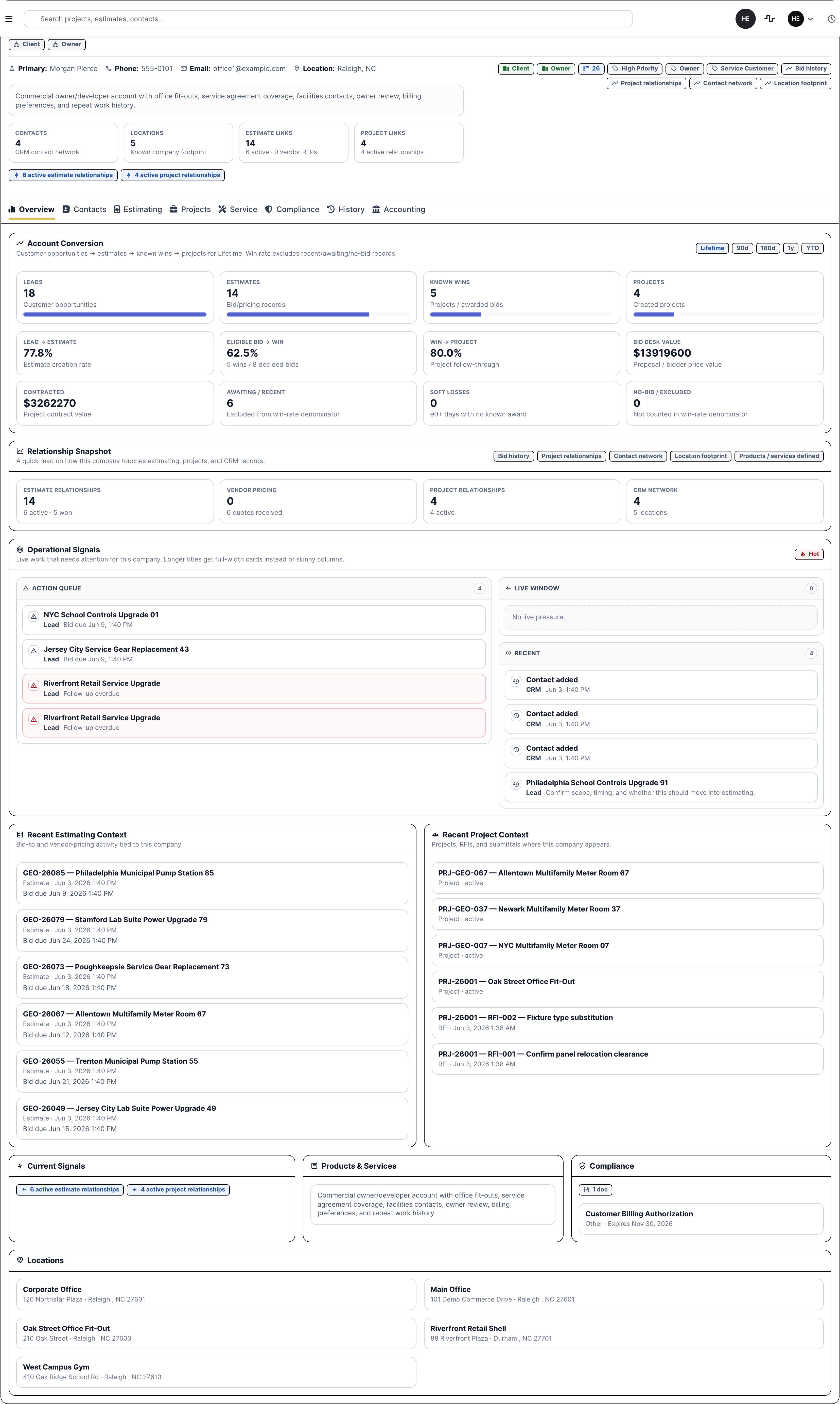
Contractor work usually starts with a company, contact, location, relationship, or piece of history. CRM keeps the customer, vendor, site, contacts, compliance, estimating, project, service, accounting, and activity context visible before the next lead, job, or service call is opened.

  • See contacts, locations, compliance, service history, projects, estimating ties, and notes from the company record.
  • Stop rebuilding customer context separately for estimating, service, projects, and billing.
  • Use the company record to understand the relationship before the next call or bid decision.
BuildDaily CRM company overview
CRM is the customer and vendor memory behind leads, estimates, projects, service, and accounting context.

A lead becomes a bid without losing who asked for what

A lead is the job before the estimate exists. BuildDaily keeps the customer, contact, source, jobsite, owner, follow-up, files, photos, notes, calls, and readiness visible before anyone builds a bid.

  • See who owns the opportunity and what still needs a call back.
  • Create the estimate from the lead without retyping customer and jobsite context.
  • Keep won, lost, stale, and no-bid reasons for the next sales review.
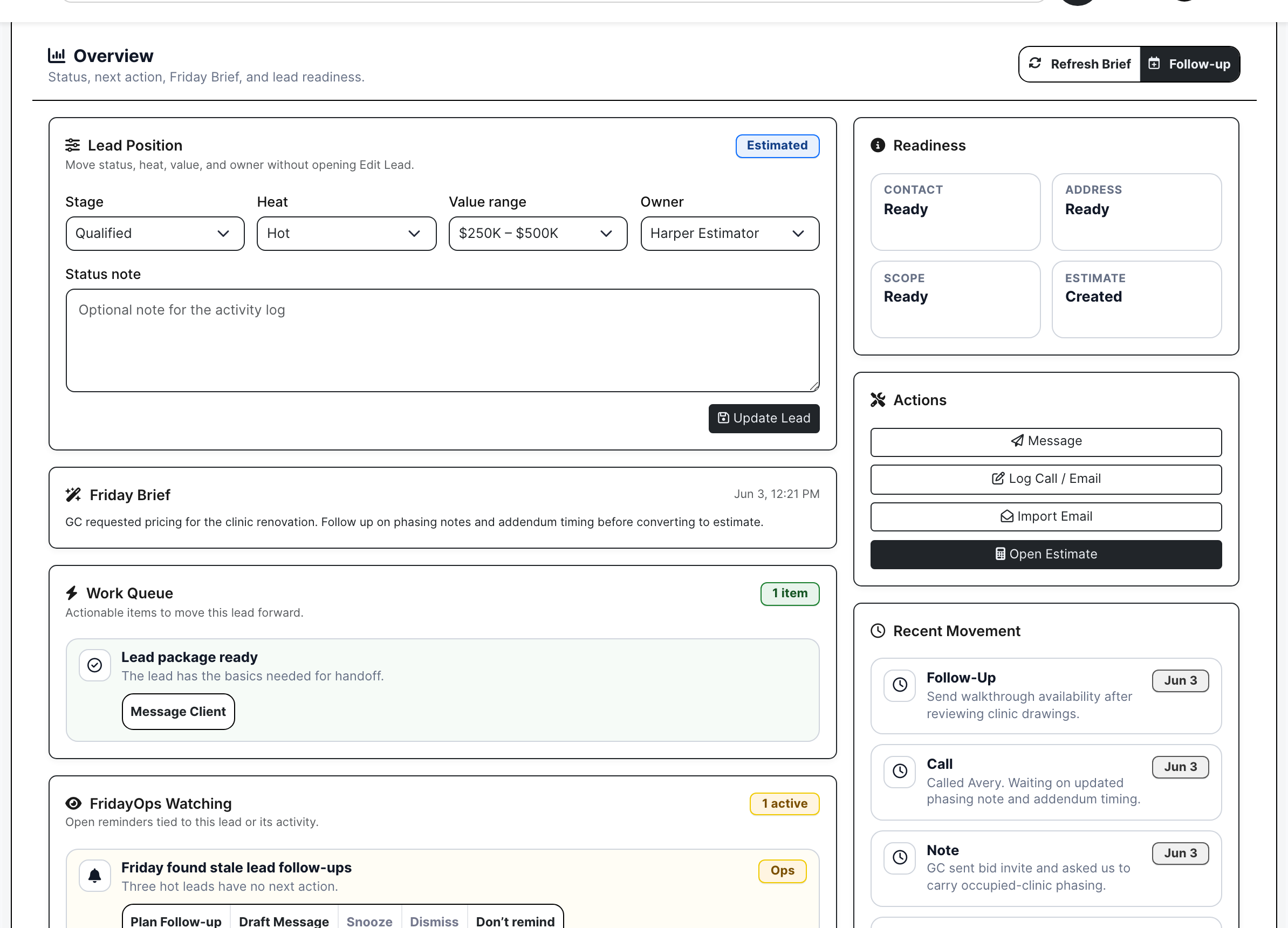
BuildDaily lead work overview
The lead work page shows readiness, action queue, owner, value, files, and estimate handoff context.

The bid keeps the files, bidders, quotes, and proposal work together

Estimating is where the contractor handles bid files, RFP groups, vendor planrooms, addendums, estimate RFIs, alternates, takeoff, bid letters, proposals, competitors, bid results, and the award handoff.

  • Give vendors a no-login planroom for files and quote uploads.
  • See who opened, declined, sent pricing, or still needs a reminder.
  • Convert awarded work into a project with the bid files and customer already filled in.
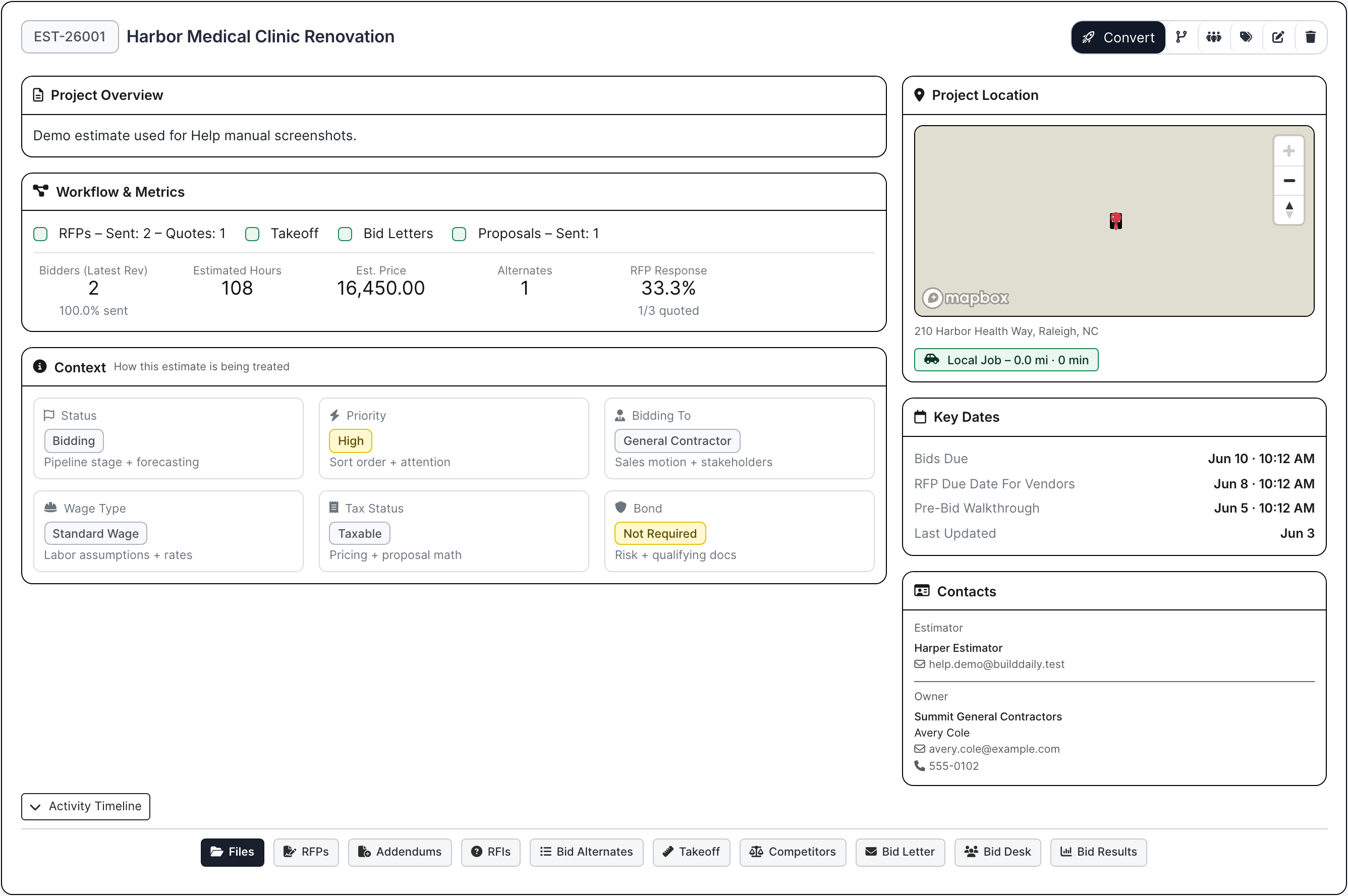
BuildDaily estimate work page
The estimate work page keeps bid setup, files, bidders, proposal work, and conversion context together.

Outside bidders and reviewers get narrow links

Not everyone belongs inside the internal app. Vendors can use a public planroom to review files and upload quotes. Owners, reviewers, signers, and subcontractors can use focused public routes for the specific decision they owe.

  • Send vendors to the files and quote upload they need, not the full system.
  • Keep addenda, quote activity, no-bids, and follow-up tied to the estimate.
  • Use external routes for reviews, signing, planrooms, invoices, and portals where the workflow supports it.
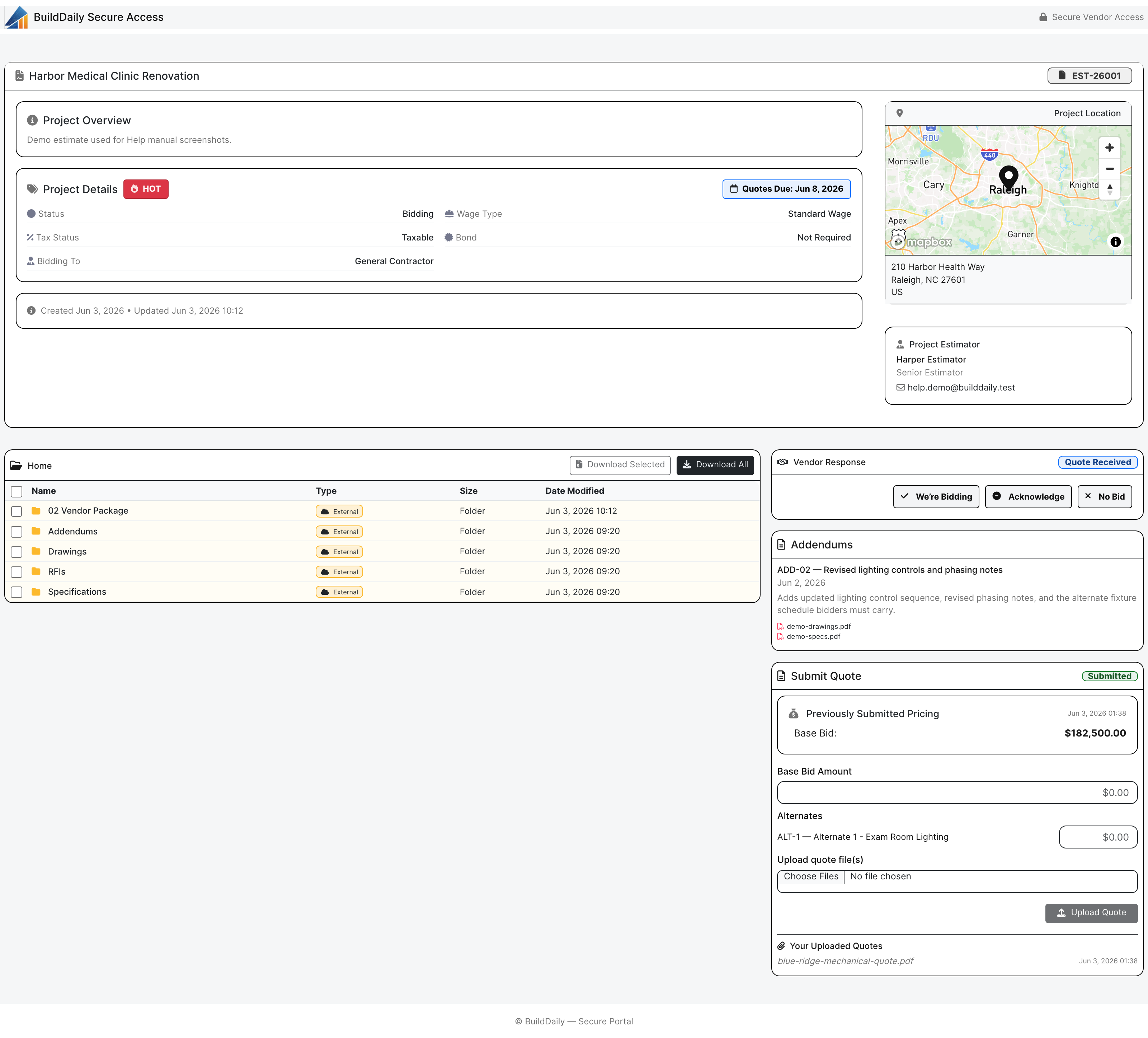
BuildDaily vendor RFP planroom
The public planroom gives bidders files, addendum context, and quote upload without internal access.

After award, the project page becomes the job file

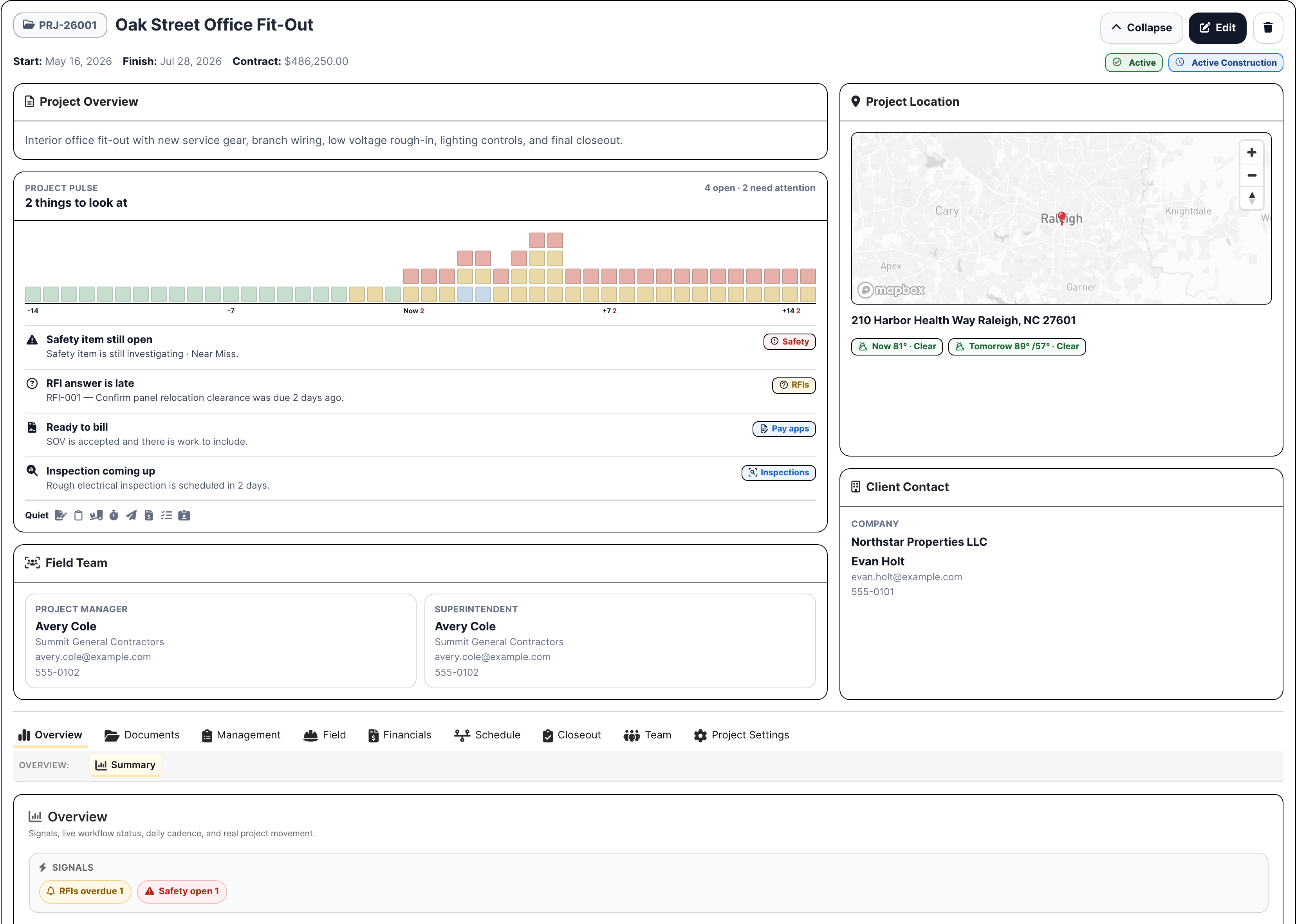
The project page is where the PM and super go for the job: team access, notes, activity, RFIs, submittals, project RFPs, meetings, permits, inspections, daily reports, safety, deliveries, change orders, T&M tickets, pay applications, drawings, specs, files, schedule, and closeout.

  • PMs and supers work from the same job record instead of trading disconnected logs.
  • Field reports, RFIs, submittals, files, drawings, specs, change work, and pay apps stay on the job.
  • Project rows and tabs expose the next job issue before it becomes a meeting surprise.
BuildDaily project work page
The project work page keeps the job shell, team, tabs, activity, and current job context together.

Project cost and billing stay attached to the work

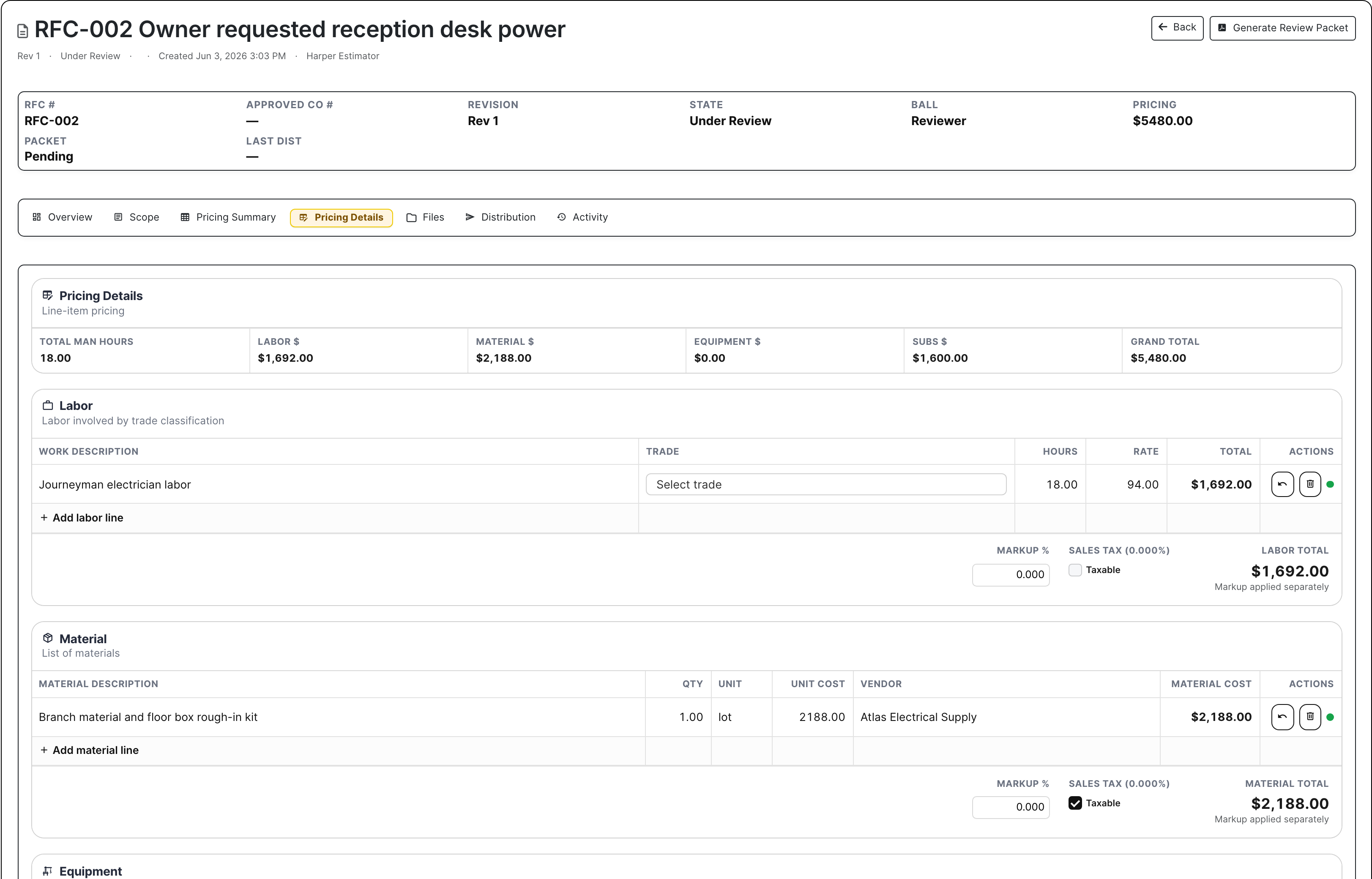
Extra work is only valuable if the office can prove it, price it, approve it, and bill it. Change pricing, T&M, pay applications, A/R context, files, and job backup stay close to the project record that created the money.

  • Price change work with scope, backup, cost, markup, and customer value visible.
  • Use pay applications and SOV context to see what has been billed and what is still open.
  • Keep the financial trail tied to the job instead of recreating it during collection.
BuildDaily change order pricing
Change pricing turns field and PM context into a billable package instead of a loose note.

Service work moves from call to dispatch to invoice decision

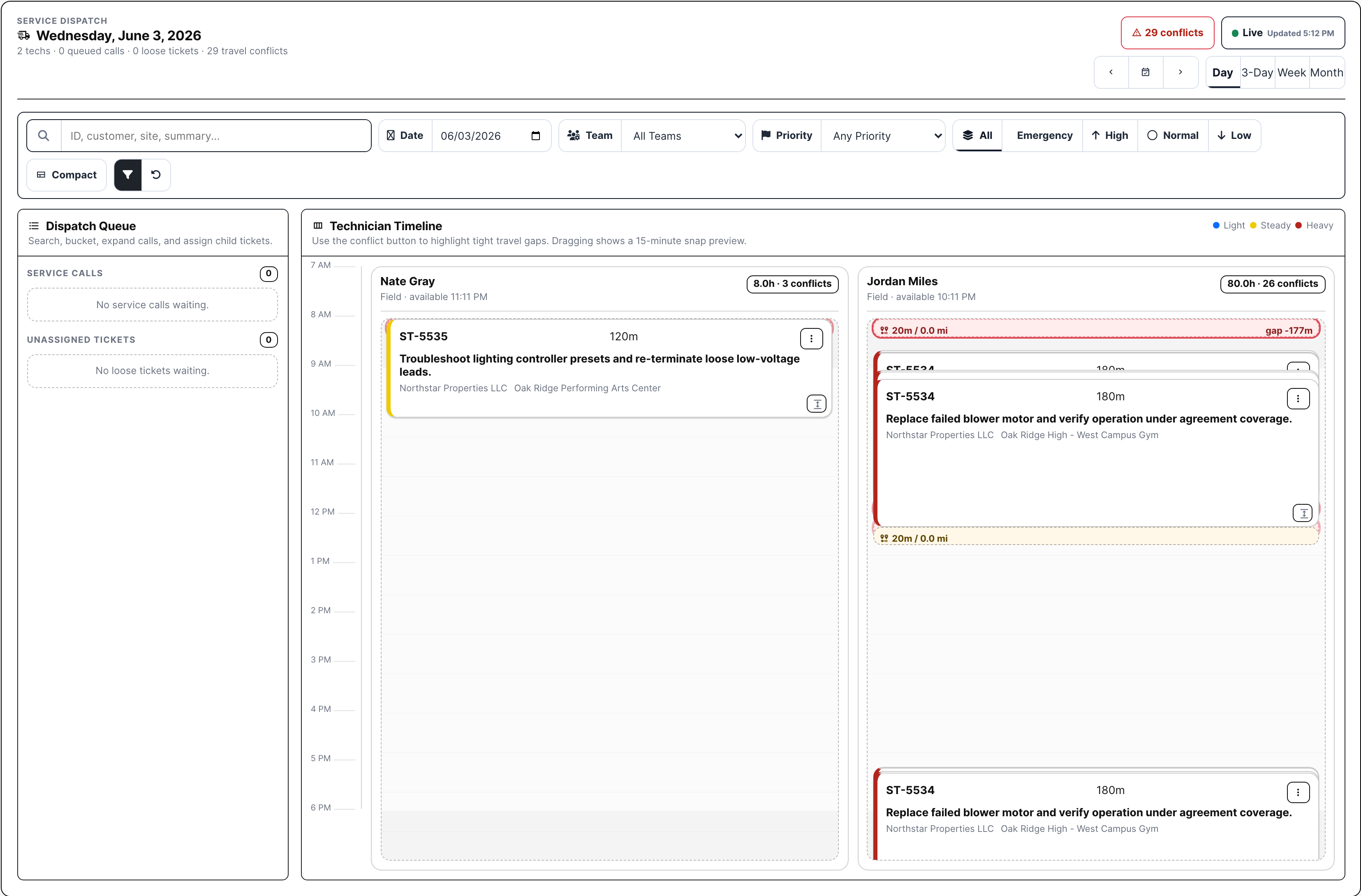
A service ticket needs the call, site, equipment, technician, work performed, parts, signature, and billing decision. BuildDaily keeps that together through dispatch, Work On, billing review, invoice email, payment link, and A/R.

  • Dispatch can see technician load, queued calls, loose tickets, travel pressure, and assignment status.
  • The ticket shows labor, parts, files, notes, totals, and signature state before billing touches it.
  • Billing can decide whether the work is billable, warranty, goodwill, internal, partial coverage, or not ready.
BuildDaily service dispatch board
Dispatch places call and ticket work onto technician lanes before Work On and billing review finish the record.

Paperwork is routed from the record that needs it

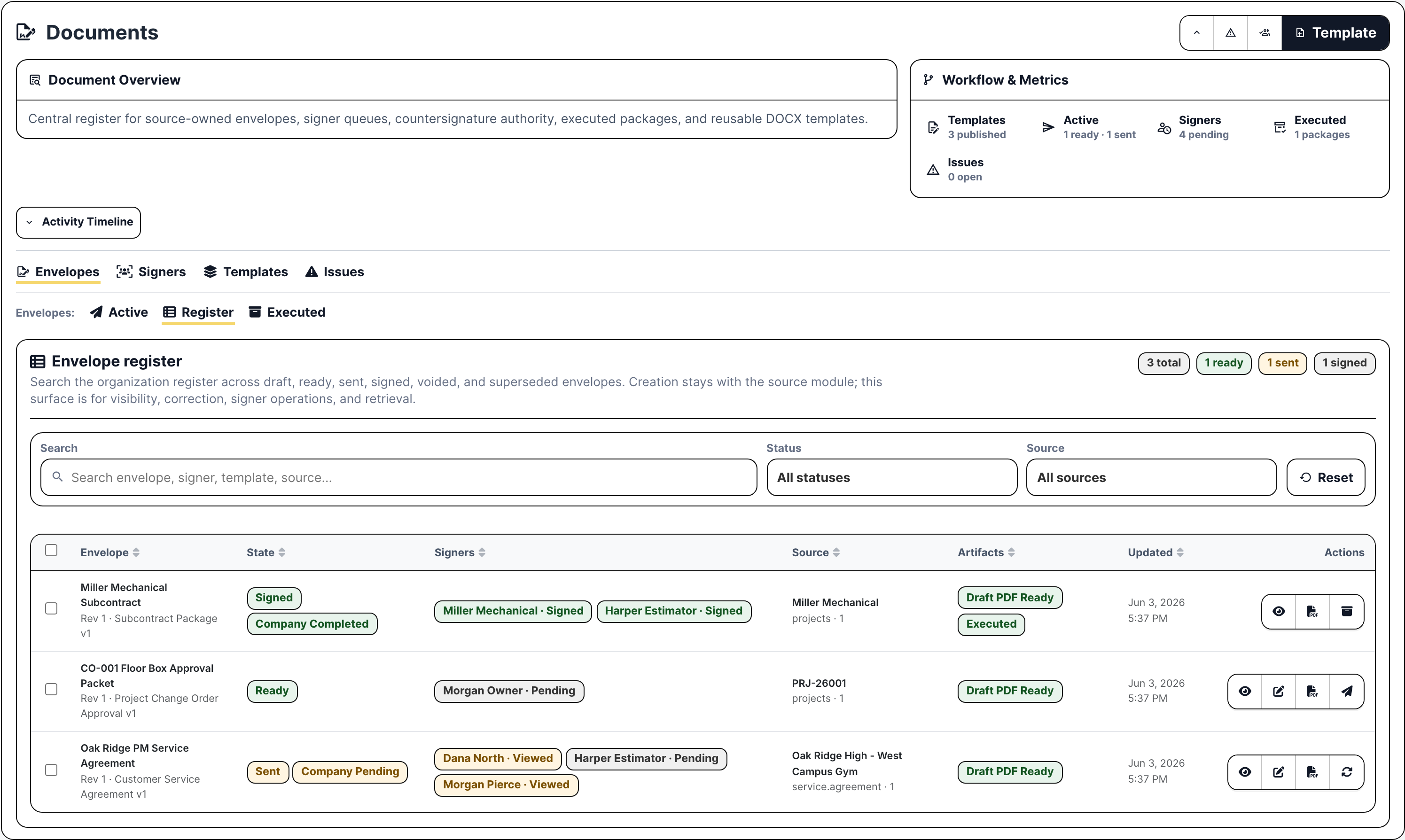
Agreements, authorizations, change approvals, HR acknowledgements, and other packets should not float around in email. Documents can generate or upload the packet, route signers, collect countersignature, track status, and return the executed package to the source context.

  • Use templates or uploaded PDFs when the packet needs signatures.
  • Track sent, viewed, signed, declined, countersigned, and executed package state.
  • Keep signer evidence near the project, service, HR, subcontractor, or agreement record that needs it.
BuildDaily document envelope register
The envelope register shows packet state, source record, signer progress, and executed package readiness.

Time and manpower turn labor into a managed plan

Contractors do not just need hours after the fact. They need timesheets, PTO, expenses, crew schedules, skills, certifications, licenses, assets, and conflicts visible before payroll or the field plan breaks.

  • Review submitted and missing time before payroll cleanup becomes a scramble.
  • Schedule people to project, service, estimate, or overhead work with conflict visibility.
  • Keep labor context connected to the jobs and service work creating the demand.
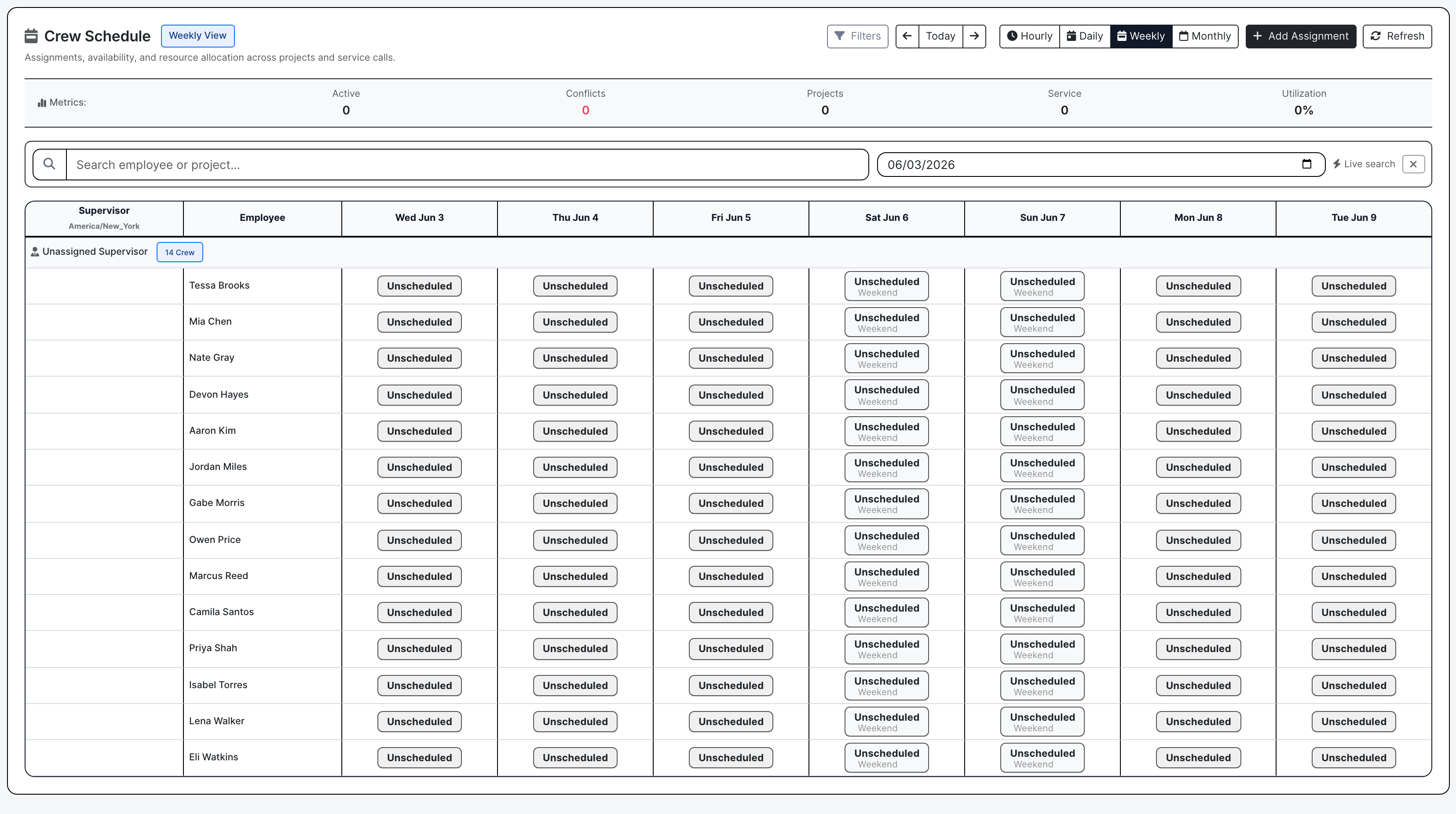
BuildDaily manpower schedule
Manpower scheduling connects people to the work that needs them and flags conflicts early.

Analytics and support point back to records, not abstract charts

Management needs to know what is slipping and who owns the next move. Analytics reads leads, estimates, projects, service, A/R, backlog, dispatch, and manpower pressure. Support keeps product issues tied to module, evidence, owner, replies, and status.

  • Use analytics to find stale follow-ups, bid gaps, project risk, service backlog, A/R pressure, and crew conflicts.
  • Open the record behind the signal instead of discussing a chart in isolation.
  • Use support tickets when product issues need evidence, reply history, assignment, and closure.
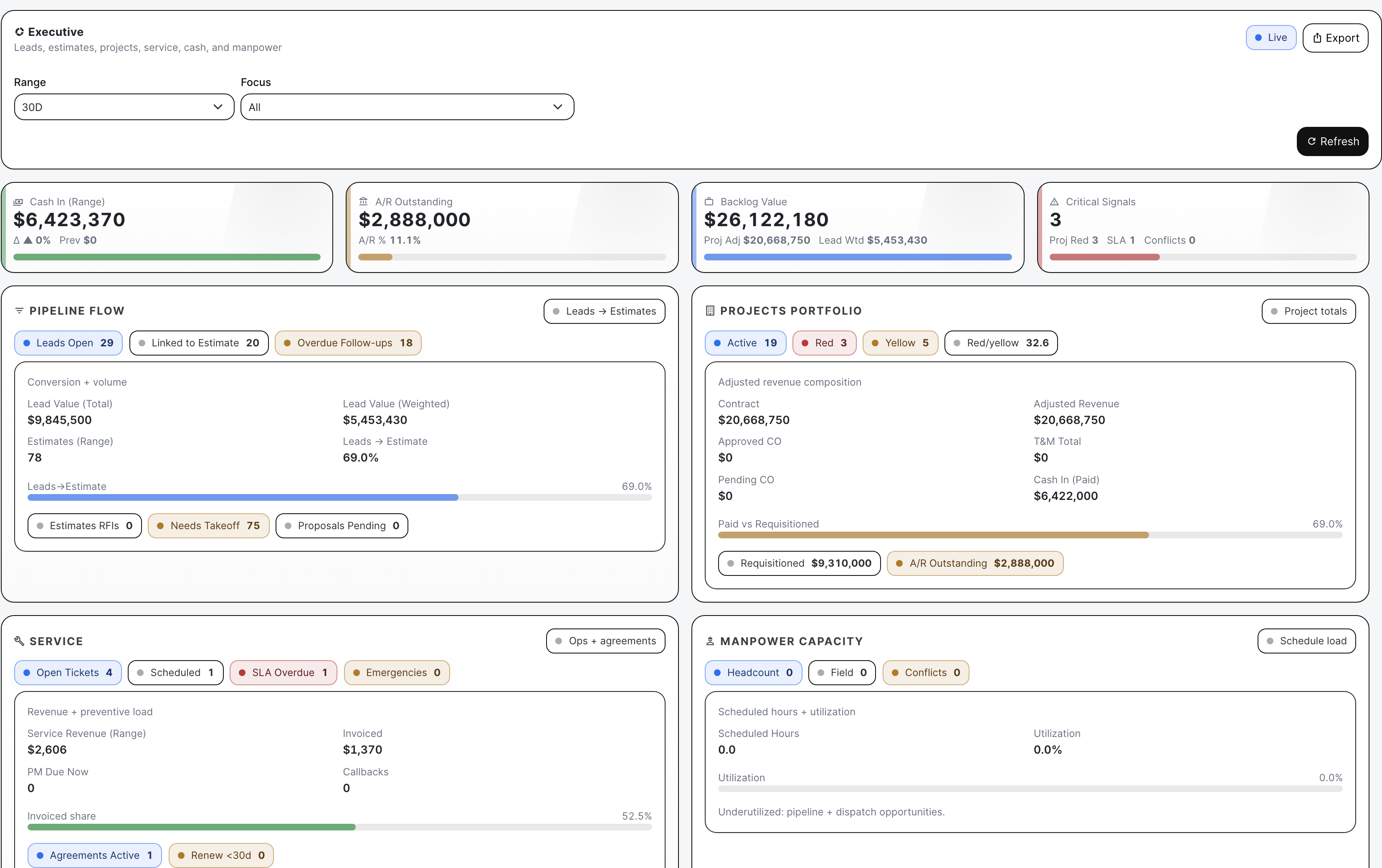
BuildDaily executive analytics
The executive board shows the pressure read across departments, then points managers back to the work.

Real Screens

Real screens across the contractor workflow

BuildDaily project work page with job record, tabs, team, and activity context
The project work page is the job record after award: team access, customer/site context, tabs for the logs, and the PM's working surface in one place.
BuildDaily lead work overview with readiness and action queue
The lead work page shows the pursuit before the bid exists: readiness, owner, action queue, follow-up pressure, files, and estimate handoff context.
BuildDaily estimate work page with bid context and navigation
The estimate work page keeps bid setup, files, bidders, pricing, proposal work, and award handoff in the same estimating record.
BuildDaily public vendor RFP planroom with files and quote upload workflow
Vendor planrooms let outside bidders open files and upload quotes through a focused public link instead of getting internal app access.
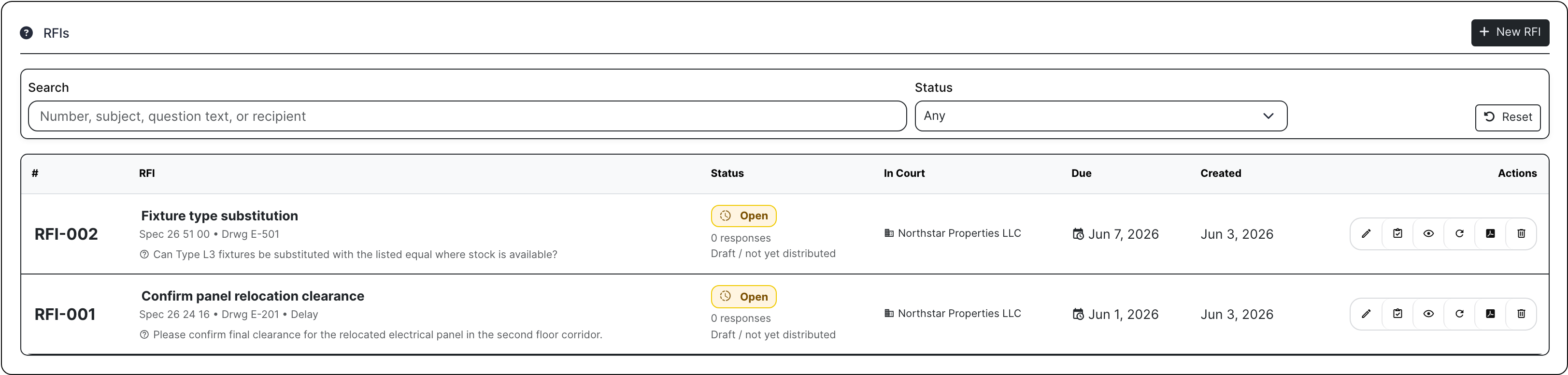
BuildDaily project RFI log with due dates, status, and owner context
Project RFIs show the job question, where it applies, who owes the answer, when it is due, and what happened next.
BuildDaily change order pricing workbench with backup and pricing rows
Change order pricing keeps extra work, backup, scope, cost, markup, and customer-facing value together before it becomes receivable work.
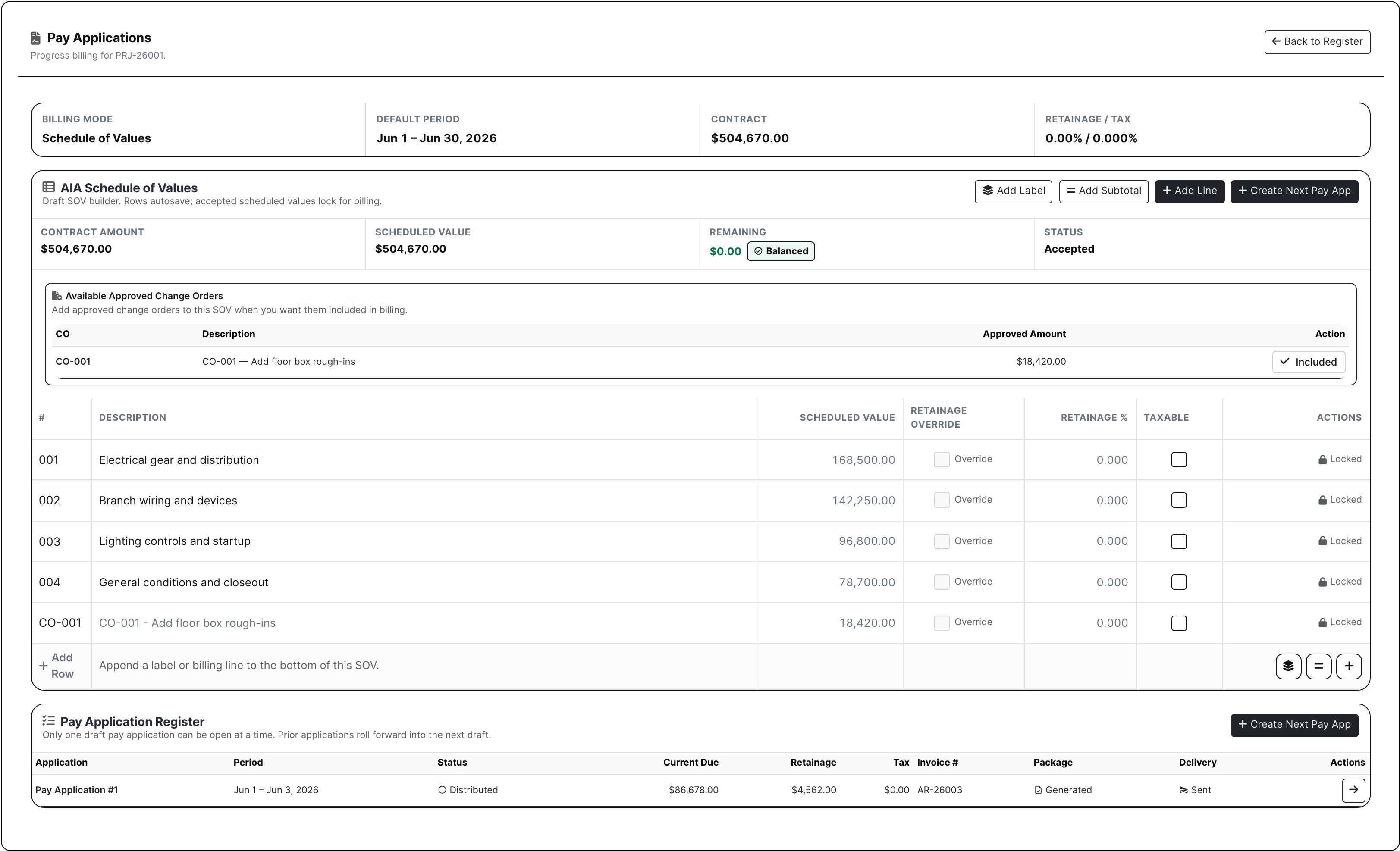
BuildDaily project SOV and pay application register
Pay applications and the SOV show what has been billed, what has been approved, and what package is going out to the customer.
BuildDaily service dispatch board with technician lanes and travel conflicts
Service dispatch turns calls and loose tickets into technician lanes with load, date, priority, assignment, and travel pressure visible.
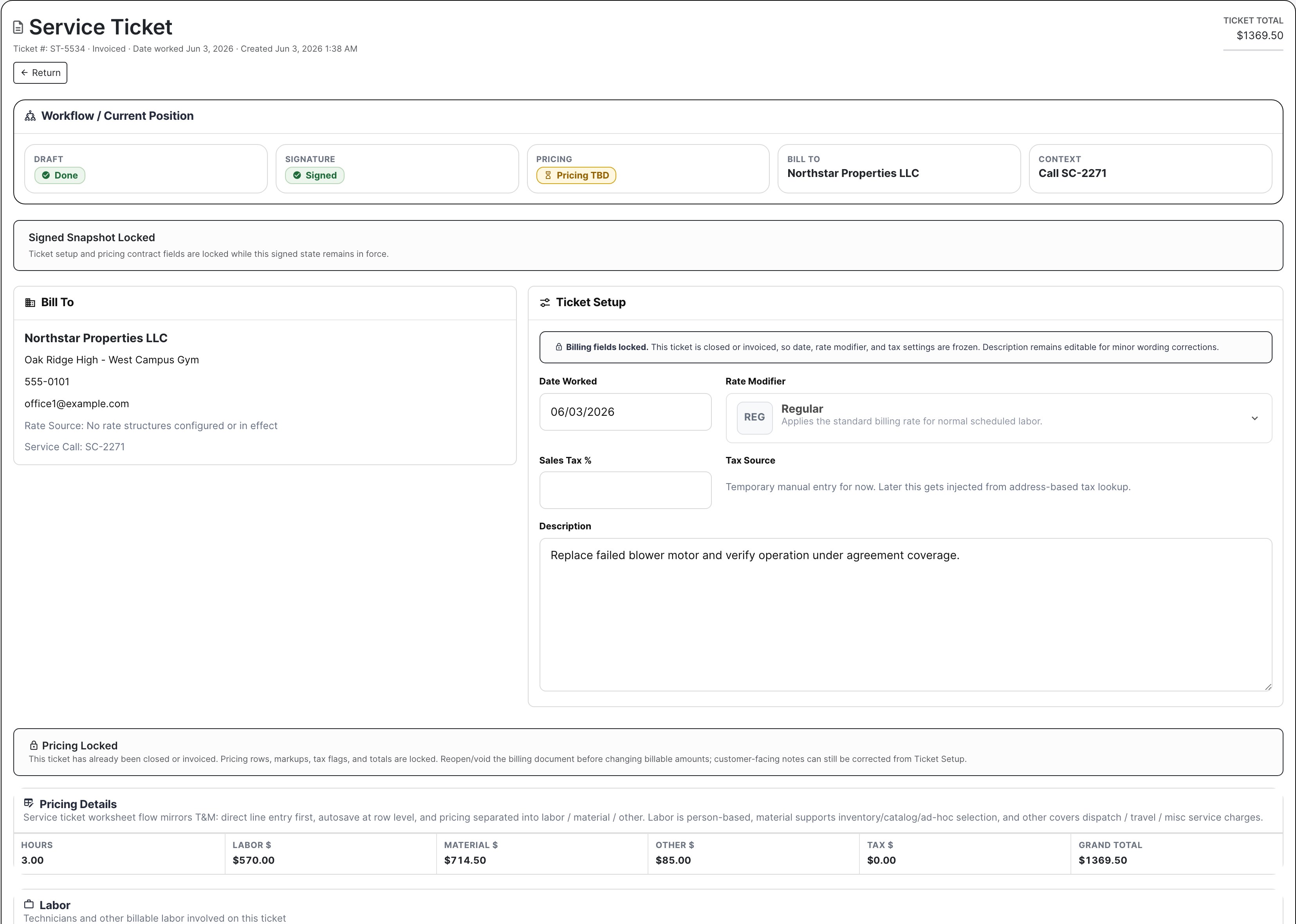
BuildDaily service ticket workspace with billing and completion context
Work On keeps the field result on the ticket: notes, files, labor, material, customer signature, pricing, and billing context.
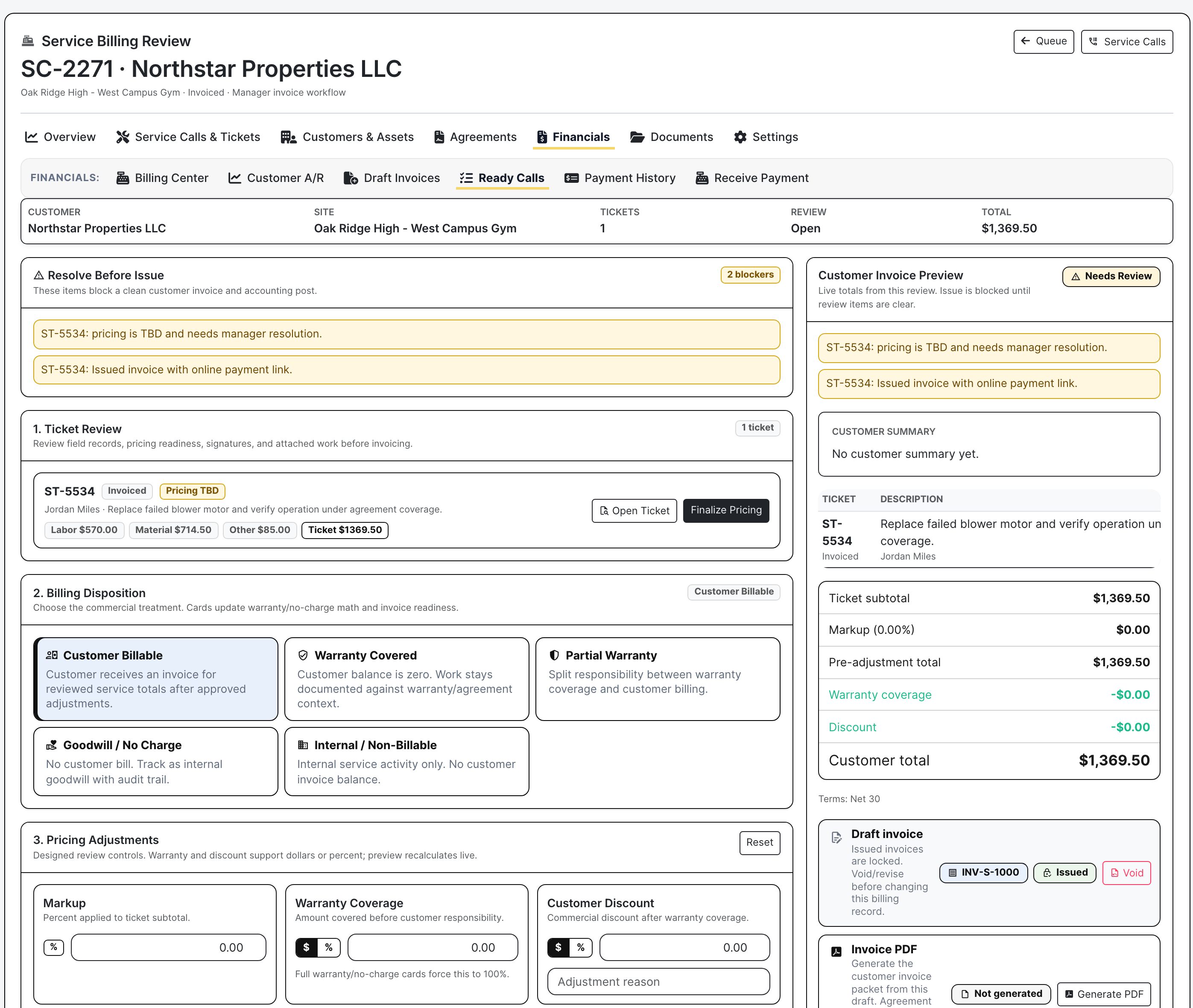
BuildDaily service billing review with disposition and invoice readiness
Billing review makes the financial decision explicit before service work becomes an invoice or stays held for cleanup.
BuildDaily document envelope register with signer and source-record context
Documents shows which agreement is ready, sent, signed, waiting on a signer, or ready to download back to the source record.
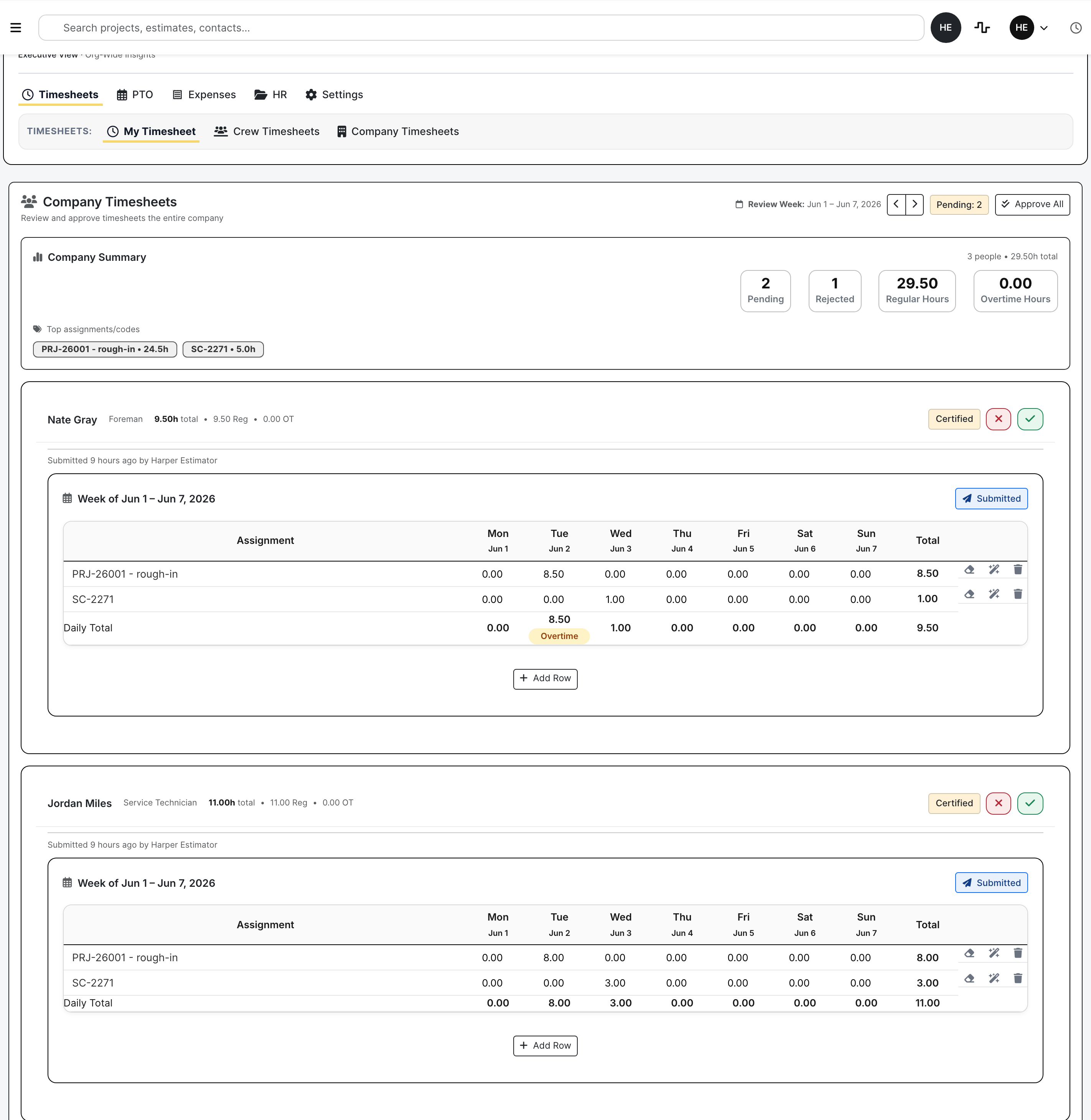
BuildDaily company timesheets review with crew time and approval status
Company timesheets give reviewers a payroll-ready view of employee time, work ties, submission state, and approval decisions.
BuildDaily manpower schedule with crew assignments and planning controls
Manpower scheduling places people against project, service, estimate, and overhead work before conflicts hit the field.
BuildDaily executive analytics board with project service manpower and cash signals
Analytics pulls backlog, A/R, project risk, service load, stale follow-ups, and manpower capacity into a management review surface.

Weekly Use

What the office comes back to during the week

Morning operations review

Owners and managers check the things that can hurt today: stale follow-ups, bids missing quotes, jobs with A/R or RFI trouble, unsigned change work, service calls running late, and crew conflicts.

Office cleanup

Estimators work Bid Desk, PMs open project logs, service managers clean up tickets before billing, HR reviews timesheets and expenses, and dispatch moves technicians or crews before the schedule falls apart.

Outside people get a narrow link

Vendors, reviewers, customers, signers, and subcontractors can open the planroom, review page, signing page, invoice, or portal item they need without seeing the internal app.

Questions

The questions contractors need answered without another spreadsheet

Contractor needs BuildDaily does it
What are we chasing? Yes
Leads show source, customer, contact, jobsite, owner, value, heat, next follow-up, files, calls, emails, linked estimates, and outcome.
Can we bid this cleanly? Yes
Estimates hold files, RFP scopes, bidders, quote status, addendums, RFIs, alternates, takeoff, bid letters, proposals, competitors, bid results, and the project handoff.
What is happening on the job? Yes
Projects hold RFIs, submittals, meetings, permits, inspections, daily reports, safety, deliveries, change orders, T&M, pay applications, A/R, files, drawings, specs, schedules, and closeout.
Can service bill the work? Yes
Service shows the call, dispatch slot, technician, site, equipment, line items, customer signature, billing review, invoice email, payment link, and open balance.
Who needs to sign or review? Yes
Documents and public links handle envelopes, signing, countersignature, vendor planrooms, owner reviews, subcontractor portal work, and executed packages.
Is labor planned and approved? Yes
Timeclock, HR, expenses, PTO, manpower, assets, skills, certifications, licenses, and conflicts help the office catch payroll and crew problems early.
What needs attention? Yes
Analytics shows backlog, A/R, project risk, service load, bid readiness, stale follow-ups, manpower capacity, and where the work is concentrated.
What is still being built? Yes
Accounting and deeper finance areas are treated carefully because they are not a finished replacement for a contractor's full financial close.

Why It Matters

The problem is the handoff, not the lack of another dashboard

The same job appears in different forms

A school boiler replacement might start as a lead, become an estimate, send RFPs to vendors, convert into a project, create change work, collect daily reports, send an agreement for signature, and finish with billing.

The money is hidden in missed handoffs

A stale follow-up loses a bid. An unsigned T&M ticket loses extra work. A service ticket with no billing decision delays cash. A payroll correction burns office time. Those misses usually start when the handoff is vague.

The field and office need different controls

A superintendent, estimator, service manager, dispatcher, HR reviewer, and owner do not need the same screen. They do need the same customer, job, ticket, file, signer, worker, and next action.

Job Path

How one piece of work keeps its context

1

Capture the opportunity or request

Start where the work starts: a lead, customer, estimate, project, service call, agreement, time entry, crew assignment, or support issue. The first entry should not have to be typed again downstream.

2

Move the work to the page where it gets finished

Qualified leads become estimates. Awarded estimates become projects. Service calls become dispatched tickets. Agreements become envelopes with signers and a final executed package.

3

Work the details from the record

Files, notes, contacts, status, line items, decisions, pricing, signatures, due dates, and public links stay on the page where the team is doing the work.

4

Review the decision that matters

The next move is concrete: chase it, bid it, dispatch it, price it, approve it, bill it, send it for signature, escalate it, collect it, staff it, or close it.

5

Use analytics and support to catch what is slipping

Analytics shows which leads, bids, jobs, service tickets, invoices, or crew plans are slipping. Support keeps product issues tied to the module, evidence, reply thread, owner, and next step.

Records

The work areas BuildDaily ties together

Preconstruction and sales

CRM Companies, contacts, locations, compliance, estimating ties, service history, activity, and notes.
Leads Pursuits, owners, follow-ups, files, photos, calls, emails, maps, outcomes, and linked estimates.
Estimating Bid files, RFPs, bidders, no-login planrooms, addendums, RFIs, alternates, takeoff, proposals, competitors, and bid results.
Bid Desk Proposal readiness, bidder replies, pricing review, no-bids, received quotes, and send/resend activity.

Project and field operations

Projects Job identity, team access, notes, activity, settings, tags, customer, location, and favorites.
Management logs RFIs, submittals, project RFPs, meetings, permits, inspections, directives, and correspondence.
Field records Daily reports, lookaheads, safety, deliveries, toolbox talks, punch work, files, photos, and manpower.
Financial controls Change orders, T&M tickets, pay applications, requisitions, A/R, payment links, subcontractor records, and billing notes.

Service, workforce, documents, and intelligence

Service Calls, dispatch, tickets, sites, equipment, agreements, rates, line items, signatures, billing review, invoices, and payments.
Time and manpower Clocking, timesheets, PTO, expenses, HR files, crew schedules, assets, skills, certifications, licenses, and conflicts.
Documents and portals Templates, envelopes, public signing, executed packages, vendor planrooms, owner review links, and subcontractor/customer portals.
Analytics, support, and Friday Executive boards, support tickets, evidence threads, reviewed AI help, and cleaner wording for job records.

Decisions

What the team can decide from the work in front of them

Operational decisions

  • Which leads need follow-up before they go cold?
  • Which bids are missing takeoff, pricing, proposals, or vendor quotes?
  • Which projects have red/yellow health, overdue RFIs, unsigned change work, or A/R trouble?
  • Which service tickets are complete but not financially ready?

Financial decisions

  • Can this T&M ticket or change order be priced and packaged?
  • Is the service ticket customer billable, warranty, goodwill, internal, partial coverage, or not ready?
  • Which invoices, payment links, pay applications, receivables, and customer balances need attention?
  • Which accounting areas are usable job context, and which are still development-stage?

People and schedule decisions

  • Are the right people scheduled to the right project, service, estimate, or overhead work?
  • Who has a time, PTO, expense, receipt, certification, license, or HR file issue?
  • Which assignments conflict before the field finds out?
  • Where does dispatch or manpower need to move capacity?

External-party decisions

  • Which vendor still owes a quote?
  • Which reviewer needs a public link or reminder?
  • Which customer needs an invoice, payment link, signature, or service update?
  • Which signer, owner, subcontractor, customer, or support requester owes the next answer?

Practical Comparison

How to think about it against familiar tools

Versus a generic CRM

A CRM can remember who the customer is. BuildDaily also shows the bid, job, service ticket, agreement, crew issue, and billing trail tied to that customer.

Versus project-only software

Project-only systems often start after award. BuildDaily can show what happened before award too: lead, estimate, bidders, vendor quotes, proposal work, and the files that became the job.

Versus spreadsheets and shared drives

Spreadsheets can list work, but they do not know whether a vendor opened the planroom, a signer finished the packet, a service ticket is billable, or a crew conflict is about to hit the schedule.

Bring one lead, one bid, one job issue, one service call, and one crew question.

That is the fastest way to judge BuildDaily: use the work your team already knows and see whether the handoff gets cleaner.

Request Demo