BuildDaily

Service

Service work from the first call to the paid invoice

Service is where small emergencies become real money or real leakage. BuildDaily keeps the call, schedule, field ticket, agreement terms, parts, signature, billing review, invoice packet, and payment link in one trail, so a repair does not disappear into a technician note, an inbox thread, or a spreadsheet.

Service Workflow

Follow the service job from phone call to cash

Start with the right customer, site, equipment, and urgency

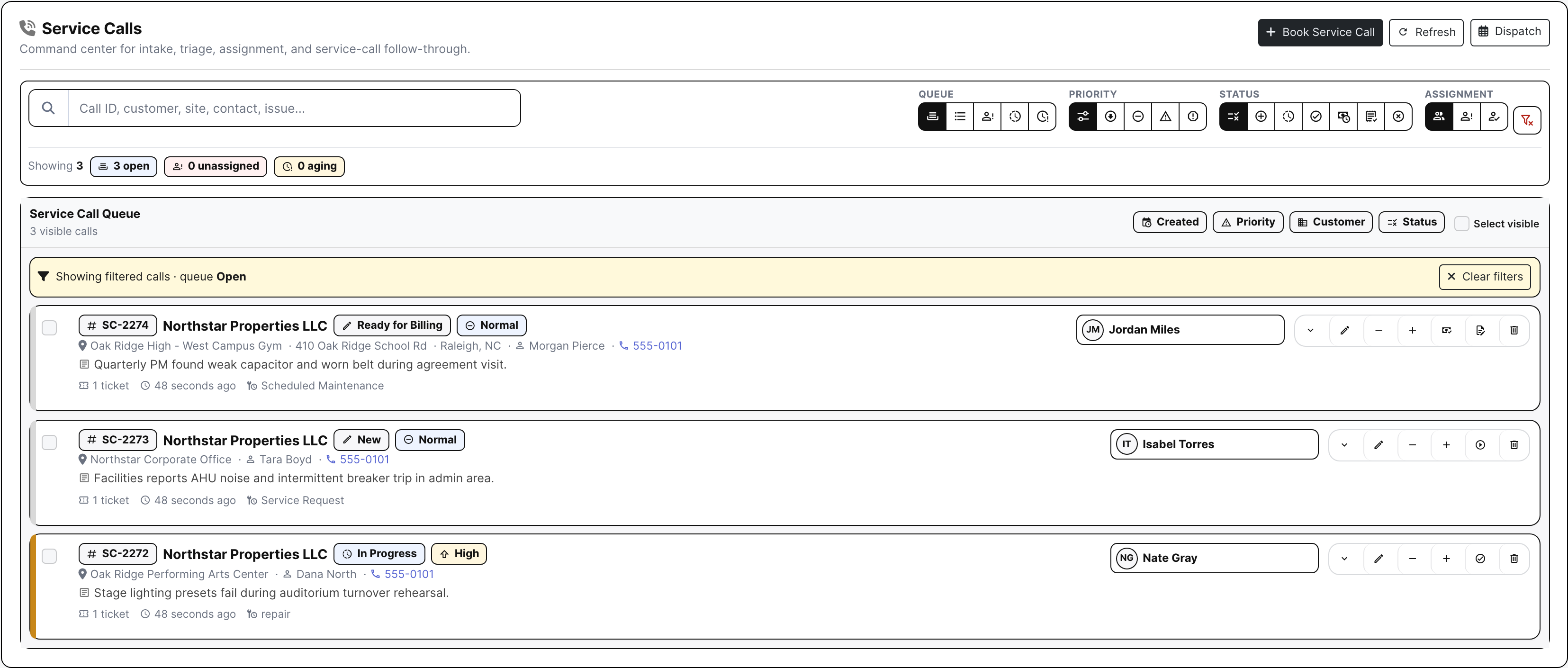
The call record is the first commercial decision. BuildDaily captures who called, which location is down, which unit is involved, how urgent the response is, and whether the work belongs under an agreement, warranty, project, estimate, or ordinary billable repair.

  • Capture customer, site, caller, equipment, issue, call type, and priority
  • Keep agreement, warranty, project, and estimate context attached from the start
  • Turn intake into tickets without losing the original call history
Service calls list
The call record keeps intake, assignment, and billing context together before a technician is dispatched.

Build a technician day that can actually be run

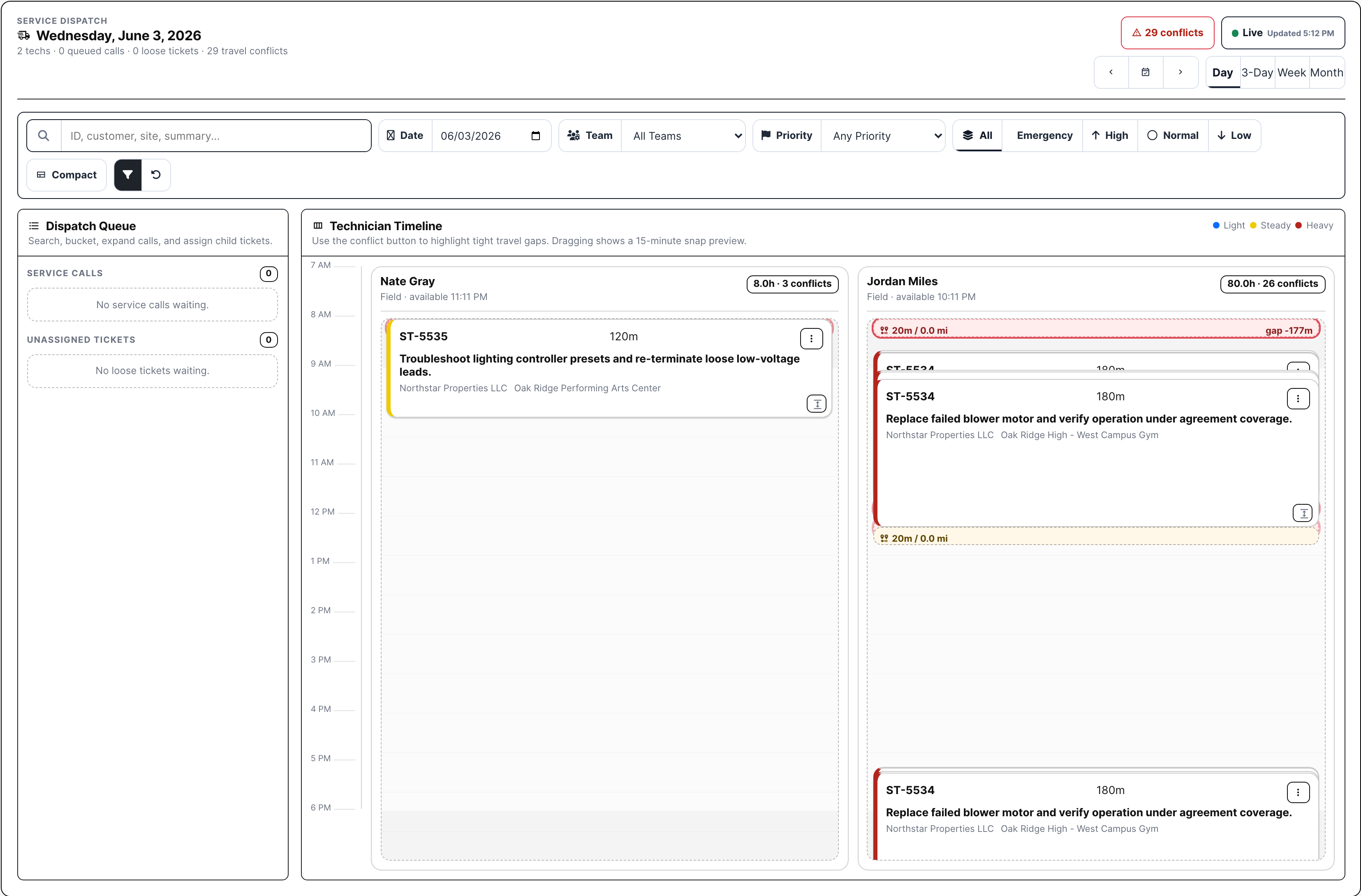
Dispatch is where service work either becomes manageable or starts bleeding time. The board shows technician lanes, scheduled slots, loose calls, loose tickets, travel pressure, conflicts, and date/team/priority filters before the route breaks in the field.

  • Place, resize, move, or unschedule dispatch slots
  • Balance technician load against priority and travel pressure
  • See loose work and conflicts before they become missed windows
Service dispatch board
The dispatch board shows load, timing, and conflict pressure instead of hiding it in calendar notes.

Keep the ticket queue readable when the day gets messy

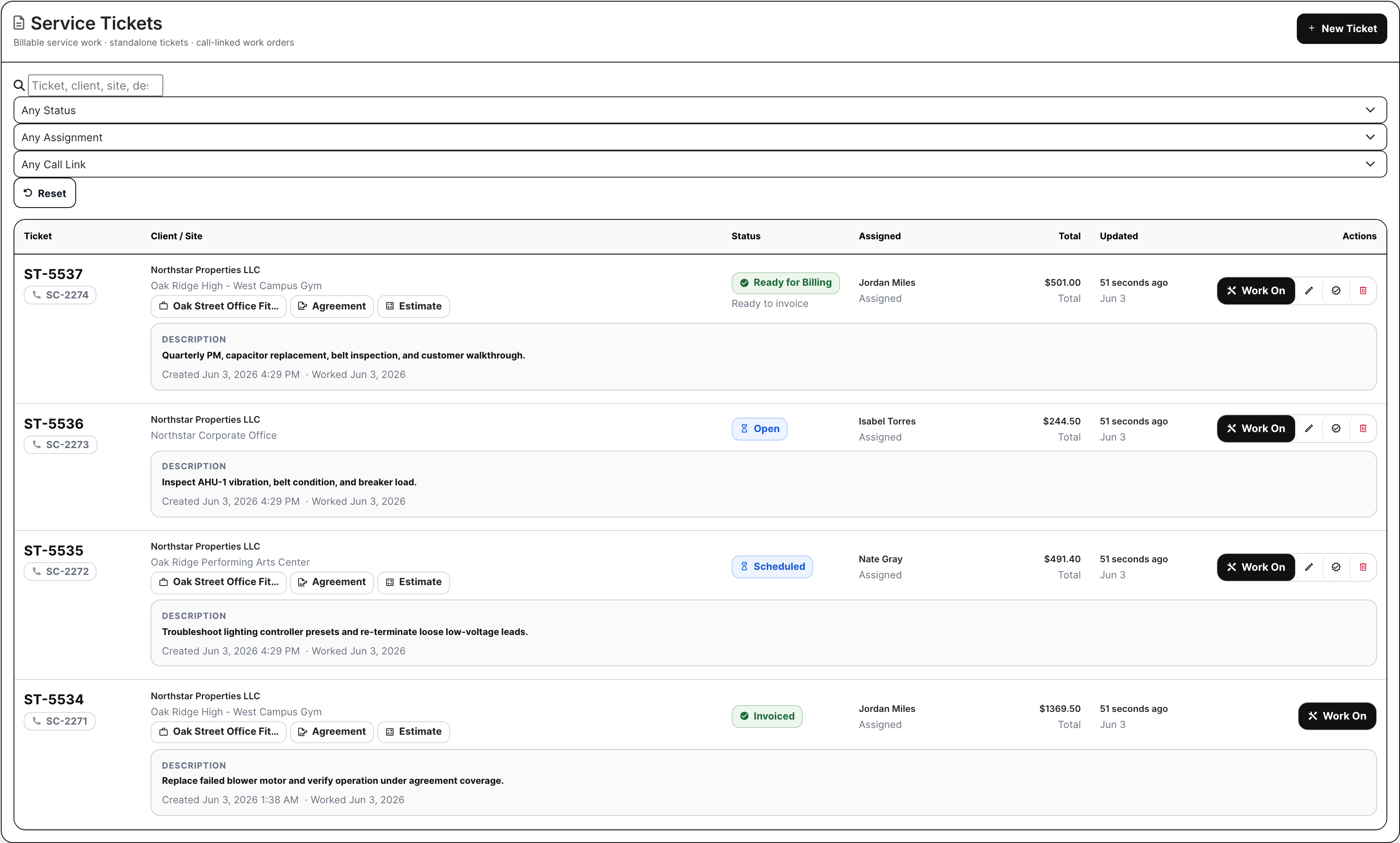
The ticket list is the shared queue for dispatch, service management, and billing. It shows who the work is for, where it happened, which call it came from, whether an agreement or job matters, who owns it, what state it is in, and whether money is already on the ticket.

  • Filter tickets by operating state instead of hunting record by record
  • Open Work On from the row that already shows customer and billing context
  • Keep calls, agreements, projects, estimates, assignments, and totals connected
Service ticket list
Ticket rows carry enough context for the office to triage before opening the work.

Work On is the field ticket and the office record

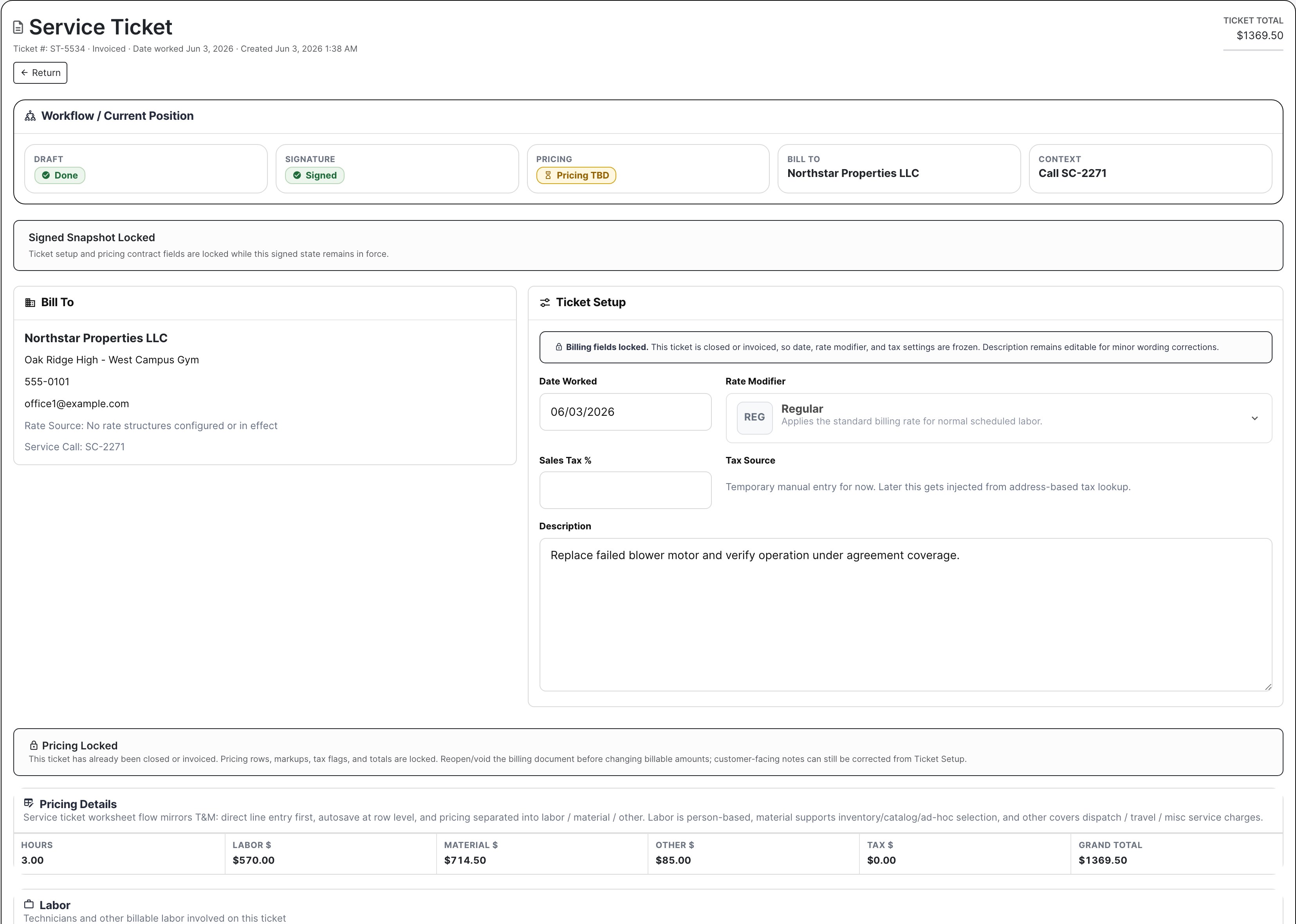
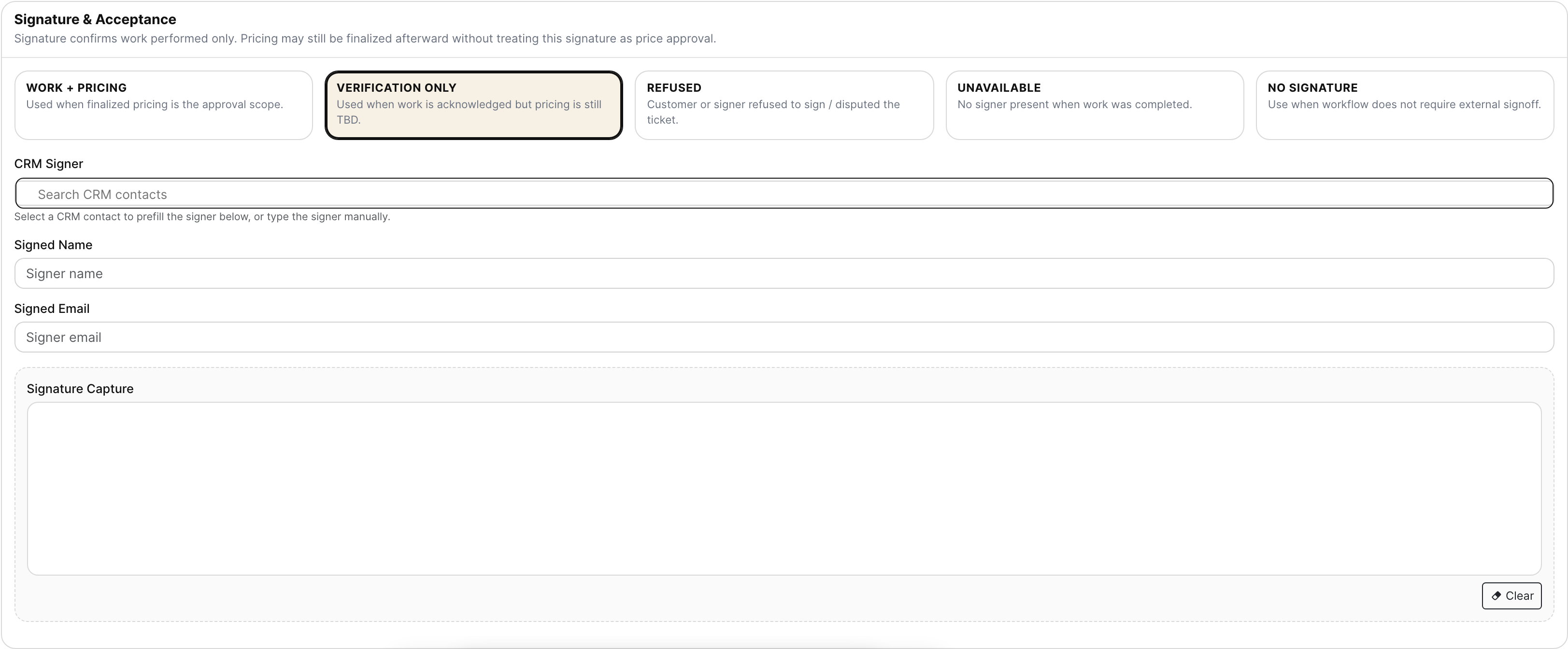
A service ticket cannot be a loose PDF, a phone photo, and a later accounting guess. Work On keeps the bill-to, setup, date worked, rate modifier, signed snapshot, labor, materials, other charges, files, site history, equipment history, and signature panels in the same workspace.

  • Record labor, material, other charges, notes, files, photos, and signature
  • Use Timeclock and Manpower suggestions when service work can be matched back to time and schedule
  • Keep signed and invoiced tickets controlled without making corrections impossible
Service ticket workspace
The ticket workspace is where field completion and billing readiness meet.

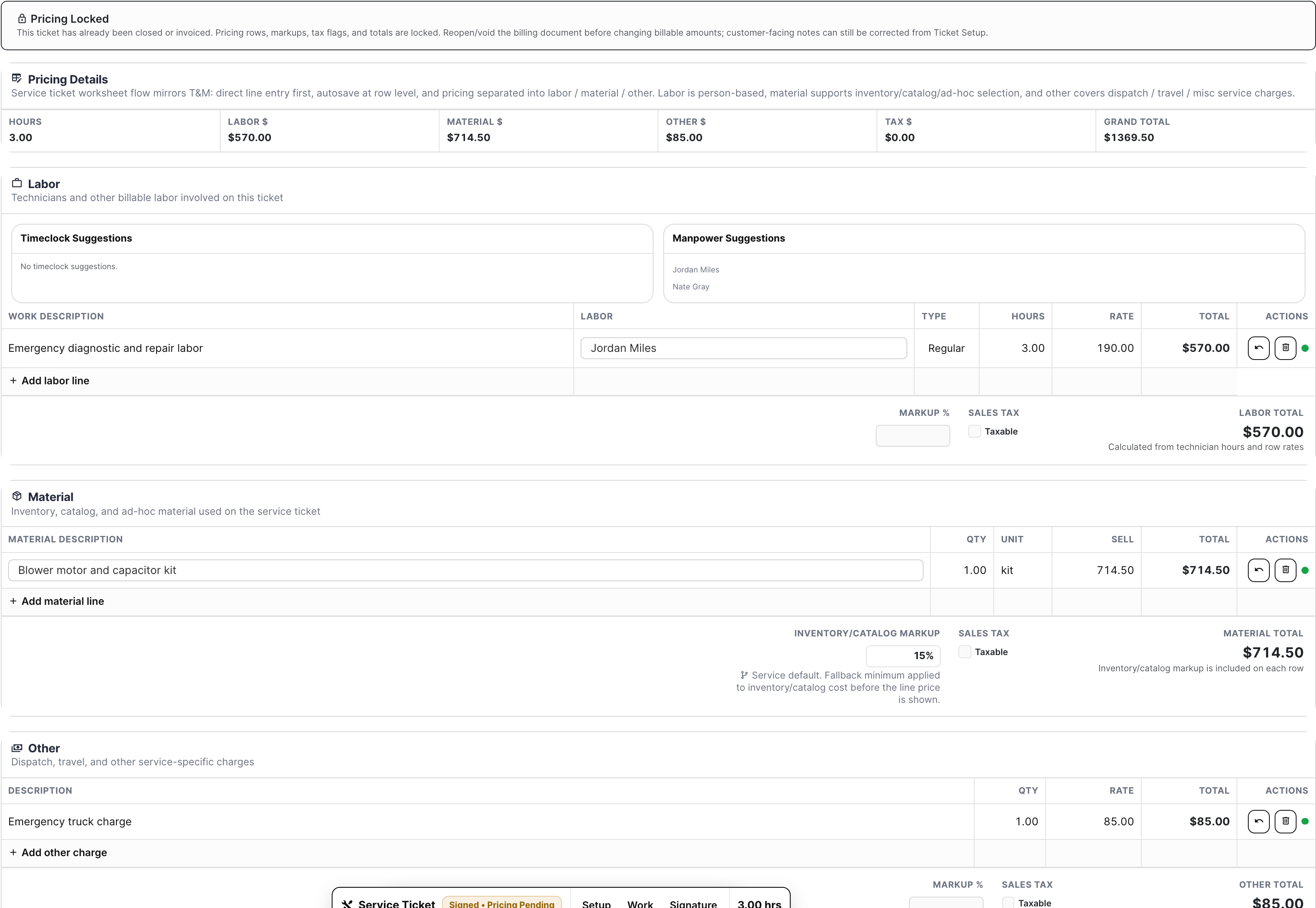
Parts and labor stay priced, not buried in notes

The material row is where margin is often won or lost. BuildDaily keeps labor, parts, quantities, cost, sell price, tax, and totals visible, with catalog or inventory context available where the item can tie back to stock, truck parts, or common materials.

  • Separate labor, material, and other charge lines
  • Carry cost, sell price, quantity, tax, and totals into billing review
  • Tie service material usage back toward inventory or catalog records when available
Service ticket pricing rows
Line items show what the repair is worth before the invoice is created.

Agreements stop PM, coverage, rates, and billing from splitting apart

Service agreements are not just contract storage. They define the billing model, flat or T&M treatment, SLA, covered work, PM schedules, next invoice timing, and document signature state that service needs when a call comes in.

  • Manage flat, T&M, and hybrid agreement terms
  • Track PM schedules, coverage, SLA, status, and next invoice timing
  • Route agreement documents for signature and countersignature through Documents
Service agreements with document status
Agreements show the contract, the recurring work, the signature state, and the billing automation together.

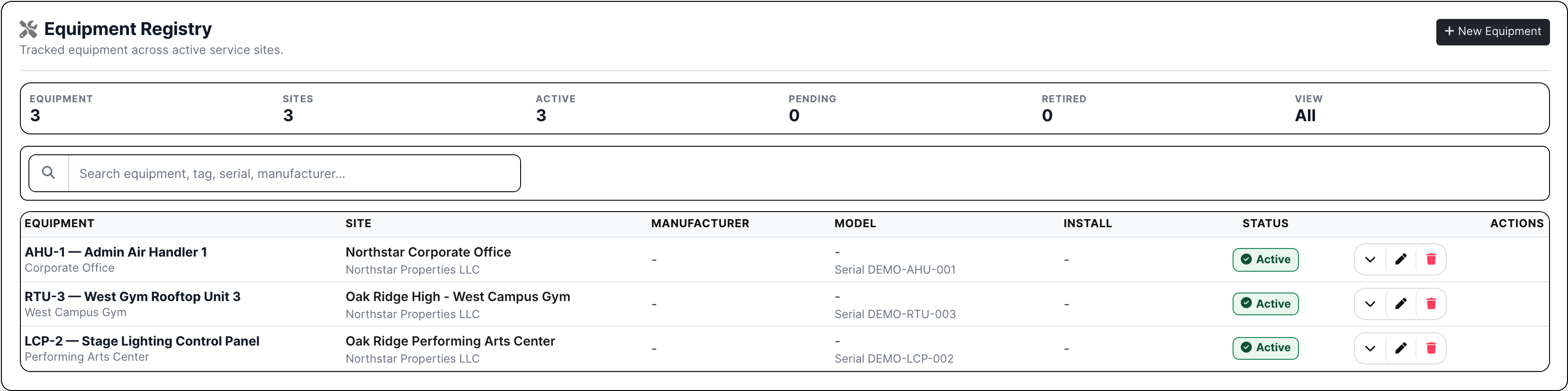
Sites and equipment create service memory

Repeat customers should get smarter service every visit. Sites and equipment keep the location, contacts, asset identity, manufacturer, model, warranty dates, PM needs, past tickets, and covered agreement context where dispatch and billing can use it.

  • Track customer locations, service contacts, and equipment records
  • Attach calls, tickets, agreement coverage, and history to the correct site and unit
  • Make warranty and PM context available before dispatch and invoice review
Service equipment list
Equipment records keep unit-level context available for the next repair or PM visit.

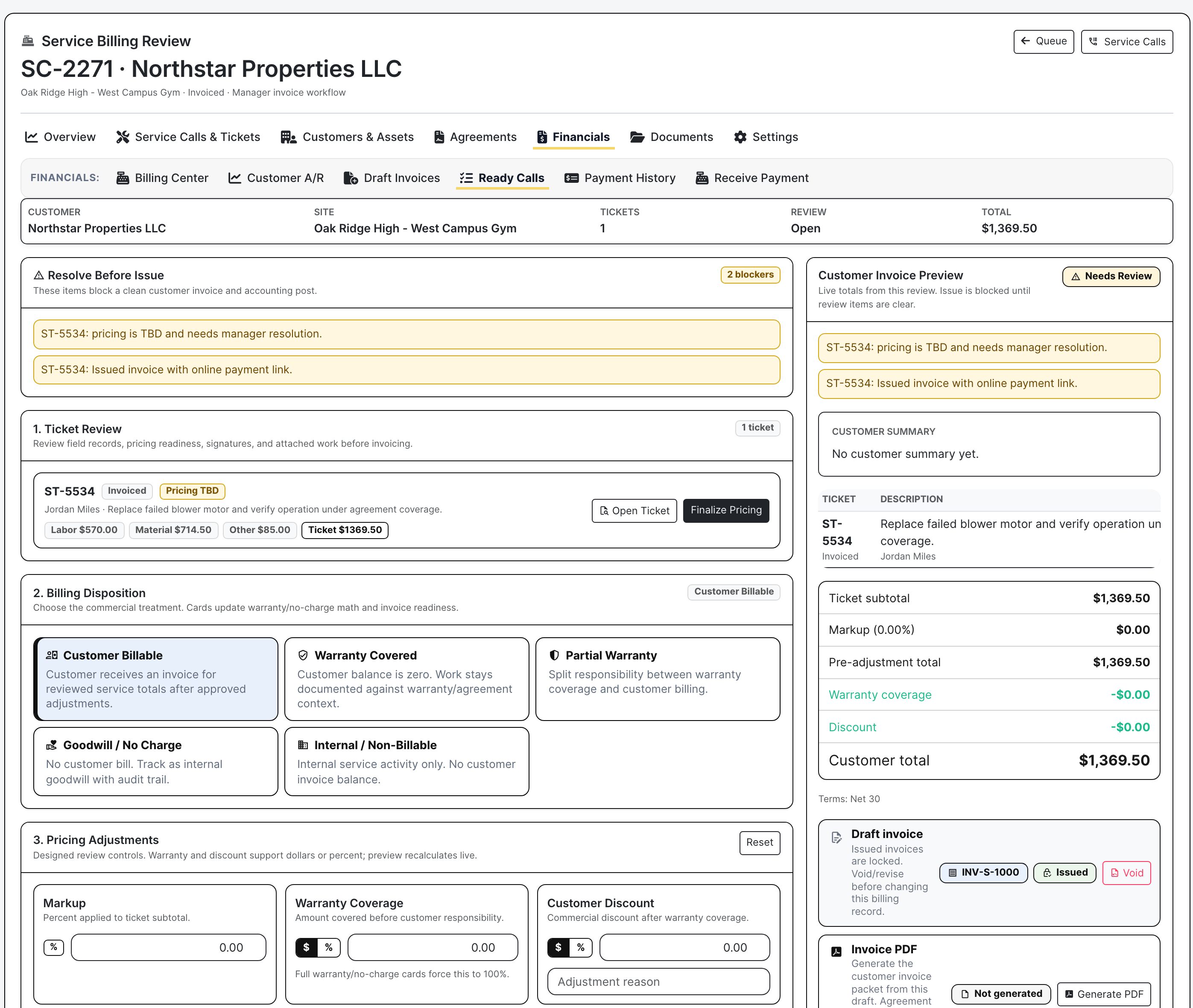
Billing review protects revenue before the invoice leaves

Finished field work is not automatically clean billable work. Billing review catches missing prices, signature gaps, warranty treatment, discounts, no-charge decisions, internal work, customer summaries, invoice preview, and issue controls before the customer sees it.

  • Review ticket totals, summaries, signatures, and blockers
  • Choose customer billable, warranty, partial warranty, goodwill, no-charge, or internal treatment
  • Generate draft, PDF, and issued invoices only after the ticket is commercially ready
Service billing review
Billing review makes the office decide what the ticket is financially before it becomes an invoice.

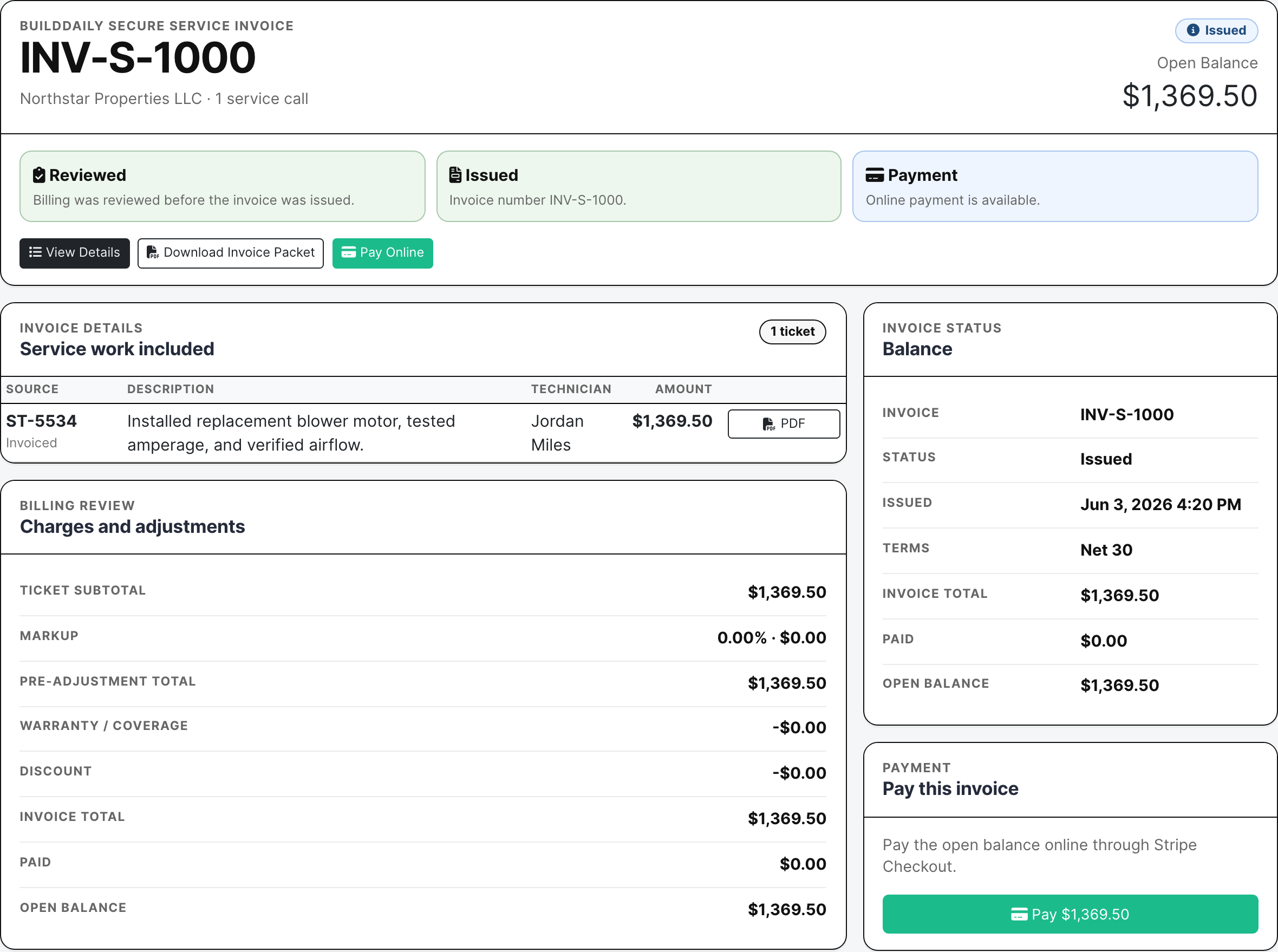
The invoice email can ask for payment immediately

When Stripe payments are enabled, the issued service invoice can include a public Pay Online path. The customer can review the packet and pay without creating an account, while the office keeps invoice status, open balance, payment history, reminders, statements, and receive-payment actions in view.

  • Send invoice emails with payment-link readiness
  • Give customers a no-login invoice and payment page
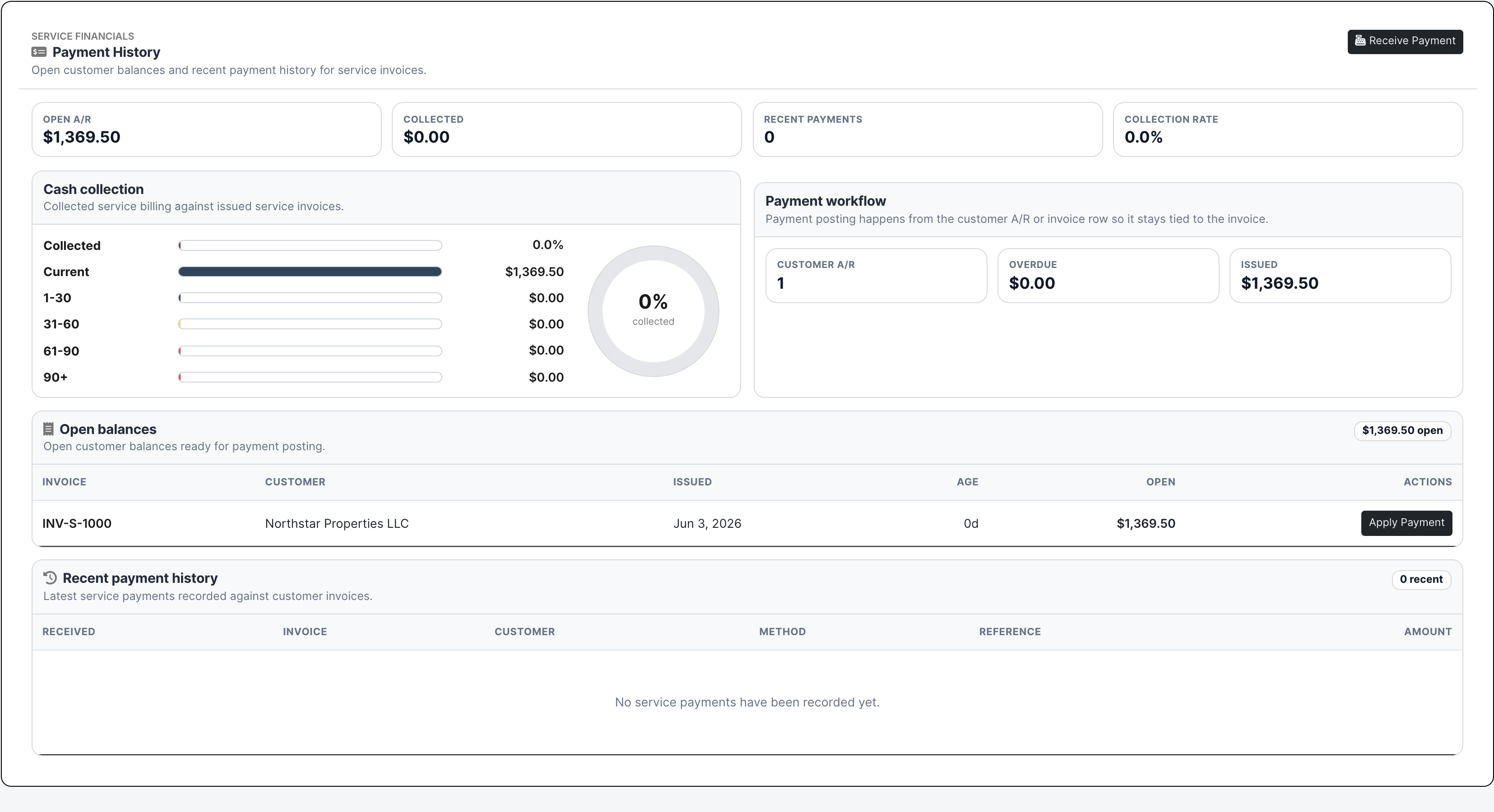
  • Track open balances, receipts, payment history, reminders, and A/R follow-up
Public service invoice payment link
The public invoice page gives the customer the packet, open balance, and online payment button in one place.

Service Proof

Actual service screens with real work loaded

Service dispatch board with technician timelines and travel conflicts
Dispatch gives the office a live view of the technician day: what is scheduled, what is still loose, where travel gets tight, and which priority calls are about to collide.
Service ticket list with linked calls and billing state
The ticket list is the control room. It shows the customer, site, linked call, agreement or job context, technician, status, total, and the Work On action without forcing the office to open every record.
Service ticket workspace with workflow status and bill-to context
Work On is where the field record becomes billable work: bill-to, setup, current status, signature state, pricing state, call context, and the worksheet for labor and materials.
Service ticket labor material and other line items
The money on the ticket is visible before billing touches it. Labor, parts, other charges, costs, sell prices, tax, and totals stay tied to the actual repair.
Service ticket signature and signed snapshot
The customer signature becomes part of the ticket record, while billing can still review wording, pricing, and treatment before anything goes out.
Service agreements with billing automation PM schedule and signature status
Agreements show whether coverage is signed, what billing model applies, which PM schedules are active, and whether renewal or countersignature work is still pending.
Service billing review with ticket review and customer invoice preview
Billing review forces the commercial decision: customer billable, warranty, goodwill, internal, partial coverage, or not ready. The invoice is not treated as an afterthought.
Public service invoice with Stripe payment link
The customer can open a no-login invoice page, download the packet, see the open balance, and pay online through Stripe when payments are enabled.
Service payment history and customer open balances
A/R can see what is still open, what has been paid, which invoice the money belongs to, and where a reminder or statement belongs.
Service equipment records
Equipment history stays with the unit, not with whoever happened to answer the last call. Asset, site, warranty, PM state, and ticket history stay available for the next visit.

Service Desk

How each seat uses the same service record

Service manager

Owns response time, margin, PM commitments, agreement coverage, aging tickets, and the handoff between field completion and billing.

Dispatcher

Builds the technician day from real call pressure, not guesswork: loose calls, loose tickets, scheduled work, travel conflicts, priority, and team availability.

Technician

Works from the ticket, records what happened, adds labor and material, attaches proof, captures the signature, and leaves the office a billable record instead of a story to reconstruct.

Billing and A/R

Turns completed tickets into clean invoices, decides warranty or no-charge treatment, sends invoice emails, watches payment links, and follows the balance until it is collected.

Warehouse and operations

Uses material lines and equipment history to understand common parts, truck stock, warehouse pulls, repeat failures, and replenishment pressure.

Coverage

Service jobs contractors have to control

Contractor needs BuildDaily does it
Call intake Yes
Opens the service request with customer, site, caller, affected equipment, issue, priority, agreement, warranty, assignment, and linked ticket context.
Dispatch control Yes
Schedules technicians on a board that shows loose work, placed work, route pressure, conflicts, team filters, date filters, and priority filters.
Ticket workspace Yes
Gives the office and field one Work On page for bill-to, setup, workflow state, signature state, pricing state, notes, files, history, and equipment context.
Labor and material pricing Yes
Keeps hours, techs, parts, quantities, costs, sell prices, taxes, miscellaneous charges, and totals visible before the invoice is created.
Field signoff Yes
Captures the customer's signature and signed snapshot while keeping final invoice language and billing treatment under office control.
Time and schedule reconciliation Yes
Surfaces Timeclock and Manpower suggestions where service tickets can be matched to employee time and scheduled field labor.
Customer sites Yes
Maintains service locations, contacts, address history, related calls, related tickets, and the equipment installed at each site.
Equipment history Yes
Tracks unit identity, tag, manufacturer, model, warranty context, PM state, prior tickets, and repeat-service history.
Service agreements Yes
Maintains coverage, billing model, SLA, status, PM schedules, next invoice timing, document status, and renewal/signature work.
Agreement documents Yes
Routes generated service agreements through Documents for signing, countersignature, retract/reissue, executed packages, and audit history.
Rates and labor classes Yes
Applies service pricing rules, labor classes, rate modifiers, travel/dispatch treatment, and agreement/customer-specific billing context.
Preventive maintenance Yes
Connects recurring PM schedules to covered equipment and agreements so repeat visits are managed as obligations, not calendar reminders.
Billing review Yes
Catches missing prices, signatures, summaries, and blockers before choosing customer billable, warranty, goodwill, no-charge, partial coverage, or internal treatment.
Invoice delivery Yes
Creates invoice packets, issues customer invoices, sends invoice emails, and includes Stripe-backed Pay Online links when payments are configured.
Customer A/R Yes
Shows open balances, recent payments, statements, reminders, invoice links, receive-payment actions, and the payment trail behind the service invoice.
Inventory and parts Yes
Connects service material usage back toward catalog or inventory records so common parts, truck stock, and warehouse movement are not invisible.
Files and service proof Yes
Keeps photos, PDFs, ticket files, service library files, support files, generated packets, and customer-facing downloads attached to the work.

Call To Cash

A live service ticket, start to finish

1

The phone rings

The office records the caller, customer, location, affected equipment, issue, urgency, and whether this should be treated as agreement, warranty, project, estimate, or regular billable work.

2

Dispatch turns it into a technician day

The dispatcher places the work on the board, checks loose work and conflicts, and makes the route visible before the technician is sent into the field.

3

The technician completes the record

Work On captures the field summary, labor, parts, other charges, photos, files, site context, equipment context, and customer signature.

4

Agreement rules stay in the room

Coverage, SLA, PM schedule, warranty context, rate structure, and document status stay attached so repeat service is not treated like a brand-new mystery every time.

5

Billing decides what the work is worth

The office resolves blockers, chooses the right billing treatment, reviews ticket totals, previews the invoice, and creates or issues the customer invoice.

6

The customer can pay from the invoice

The public invoice page shows the packet, service line, invoice total, open balance, and Stripe-backed Pay Online button. A/R can see what is still outstanding.

Operating Areas

The service desk by responsibility

Service command

Dashboard The manager view of open work, service pressure, queues, and the tickets that need attention.
Dispatch The technician board for scheduled slots, loose work, conflicts, route pressure, unscheduling, and priority filtering.
Service Calls The intake lane for customer calls, site/equipment issues, assignment, priority, status, linked tickets, and billing context.
Tickets The operating queue and Work On workspace for assignment, field completion, line items, files, signatures, status, billing state, and activity.

Customers and assets

Sites Customer locations with contacts, addresses, service history, ticket history, and the equipment installed there.
Equipment Unit records with tag, manufacturer, model, warranty, PM state, site, customer, and service history.
Technicians Technician profiles with service tags, dispatch readiness, billing context, and truck/rate assumptions where used.
Assets Company-owned assets that support field service operations when they are part of the workflow.

Agreements and PM

Agreements Coverage, billing model, SLA, flat rate, automation, PM schedules, document status, and active/renewal status.
Rate Structures The rules that control labor, material, travel, dispatch, agreement, and customer-specific service pricing.
Labor Classes The technician labor categories and billing assumptions behind ticket pricing.
PM Templates and Records Recurring maintenance schedules, checklist records, covered equipment, visit history, and execution state.

Financials

Billing Center The review desk for turning completed service work into the right commercial outcome.
Ready Calls Completed service calls that are waiting for manager review before invoicing.
Draft Invoices Invoices prepared from service work before they are issued to the customer.
Customer A/R Customer balances, linked invoices, statements, reminders, and payment posture.
Payment History Recent payments, open balances, invoice links, and receive-payment actions.
Receive Payment The office action for applying received customer money to issued service invoices.

Documents and files

Library Reusable service documents, forms, and reference files.
Support Files Files attached to service support records and service operations.
Generated PDFs Ticket closeout PDFs, invoice packets, service agreement documents, and public download links.
Service Settings The operating defaults and configuration that keep service behavior consistent.

Weekly Reality

Service work that has to survive a busy week

Emergency repair

  • Capture the call with priority, caller, site, equipment, and issue.
  • Dispatch the technician while the board shows travel pressure and schedule conflicts.
  • Record labor, parts, other charges, notes, files, and customer signature from the Work On page.
  • Review the ticket commercially, issue the invoice, and send the payment link.

Agreement PM visit

  • Start from covered site/equipment and the PM schedule, not a disconnected calendar event.
  • Send the visit through dispatch and complete it in the same ticket workspace.
  • Keep agreement coverage, SLA, rate rules, and document status visible while the work is completed.
  • Bill by agreement terms or mark the visit covered, depending on the contract.

Warranty, goodwill, or no-charge work

  • Document the field work with the same labor, material, files, and signature trail.
  • Decide warranty, partial warranty, goodwill, no-charge, or internal treatment during billing review.
  • Keep the operational record without accidentally sending the customer the wrong invoice.

Customer billing and collection

  • Finalize ticket pricing and customer-facing summary.
  • Generate the invoice packet and issue the service invoice.
  • Email the invoice with Pay Online when Stripe payments are enabled.
  • Track open balance, reminders, statements, and received payments.

Parts, truck stock, and inventory follow-through

  • Record the parts used on the ticket while the technician still knows what happened.
  • Use catalog or inventory context for common items where available.
  • Give warehouse and operations a cleaner path to see usage, replenishment, and recurring part demand.

Walk through Service work from the first call to the paid invoice

We can walk through the module around the way your company actually handles the work.

Request access