BuildDaily

Service Dispatch

Put the right technician on the right service call before the day slips

Dispatch is the service desk for turning calls and tickets into a technician day. The board starts with queued service calls and loose tickets, then gives dispatchers date, team, priority, and calendar controls. Technician lanes show scheduled work, load, travel gaps, and live refresh signals so the office can move work without losing the ticket record.

Dispatch Workflow

How service work moves from call queue to technician lane

Start with the queue, not a blank calendar

Service dispatch starts with the work that is actually waiting: customer calls, equipment issues, loose tickets, priority, and who has already been assigned. The office can search by customer, site, ticket, or summary, then decide what needs a truck today and what can wait.

  • Search calls and tickets by real job details
  • Sort the day by priority instead of memory
  • Open service calls to see the tickets underneath them
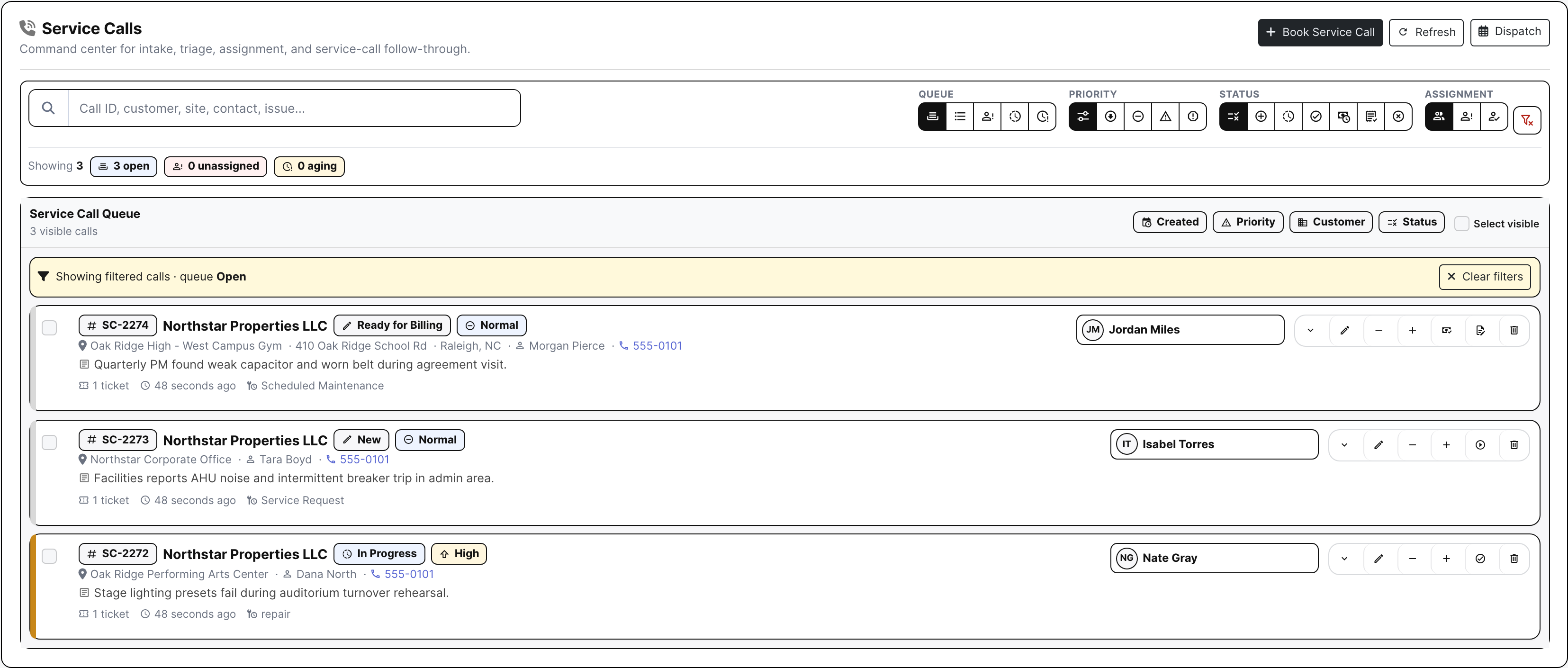
Service calls queue with real customer and priority context
The call queue shows the work dispatch has to place before a technician is sent.

Schedule against technician lanes

The board is built around technician timelines, not a generic appointment list. Dispatchers can move between day, three-day, week, and month views; filter by team or priority; and place work into a time-sized slot for the technician who can actually take it.

  • Use day, three-day, week, and month planning views
  • Filter by date, team, priority, and search text
  • Assign, move, resize, or unschedule appointment slots
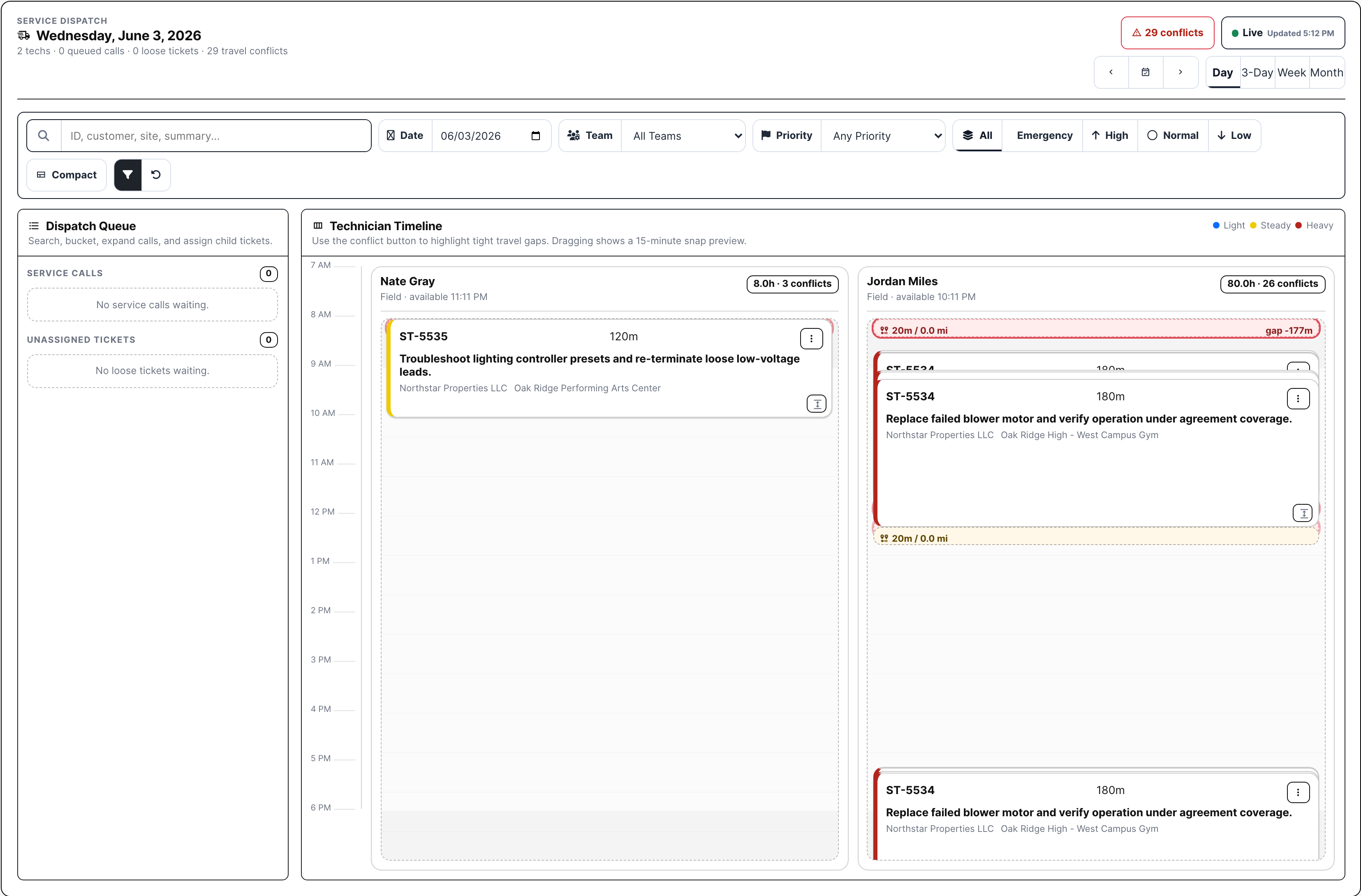
Dispatch board with technician lanes
Technician lanes show the schedule, assignment cards, load pressure, and travel conflict context.

Catch load and travel pressure before it costs the day

A full technician lane is not the same as a workable route. Dispatch shows scheduled hours, next availability, load pressure, travel cards, and conflict counts so the office can fix a bad day before the technician is already across town.

  • See light, steady, and heavy technician load
  • Review travel conflicts from the board
  • Use auto-space when tight travel gaps need cleanup
Dispatch board showing travel pressure and scheduled service work
The dispatch board gives the office enough route pressure to adjust work before the field day breaks.

Keep the ticket moving after assignment

Sending a technician is only useful if the ticket record moves with the work. Dispatch assignment updates the ticket context, and Work On carries the field result into notes, files, labor, material, signature, pricing, and billing review.

  • Keep assigned technician and schedule tied to the ticket
  • Let the tech complete the same ticket dispatch scheduled
  • Carry service work into billing without rebuilding the story
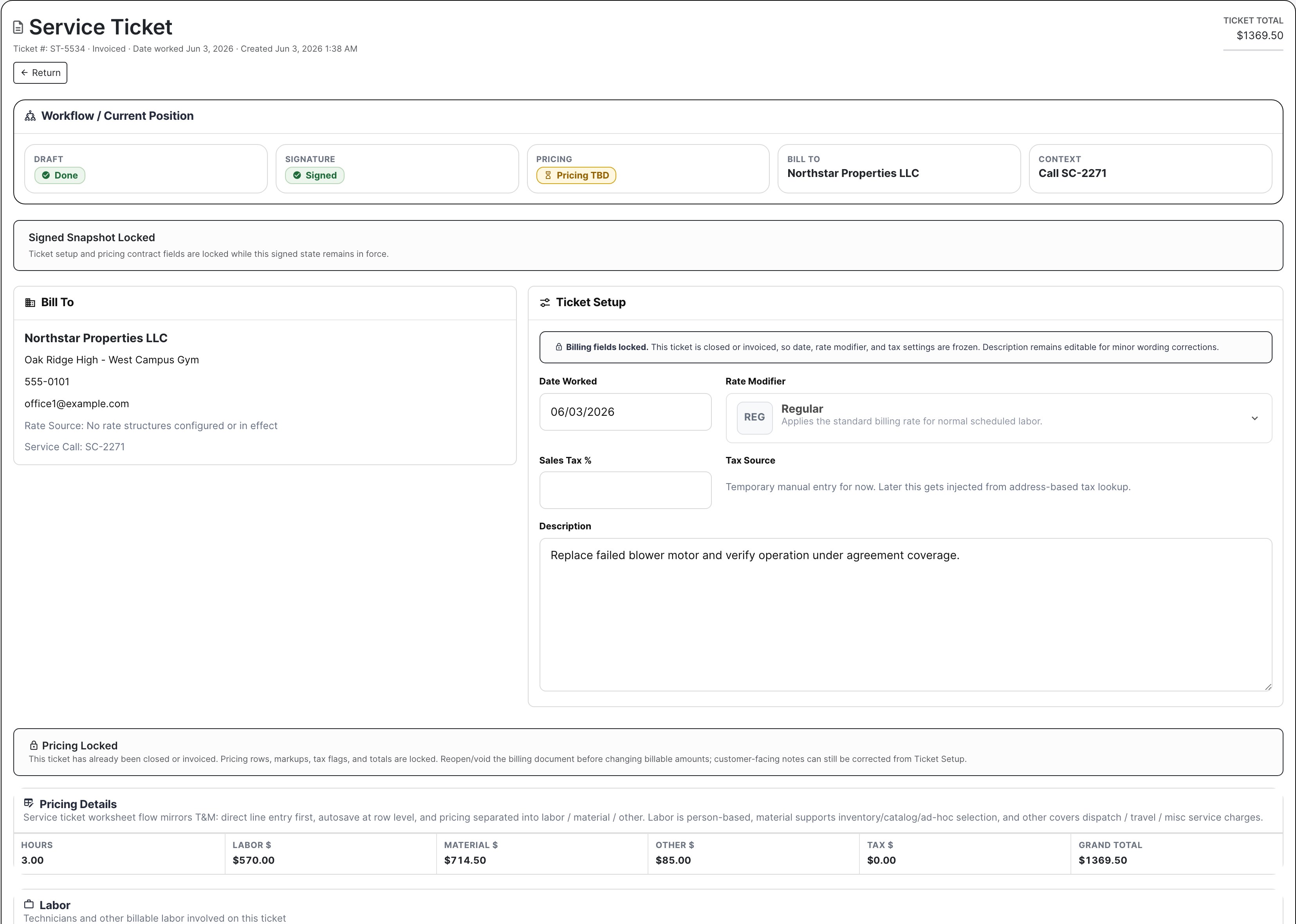
Service ticket Work On screen after dispatch
The ticket workspace carries the dispatch result into field completion and billing review.

Dispatch Proof

Actual service dispatch screens with demo tickets and calls

Service dispatch board with technician lanes and travel conflicts
The board combines live status, date and view controls, filters, priority buckets, technician lanes, scheduled tickets, travel pressure, and assignment cards.
Service calls queue with customer, site, issue, priority, and assignment controls
Service calls give dispatch the customer, site, caller, issue, priority, ticket count, status, and assignment controls before work is placed on a tech.
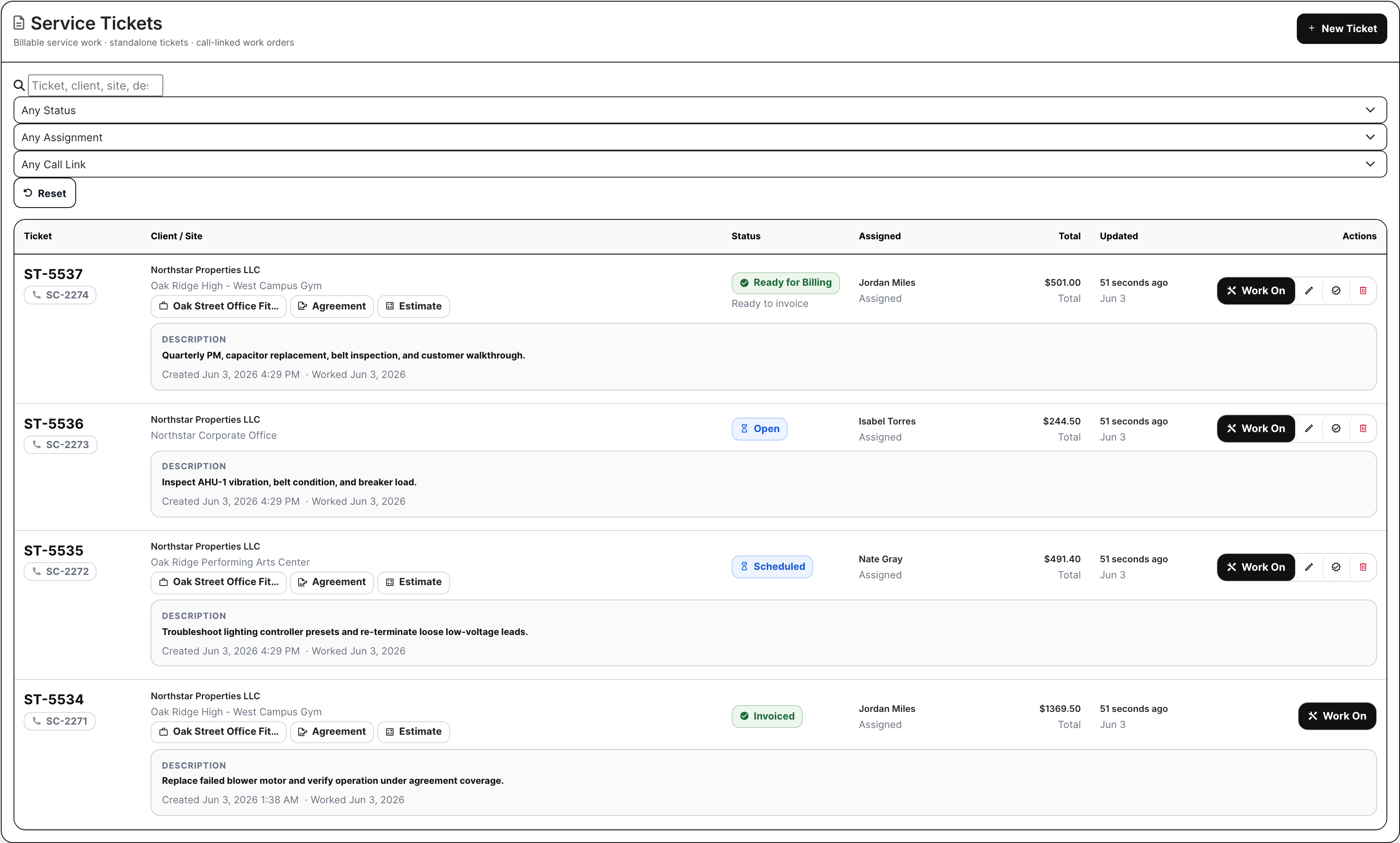
Service tickets list with assigned technicians and Work On actions
Ticket rows show assigned technician, call link, customer and site, status, total, and Work On action so dispatch stays connected to the billable ticket.
Service ticket Work On screen with workflow, completion, signature, and billing context
Work On keeps the dispatch result tied to completion notes, signature, pricing, billing context, and ticket history after the tech is sent.

Operating Responsibilities

The dispatch decisions this screen supports

Dispatcher

Decides which calls need attention now, which technician has room, and how to move the schedule when a customer cancels, a tech runs long, or a higher-priority call lands.

Service manager

Reviews load, open work, assignment state, and conflict pressure so the team can protect response time without overloading the same technician every day.

Technician lead

Sees the shape of the day from the ticket side: who owns the work, what site or equipment is involved, and whether the ticket is ready to be worked, completed, and billed.

Coverage

Dispatch questions contractors have to answer

Contractor needs BuildDaily does it
Which calls still need a technician? Yes
Dispatch separates queued service calls and unassigned tickets so the office can see what has not been placed on a schedule yet.
Can dispatch filter by the day, team, and priority? Yes
Date, team, priority, and search controls let the dispatcher narrow the board to the work they are actually planning.
Can call work and loose ticket work both be scheduled? Yes
The queue handles service-call cards and standalone unassigned tickets so work does not fall between intake and field execution.
Can a service call expose the tickets underneath it? Yes
Call cards can show child tickets, which helps dispatch place the right billable work instead of treating every call as a vague appointment.
Can tickets be assigned to a tech and time? Yes
Dispatch creates technician schedule slots from the board and keeps the assignment connected to the ticket.
Can appointments be moved, resized, or unscheduled? Yes
Existing slots can be moved, stretched, shortened, or removed when the day changes.
Can the board show day, three-day, week, and month views? Yes
Dispatch supports short-range fire drills and longer planning views without sending the team to a separate calendar.
Can the office see technician load and next availability? Yes
Technician lanes show schedule load and availability signals so dispatch can avoid stacking the same person past capacity.
Can travel conflicts be highlighted and cleaned up? Yes
Travel conflict counts, conflict review, and auto-space controls help the office fix routes that are too tight.
Does dispatch update ticket assignment and status? Yes
Assigning work updates the service ticket context so the scheduled tech and ticket state stay aligned.
Does the board refresh for the org? Yes
The dispatch screen carries a live update signal so the office is not working from a stale board after another dispatcher changes the day.
Does dispatch stay tied to customer, site, equipment, Work On, and billing? Yes
The dispatch board is connected to service calls and tickets, and the ticket continues into Work On completion and billing review.

Dispatch Rhythm

A service day from intake to field assignment

1

The call lands

The office captures the customer, site, issue, priority, caller, and any ticket work that needs to come out of the call.

2

Dispatch narrows the board

The dispatcher picks the date, view, team, priority, and search filters that match the service day they are trying to build.

3

Work gets placed on a technician

A queued call or loose ticket becomes a scheduled slot in a technician lane, with the assigned person and appointment time tied back to the ticket.

4

The day gets adjusted

If a tech runs long, a customer cancels, or an emergency comes in, dispatch can move, resize, unschedule, or rebalance the work from the same board.

5

The ticket gets worked

The technician works the scheduled ticket, captures completion details, and leaves the office with a billing-ready record instead of a separate dispatch note.

Dispatch Areas

The dispatch desk by operating task

Board controls

Search Find a service call or ticket by customer, site, ticket number, or work summary while the phone is still active.
Date and view Move between day, three-day, week, and month planning without leaving dispatch.
Team and priority Filter the board to the crew and urgency level the dispatcher is actually managing.
Apply and reset Change the working board quickly, then clear filters before the next dispatch pass.

Queue

Service calls Show customer, site, caller, issue, status, priority, assignment, and ticket count before the work is scheduled.
Child tickets Open a call to see the tickets underneath it so dispatch schedules the billable work, not a vague call note.
Unassigned tickets Keep loose ticket work visible instead of letting it disappear outside the call queue.
Priority buckets Separate emergency and high-priority work from routine visits when the day starts slipping.

Technician lanes

Timeline Place work into a technician's lane with start time and duration instead of a loose appointment note.
Load Read scheduled hours and availability before stacking one tech while another has room.
Travel pressure See conflict counts and travel cards when the route is too tight to be realistic.
Auto-space Use spacing controls when appointments need room between stops.

Ticket follow-through

Assign Tie the appointment to the technician and service ticket at the same time.
Move or resize Adjust a slot when a repair runs long, starts late, or has to be shortened.
Unschedule Pull the work off the lane without deleting the ticket record.
Work On Carry the dispatched ticket into field notes, signature, pricing, and billing review.

Field Reality

What the dispatcher changes when the service day moves

A no-cooling call bumps the schedule

  • Mark the new call as urgent so it rises above routine work in the queue.
  • Filter today's board to the service team that can handle the equipment.
  • Check technician load and travel pressure before choosing who gets the call.
  • Move or shorten lower-priority work, then assign the urgent ticket into a real time slot.

A technician is running long

  • Open the technician lane and identify the appointments that are now at risk.
  • Resize the active slot if the repair needs more time on site.
  • Move the next ticket to another technician or later time without losing assignment history.
  • Use the updated board so the office stops promising arrival windows from an old schedule.

A customer asks to reschedule

  • Unschedule the appointment while keeping the service ticket and customer issue intact.
  • Move the ticket back into dispatch planning instead of rebuilding it from notes.
  • Place the work on a later date, different tech, or different team once the customer confirms.
  • Keep Work On and billing context attached when the visit finally happens.

The route is too tight to work

  • Review travel conflict counts before the technician starts driving.
  • Use travel cards to see which stops are creating the bad gap.
  • Auto-space or move appointments so the route has realistic breathing room.
  • Protect billable time by fixing windshield waste before it becomes overtime or missed calls.

Walk through your service board

Bring a busy service day: emergency calls, maintenance visits, loose tickets, and a technician who is already overbooked. We will map how BuildDaily Dispatch would place the work and keep the ticket record intact.

See dispatch workflow